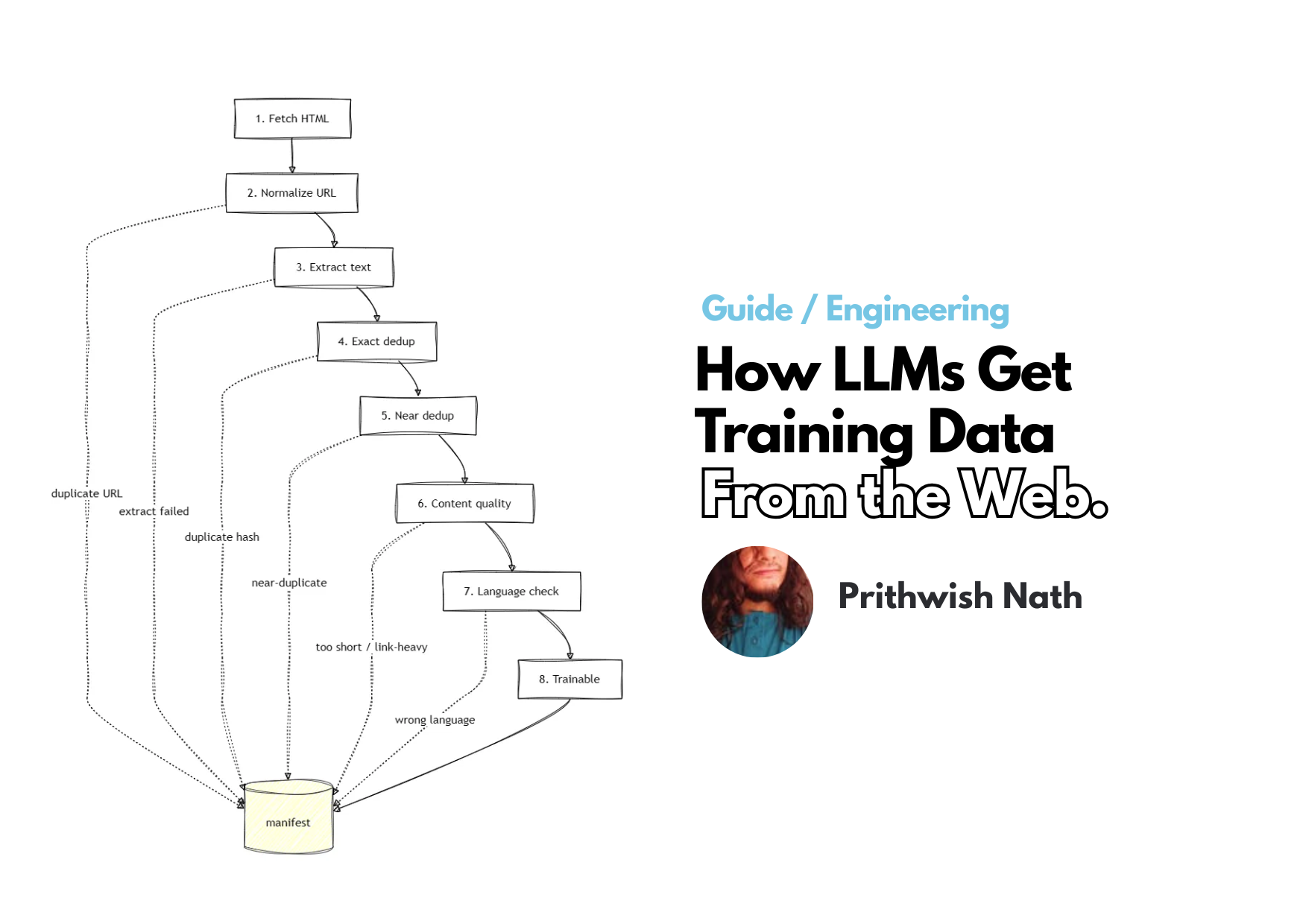
Learn how AI labs fetch, extract, deduplicate, and filter web crawls into a clean, reproducible corpus
TL;DR: AI companies don’t train language models on raw HTML. Learn how AI labs fetch, extract, deduplicate, and filter web crawls into a clean, reproducible corpus.
So, You Want To Train a Model…
Can you train AI on raw data from the web? Not as is. The data you actually want is a tiny fraction of the bytes you fetched. Even after stripping away HTML soup, you’re still left with duplicate pages, thin content and one awkward problem: when lawyers come for you, you can’t point to a single dataset and say, “This is exactly what my model was trained on.”
So how do AI/ML teams really build their training data? To understand this, I built a miniature version of the same pipeline they use — fetch, normalize, extract, deduplicate, filter, record — at a size small enough to watch every stage happen. To collect the raw material, I crawled the Arch Linux Wiki with a three-tier fetch fallback — direct HTTP first, then a Bright Data residential proxy if the server blocks or serves a bot wall, then the MediaWiki API as a last resort for revision URLs.
I deliberately mixed in regular articles, talk pages, templates, help and list pages, duplicate URLs and historical revisions. Then I normalized the URLs, extracted the text, deduplicated the content and filtered whatever was left.
Fetched:            500 pages   33.8 MB HTML
After extraction:   439 pages    2.1 MB text
Actually trainable: 286 pages    1.3 MB text
In this post, I’ll give you the working mental model of how AI teams turn billions of messy webpages into a training corpus. The accompanying repo (with sample data) is here if you want to dive in: https://github.com/sixthextinction/arch-corpus-funnel
💡 This article is about turning raw web text into clean documents a model can read. It is not about SFT data, RLHF preference pairs, or synthetic distillation. This one’s about the boring, load-bearing stuff that happens before any of that is even possible.
Why Don’t AI Companies Just Use Scraped Web Data Directly?
Because AI training needs to read the same data over and over, for many epochs, across a cluster that’s very expensive per hour.
Re-downloading everything every time a GPU wants a batch is slow, costs a ton of money, and — more importantly — makes your run non-reproducible. Pages change. If you don’t freeze what you actually ingest, you can no longer answer the question “what did your model actually train on?” That’s exactly the kind of question that comes up in billion-dollar copyright litigation, by the way.
So instead, the best practice is to download once, clean once, store the result, and read it many times.
That frozen, cleaned, stored result is the corpus. Every worker reads the same bytes, and training becomes something you can audit six months later instead of something you vaguely remember doing.
A corpus is a frozen, checksummed collection of cleaned documents used for training. Every worker reads the same bytes, so a training run is reproducible and auditable months later.
The crawl gives you raw material, but your training pipeline is what actually turns it into something you’re allowed to call a dataset.
Our Miniature Training Pipeline
Here’s the lowdown on what we’re going to do. I’ll walk you through it stage by stage.
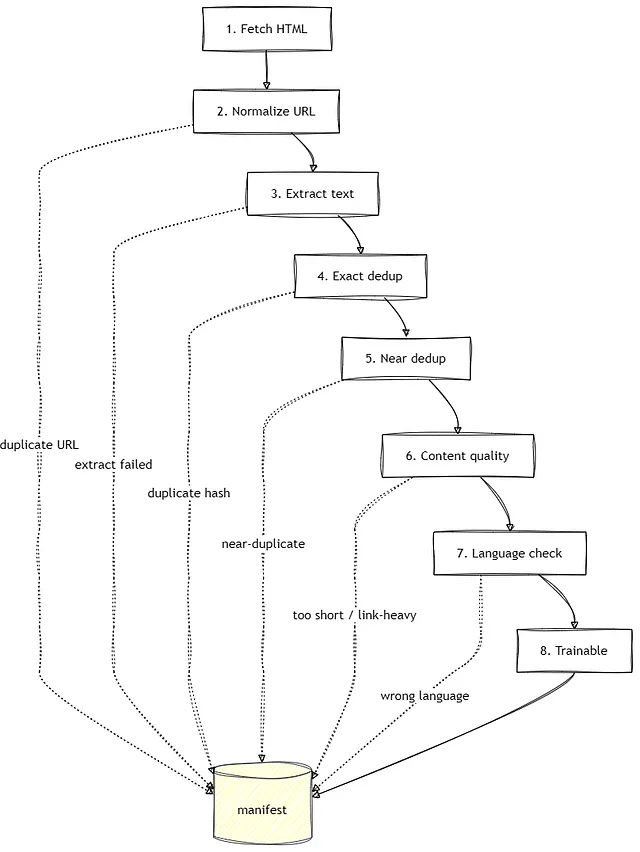
Visually, every document walks this same path.
- Fetch the pages. Take a list of URLs, crawl them with a direct → proxy → API fallback chain, get the raw HTML.
- Normalize the URLs. Give each resource one identity; kill duplicate URLs.
- Extract the text. Pull the article out from under all the navbars, banners, and markup soup.
- Remove exact duplicates. Hash the text, drop identical copies.
- Remove near-duplicates. Catch old revisions and lightly-edited copies that exact hashing is structurally incapable of seeing.
- Check content quality. Reject thin, link-heavy, boilerplate-heavy documents.
- Check the language. If your corpus is meant to be in English, keep only the documents that are in English, drop what isn’t.
- Write a manifest. Record what happened to every single page, and why.
Each stage only works because the previous one already ran — you genuinely cannot skip ahead or reorder these without breaking something downstream. The rest of this article is basically me proving that to you with real numbers instead of just asserting it.
At any stage it can exit early — dropped rows still land in the manifest with a drop_stage and drop_reason. Survivors get a final row marked trainable. Every fetched URL ends up in the manifest either way:
👉 See the full
run_pipelinestage here: https://github.com/sixthextinction/arch-corpus-funnel/blob/main/funnel.py
Why Clean, Predictable Sources Are Best for Beginners Learning AI Training
For a first training pipeline, you want to introduce one problem at a time. A clean source makes it obvious which stage caught what, instead of mixing spam, broken HTML, multiple languages, and wildly different page layouts into one giant debugging session.
The Arch Linux Wiki is ideal for that: good English prose, consistent structure, and almost no junk.
But a corpus made entirely of perfect articles wouldn’t actually reflect anything AI/ML labs do, so I deliberately mixed in pages that reflect a real-life messy crawl better:
- Regular articles — should survive.
- Talk pages — often thin or mostly discussion.
- Template pages — short reusable snippets.
- Help pages — meta-documentation.
- List pages — link-heavy indexes.
- Thin subpages — minimal content.
- Alternate URL forms — different URLs pointing to the same page.
- Historical revisions — near-duplicates of current articles.
Although the examples come from ArchWiki, the pattern is universal. Every crawl contains some combination of duplicate URLs, low-quality pages, historical copies, and boilerplate.
With our 500-page crawl assembled, let’s start at the first stage: fetching.
Step 1: Fetching the Pages — How AI teams reliably crawl pages for training.
Step 1 takes our URL list and downloads the raw HTML — with a fallback chain when servers push back.
AI companies download once and store the result because re-fetching on every training epoch is slow, expensive, and non-reproducible. But fetching at scale isn’t as simple as curl. Servers block bots, serve challenge pages, and old revision URLs on wikis often need special handling.
Our URL list ships as seeds-arch.txt — tab-separated, swap in your own URLs anytime. Step 1's entry script is fetch_from_seeds.py (reads the seeds file, writes HTML to data/ and fetch_log.jsonl).
👉 See the crawl script and seed list: https://github.com/sixthextinction/arch-corpus-funnel/blob/main/fetch_from_seeds.py and https://github.com/sixthextinction/arch-corpus-funnel/blob/main/seeds-arch.txt
Our fetch layer looks for challenge-page markers that might indicate we got blocked, and uses a waterfall of direct HTTP, then a Bright Data residential proxy, and finally the MediaWiki API for revision URLs.
👉 See full
fetch_page,build_proxy, andis_bot_pagehere: https://github.com/sixthextinction/arch-corpus-funnel/blob/main/lib/fetch.py
BOT_MARKERS = (b"not a bot", b"Making sure you", b"xess.min.css", b"within.website")

def is_bot_page(body: bytes) -> bool:
    lower = body.lower()
    if len(body) `< 8000:  # challenge pages are tiny
        if any(m.lower() in lower for m in BOT_MARKERS):
            return True
    return b"not a bot" in lower

def build_proxy() ->` dict[str, str] | None:
    user = os.environ.get("BRIGHT_DATA_PROXY_RESIDENTIAL_USERNAME")
    password = os.environ.get("BRIGHT_DATA_PROXY_RESIDENTIAL_PASSWORD")
    if not user or not password:
        return None  # proxy step is skipped entirely
    host = os.environ.get("BRIGHT_DATA_PROXY_HOST", "brd.superproxy.io")
    port = os.environ.get("BRIGHT_DATA_PROXY_PORT", "33335")
    proxy_url = f"http://{quote(user, safe='')}:{quote(password, safe='')}@{host}:{port}"
    return {"http": proxy_url, "https": proxy_url}

def fetch_page(url: str) -> FetchResult:
    # 1. direct HTTP — _fetch_http returns err="bot_detected" on a 200 challenge page
    status, body, err, latency_ms = _fetch_http(url)
    if err is None:
        return FetchResult(..., fetch_method="direct")

    # 2. residential proxy (only if credentials are set)
    proxies = build_proxy()
    if proxies is not None:
        status, body, err, latency_ms = _fetch_http(url, proxies=proxies)
        if err is None:
            return FetchResult(..., fetch_method="proxy")

    # 3. MediaWiki API — last resort for oldid revision URLs
    if (parsed := parse_oldid_from_url(url)) is not None:
        oldid, _ = parsed
        api_body, api_err, meta = fetch_api_revision(oldid)
        if api_err is None:
            return FetchResult(..., fetch_method="mediawiki_api_parse")
    return FetchResult(..., error=err, fetch_method="failed")
If you’re following along, copy .env.example to .env and fill in BRIGHT_DATA_PROXY_RESIDENTIAL_USERNAME and BRIGHT_DATA_PROXY_RESIDENTIAL_PASSWORD from your dashboard after signing up here — new pay-as-you-go accounts get 5,000 free credits per month, no credit card required, and a hard stop when you run out so there are no surprise bills. fetch_from_seeds.py loads .env automatically.
On our Arch Wiki run, 28 URLs hit the bot wall on direct HTTP. All 28 were recovered by the residential proxy fallback. More importantly…every fetch_method is logged in fetch_log.jsonl so you can audit what path each page took.
Step 1 result: 500 pages fetched, 33.8 MB of raw HTML.
Step 2: Normalize the URLs — Why AI companies canonicalize before training.
With the HTML on disk, Step 2 gives every document exactly one identity before any expensive processing begins.
AI companies canonicalize URLs so duplicate pages aren’t extracted, hashed, filtered, and overrepresented in the final training corpus. It has to run right after fetch because there is no reason to spend compute on a page you’re about to throw away as a duplicate.
A canonical URL is the single normalized address representing one resource — fragments stripped, tracking parameters dropped, meaningful parameters (like a wiki’s
oldid) kept.
The web loves to hand you the same content under many different addresses:
/title/Pacman
/title/Pacman#Usage
/title/Pacman?utm_source=example
In a training set, that’s not a harmless rounding error. Each extra copy inflates how much the model sees that page, biasing it toward whatever those duplicates happen to contain.
Canonicalization reduces every URL to one normalized form — strip the fragment, drop parameters that don’t change what’s returned, keep the ones that do (a wiki’s oldid selects a different revision, so it stays) — until every address for one page maps to the same key.
👉 See full canonicalize here: https://github.com/sixthextinction/arch-corpus-funnel/blob/main/lib/canonicalize.py
def canonicalize(url: str) -> str:
    parsed = urlparse(url)
    if parsed.path.startswith("/title/"):
        title = unquote(parsed.path[len("/title/") :])
    elif parsed.path.endswith("/index.php"):
        title = parse_qs(parsed.query).get("title", [None])[0]
    # ...
    oldid = parse_qs(parsed.query).get("oldid", [None])[0]
    if oldid:
        return f"{BASE}/title/{title}?oldid={oldid}"  # revisions stay distinct
    return f"{BASE}/title/{title}"  # fragments and tracking params gone
At web scale you’d hash that canonical form (SHA256(canonical_url), or a UUID derived from it) rather than keep raw strings in memory.
Step 2 result: 440 unique pages after URL deduplication. None of them are clean text yet — the next step handles that.
Step 3: Extract Text Before Deduplication
Step 3 strips markup and isolates the article text. Raw web data is a dumpster fire of metadata, so AI companies extract the real content before any other analysis. If you hash or measure link density while nav menus, footers, and timestamps are still attached, you miss real duplicates and misjudge quality. That’s why extraction comes before deduplication or quality filtering in the pipeline.
Think about it: If you jump ahead and try to deduplicate an article by hashing the whole page, a tiny change in the navigation banner or a timestamp will throw off your hash and you will miss real duplicates.
Besides, every single downstream process depends on the assumption that it is looking at pure content, not the surrounding HTML.
For our work with ArchWiki, we are militant about this: we isolate #mw-content-text and strip away all scripts, nav tags, and structural debris before any analysis begins.
👉 See full
extract_wiki_contentandextract_texthere : https://github.com/sixthextinction/arch-corpus-funnel/blob/main/lib/stages.py
def extract_wiki_content(html: str) -> ExtractResult:
    soup = BeautifulSoup(html, "lxml")
    root = soup.select_one("#mw-content-text") or soup.select_one(".mw-parser-output")
    for tag in root.find_all(["script", "style", "nav", "sup"]):
        tag.decompose()
    paragraphs = [p.get_text(" ", strip=True) for p in root.find_all("p") if p.get_text(strip=True)]
    text = "\n\n".join(paragraphs) if paragraphs else root.get_text("\n", strip=True)
    return ExtractResult(text=text, extractor="wiki_bs4")
A site-specific extractor like that is brittle by design — it only works because we know the shape of MediaWiki HTML. So it can’t be our only extractor. extract_text tries the wiki-aware path first, then falls back to trafilatura — a Python library that strips nav, ads, and boilerplate to pull out the main article text from arbitrary HTML — and readability, recording which one won in the manifest's extractor field:
def extract_text(html: str) -> ExtractResult:
    wiki = extract_wiki_content(html)      # 1. MediaWiki-aware
    if wiki.text:
        return wiki
    text = trafilatura.extract(html, ...)  # 2. general-purpose boilerplate removal
    if text and text.strip():
        return ExtractResult(text=text.strip(), extractor="trafilatura")
    summary = Document(html).summary()     # 3. readability, tags stripped by regex
    ...
    return wiki if wiki.error else ExtractResult(text="", extractor="none", error="extract_empty")
This fallback chain is not source-specific and can be generalized. Point this pipeline at a blog or a forum and the wiki extractor will no-op, trafilatura takes over after, and the rest of the pipeline is no different.
Why is this step important? Look at what this did to our file sizes:
Crawled HTML:       33.83 MB
Extracted text:      2.10 MB
Reduction:              94%
Ninety-four percent of what we downloaded was useless for training the model. And this was on a wiki page — one of the neater ones you’ll see on the internet! On most sources you pick, this percentage will be even worse — and that’s exactly why our method saves the day.
Steps 4 & 5: Removing Duplicates — and Why SHA-256 isn’t enough to remove duplicate training data.
Steps 4 and 5 remove redundant content — exact copies first, then near-duplicates.
SHA-256 only catches byte-for-byte identical documents, so it misses the duplicates that actually matter: old revisions, lightly-edited copies, and pages that mean the same thing with different wording. Exact hashing detects difference, not similarity — a single changed word produces a completely different hash. That’s why AI companies pair exact hashing with near-deduplication (MinHash + LSH).
Out of 439 extracted documents, exact hashing removed two.
Only two documents in the entire crawl were byte-for-byte identical after extraction — because the genuinely duplicated content was already filtered by canonicalization, and the old revisions we collected are edited, not copied. Exact hashing is cheap enough that you always run it, but it will never be the stage that saves you.
Look at this blind spot:
"Install the package with pacman."

vs.

"Install the required package with pacman."
To any human, these are essentially saying the same thing. But to SHA-256? They are two completely different. Hashing is a brilliant tool for proving files haven’t changed — it’s great at detecting difference — but it’s terrible at recognizing similarity.
So you need two dedup strategies, not one:
- Exact deduplication: We hash the extracted text to catch copies that are exactly identical. This is cheap and foolproof, but as we just saw, it barely moves the needle.
- Near-deduplication: This is how we find documents that mean the same thing without being perfect duplicates. We can’t compare every document against every other document — that would take forever (O(n²)). Instead, we use MinHash. Essentially, we break the text into small overlapping chunks (“shingles”), hash them, and calculate a metric called Jaccard similarity which tells us what fraction of those core chunks overlap.
Production pipelines go one step further than what we ‘re doing here — they bucket similar MinHash signatures using LSH (locality-sensitive hashing) banding so you’re not comparing every document against every other document — that’s the only reason this scales to billions of pages instead of being an O(n²) fever dream.
👉 See
content_hashhere: https://github.com/sixthextinction/arch-corpus-funnel/blob/main/lib/manifest.py · fullNearDedupIndexhere: https://github.com/sixthextinction/arch-corpus-funnel/blob/main/lib/dedup.py
def content_hash(text: str) -> str:
    return hashlib.sha256(text.encode("utf-8")).hexdigest()

NEAR_DEDUP_THRESHOLD = 0.85

def make_minhash(text: str) -> MinHash:
    m = MinHash(num_perm=128)
    normalized = normalize_for_near_dedup(text)  # lowercase, punctuation → spaces
    words = normalized.split()
    if len(words) >= 3:
        for i in range(len(words) - 2):  # 3-word shingles
            m.update(" ".join(words[i : i + 3]).encode("utf-8"))
    else:
        for i in range(max(len(normalized) - 4, 1)):  # short docs: character 5-grams
            m.update(normalized[i : i + 5].encode("utf-8"))
    return m

class NearDedupIndex:
    def find_duplicate(self, text: str) -> tuple[str | None, float | None]:
        mh = make_minhash(text)
        best_key, best_score = None, 0.0
        # LSH candidates are approximate — confirm each with MinHash Jaccard
        for key in self.lsh.query(mh):
            score = mh.jaccard(self._minhashes[key])
            if score >= self.threshold and score > best_score:
                best_key, best_score = key, score
        return (best_key, best_score) if best_key else (None, None)
Near-dedup removed 25 documents in total. Our seed included 28 old revisions whose current versions were already sitting in the crawl, and 17 of them matched their own current article, with estimated Jaccard scores from 0.867 all the way to 1.0. Exact hashing had caught precisely zero of these — every one of those 17 sailed straight through SHA-256, because a revision that fixes a typo is a completely different byte string.
Eight of the 25 drops weren’t expected at all — six talk pages, one stub, one article. The talk pages in particular matched each other not because of content, but because near-empty discussion pages are mostly the same MediaWiki boilerplate. This is a humble reminder that automated similarity checking gets hyper-confident on thin documents because there’s zero unique material to disagree about, and endless templates to agree on.
These algorithms are powerful, but they cannot replace critical human oversight.
Steps 4 + 5 result: 27 documents removed (2 exact, 25 near-duplicate). 412 remain.
Steps 6 & 7: Filter for Quality and Language — How do AI companies decide whether a document is worth training on?
“Unique” is not the same as “useful” — a page can be one-of-a-kind and still be worthless to learn from.
So our next step asks embarrassingly simple questions, the same ones every quality filter from GPT-3’s training pipeline onward has asked in one form or another:
- Is the word count above a minimum threshold?
- Does it contain actual paragraph breaks, or is this one giant wall of text?
- What fraction of the text is links vs. prose?
- Are the “words” actually words — a sane average length, not drowning in symbols?
- Does it contain the ordinary words (“the”, “of”, “is”) that real prose is full of?
- Is a boilerplate line (nav text, “edit this page,” a copyright footer) repeating suspiciously often?
- Is this written in the language the corpus is supposed to contain?
The first three are source-specific gates you have to write by hand. The rest you can lift directly from published pipelines — the Gopher heuristic rules (hard thresholds on symbol-to-word ratio, mean word length, and stop-word presence) by DeepMind (https://arxiv.org/abs/2112.11446), and C4 (Colossal Clean Crawled Corpus**) rules (**reject if more than 30% of lines repeat an earlier line, or if any single line appears more than three times)
We run the cheapest fixes first:
MIN_WORDS = 50
MIN_PARAGRAPHS = 2
NAV_LINE_RATIO = 0.50
# Gopher-style
MIN_MEAN_WORD_LEN, MAX_MEAN_WORD_LEN = 3.0, 10.0
MIN_STOPWORD_RATIO, STOPWORD_MIN_WORDS = 0.20, 100
MAX_SYMBOL_WORD_RATIO = 0.10
# C4-style
MAX_DUPLICATE_LINE_RATIO = 0.30
MAX_LINE_OCCURRENCES = 3

def check_content_quality(text: str) -> QualityResult:
    words = text.split()

    # wiki gates
    if len(words) `< MIN_WORDS:                    return fail("too_short")
    if count_paragraphs(text) < MIN_PARAGRAPHS:   return fail("too_few_paragraphs")
    if nav_line_ratio(text) >` NAV_LINE_RATIO:     return fail("nav_heavy")

    # Gopher gates
    mwlen = mean_word_length(words)
    if not MIN_MEAN_WORD_LEN `<= mwlen <= MAX_MEAN_WORD_LEN:
        return fail("gopher_mean_word_length")
    if len(words) >`= STOPWORD_MIN_WORDS and stopword_ratio(words) `< MIN_STOPWORD_RATIO:
        return fail("gopher_low_stopwords")
    if symbol_word_ratio(words) >` MAX_SYMBOL_WORD_RATIO:
        return fail("gopher_symbol_heavy")

    # C4 gates
    if duplicate_line_ratio(text) > MAX_DUPLICATE_LINE_RATIO:
        return fail("c4_duplicate_lines")
    if has_excessive_repeated_line(text):
        return fail("c4_repeated_line")

    return QualityResult(True, None, ...)
These checks were brutally effective, removing 114 documents of the 412 that reached them:
- 80 dropped because
gopher_low_stopwords - 18 dropped because
too_short - 12 dropped because
gopher_symbol_heavy - 3 dropped because
c4_repeated_line - 1 dropped because
too_few_paragraphs
Then the language stage removed 12 more: 11 documents whose top detected language wasn’t English, and 1 where langdetect couldn't clear the 0.80 confidence bar.
def check_language(text: str) -> LanguageResult:
    DetectorFactory.seed = 0                 # langdetect is nondeterministic otherwise
    scores = detect_langs(text[:5000])       # first 5k chars is plenty
    top = scores[0]
    if top.lang != TARGET_LANG:      return LanguageResult(False, "wrong_language", ...)
    if top.prob `< LANG_MIN_CONFIDENCE: return LanguageResult(False, "lang_low_confidence", ...)
    return LanguageResult(True, None, top.lang, top.prob)
That DetectorFactory.seed = 0 line is not cosmetic, by the way. Without it langdetect returns slightly different results run to run, and a corpus that changes when you re-run the pipeline is not a reproducible corpus.
Of course, even if they’re doing the same thing, the big labs all run machinery that would make this toy pipeline blush — we’re talking deep ensemble classifiers, PII scrubbing, the whole shebang. But they’re all still answering the same question we are: this text is unique, but is it actually worth the computational cost of training on?
` Steps 6 & 7 result: 126 documents removed (114 at quality filtering, 12 at language check). We’re finished — 286 trainable pages remain of our original 500.
Step 8: Why do AI companies keep a manifest of every document?
A corpus isn’t just a folder of text files. Every document also needs an audit trail.
For every URL we process — whether it survives or gets dropped — we write one record to manifest.jsonl. This records the original URL, byte counts, final status, and why each page was rejected, so you can reconstruct exactly what you trained on.
{
  "url": "https://wiki.archlinux.org/title/Comparison_of_desktop_environments",
  "url_canonical": "https://wiki.archlinux.org/title/Comparison_of_desktop_environments",
  "bucket": "list",
  "source_file": "0428_list_Comparison_of_desktop_environments.html",
  "html_bytes": 79334,
  "extracted_bytes": 45,
  "trainable_bytes": 0,
  "final_status": "dropped",
  "drop_stage": "content_quality",
  "drop_reason": "too_short",
  "extractor": "wiki_bs4",
  "content_hash": "0248fdc1d823aaebcb1cf79513e712b9e3ef0391c5f58834aa86f9336b44ee57",
  "word_count": 7,
  "paragraph_count": 1,
  "stopword_ratio": 0.2857,
  "symbol_word_ratio": 0.0
}
def content_hash(text: str) -> str:
    return hashlib.sha256(text.encode("utf-8")).hexdigest()

def write_manifest(records: list[dict], path: Path) -> None:
    with path.open("w", encoding="utf-8") as f:
        for rec in records:
            f.write(json.dumps(rec, ensure_ascii=False) + "\n")
👉 See full
read_manifest/write_manifesthere: https://github.com/sixthextinction/arch-corpus-funnel/blob/main/lib/manifest.py
Two details matter here.
First, the **content_hash** is computed from the extracted text, not the original HTML. That gives every document a stable identity even if the source website later changes.
Second, the manifest stores metadata, not the document itself. The text lives separately, while the manifest records everything needed to reproduce, audit, or re-materialize the corpus later:
trainable = [r for r in read_manifest(MANIFEST) if r["final_status"] == "trainable"]
for r in trainable:
    html = (DATA_DIR / r["source_file"]).read_text(encoding="utf-8", errors="replace")
    text = extract_text(html).text
    assert content_hash(text) == r["content_hash"]   # the checksum earns its keep here!
That answers what we fetched, what we kept, and why everything else was rejected.
Quantifying Crawl Efficiency: A Number You Can Actually Use
Our refined scope shows 286 out of 500 pages survived, a survival rate of 57.2%. Suddenly, “How many pages should we crawl?” stops being a vibe and starts being arithmetic:
pages_to_fetch = target_documents / survival_rate
Our script report.py calculates this needed fetch volume directly from the manifest data (in the repo, sample outputs from this run are in samples/ if you want to try reports without fetching):
👉 See full
_plot_crawl_budget_here https://github.com/sixthextinction/arch-corpus-funnel/blob/main/report.py
def plot_crawl_budget(trainable: int, total: int, summary: dict, target: int = 1000):
    survival = trainable / total
    needed = int(target / survival)
    avg_html = summary["total_html_bytes"] / total
    avg_trainable = summary["trainable_bytes"] / trainable
    est_html_mb = needed \* avg_html / 1_048_576      # you pay to fetch every page
    est_train_mb = target \* avg_trainable / 1_048_576  # you keep only the survivors
This tells us something invaluable. If you were aiming for, say, 1,000 trainable documents, you must actually plan for fetching ~1,750 pages:
Target:              1,000 docs
Measured survival:   57.2%
Pages to fetch:      ~1,750
Est. HTML fetched:   ~118 MB
Est. trainable text: ~4.6 MB
This quantitative model changes everything. With this, your crawl capacity goes from an educated guess to an actual budget estimate, derived from empirical data.
The Structural Backbone of LLM Data Pipelines
Let’s be clear: OpenAI isn’t crawling the Arch Linux wiki for a measly ~500 pages. The web data extraction that their pipelines run spans billions of pages, requiring stages we simply don’t need for a prototype:
- Web-Scale Near-Deduplication: Scaling MinHash+LSH banding beyond a single wiki source is non-negotiable. It’s the difference between an efficient processing pipeline and an unsustainable
O(n^2)billing nightmare on any cloud platform. - Safety Filtering & PII Scrubbing: Comprehensive security requires scrubbers for toxic content and Personally Identifiable Information (PII). Simple regex isn’t enough; you need NER models (think entity detection) actively hunting for emails, phone numbers, names — the stuff you never, ever want a model accidentally trained on.
- Decontamination: Crucially, we have to check the entire corpus for n-gram overlap — frequently borrowed from large models like GPT-3 and PaLM — against known benchmark test sets. Otherwise, your fancy new model isn’t learning; it’s just memorizing the specific examples used in its final evaluation and cheating its way through benchmarks.
- Learned Quality Filters: Our simple word-count checks are placeholders for much heavier machinery: learned classifiers and perplexity models. When your dataset hits the billions mark, manual tuning is impossible; AI must judge quality on its own.
So yes, AI/ML labs use technology that is a million times bigger. But the blueprint doesn’t change. It’s always: Fetch raw material → Establish identity → Extract content → Kill repetition → Judge quality → Document everything.
Every stage, whether we are processing 500 pages or 1 billion, exists for one reason: the data is not ready until it passes through every single gate.
A quality training corpus is not a collection of data that just so happens to exist. It is data that has survived rigorous questioning about its own worth, structure, and redundancy.
Frequently Asked Questions (FAQ)
How do AI companies get training data from the web?
They combine large public crawls, commercial data feeds, and targeted scrapes — then run everything through a cleaning pipeline before any GPU sees it. Most production corpora start from Common Crawl snapshots. Labs also run focused crawls to fill gaps: fresh news, code repositories, textbooks, etc. OpenAI, Anthropic, Meta, and Google have all described this article’s fetch-normalize-extract-dedup-filter-record pipeline in their papers.
Should you use Common Crawl or build your own web crawl?
Common Crawl when you need breadth; a custom crawl when you need control. This article’s custom crawl is best when you need a specific domain mix, reproducible fetch metadata, compliance with a site’s terms, or a corpus small enough to audit line by line. Most labs do both: Common Crawl (or a commercial crawl feed) for scale, with targeted crawls to fill gaps or refresh stale slices.
What’s the difference between pretraining data and fine-tuning data?
Pretraining data teaches a model language itself; fine-tuning data teaches it a behavior or format. Pretraining corpora are massive collections of plain text — web pages, books, code — with no labels and no instructions. Fine-tuning data (supervised fine-tuning, or SFT) is tiny — prompt + response pairs, chat transcripts, or task-specific examples that tell the model how to answer. The 8-step pipeline in this article produces pretraining material.
How much web data do you need to train a language model?
Token count matters more than page count, and the target depends on model size. A useful rule of thumb from the Chinchilla scaling laws: train on roughly 20 tokens per parameter —so a 7B-parameter model wants on the order of 140B tokens (~300–500 GB of compressed text).
What format should LLM training data be stored in?
JSONL for manifests and metadata; Parquet or binary shards for the text payload at scale.
Comments
Loading comments…