A browser game can occupy a different amount of screen space without changing the coordinate system used to draw it. Touch input arrives in the browser’s page layout, so the game has to translate that position into its drawing coordinates. Keeping those measurements aligned connects a touch to the drawing at different display sizes.
Browser-delivered casino games bring artwork and controls into the same view. The game area and its surrounding controls need to remain usable as the browser’s available space changes. Canvas is one way developers draw interactive artwork, and a documented mobile adaptation of Starlight Breaker shows how displayed dimensions and drawing dimensions can be handled separately.
People who play at Joe Fortune on mobile devices access online casino games through a mobile browser. Adapting that view involves keeping game content legible, controls reachable, and input positions connected to the displayed game area. These are separate design tasks: scaling artwork changes its size, while interpreting a tap connects an input event to an action. Each game will require a different approach, depending on its controls, layout, and the screen in question. Making sure that games adapt is a key challenge for sites like this, since user-friendliness is at the core of their ethos.
In Starlight Breaker’s canvas implementation, locating a touch requires a coordinate conversion. The browser reports where the touch occurred within its viewport, the visible area of the page. The drawing code needs a position relative to its own surface. The conversion joins those measurements; the interface determines what the touch does.
The displayed canvas and its drawing grid
An HTML canvas has a drawing surface whose dimensions are set through its width and height attributes. CSS controls how much space the element occupies on the page. Those measurements can match, but they do not have to.
When CSS displays a canvas at a different size, the browser scales its drawing to fit. The artwork can therefore appear in a smaller rectangle while the drawing code continues using its existing coordinates. A position measured across the displayed rectangle cannot simply be treated as the same position in the drawing grid.
The display measurement is expressed in CSS pixels, which are the browser’s layout units. The drawing grid uses the canvas’s own dimensions. Comparing those units explains the required scale factor, without assuming that a layout pixel corresponds to a single physical screen pixel.
The Starlight Breaker adaptation addresses sizing by selecting drawing dimensions according to the available viewport width. It retains the game’s proportions across those sizes, with positions expressed relative to the canvas dimensions. The author also reruns the sizing routine when the viewport changes.
This is distinct from choosing where controls belong. A canvas can fit its allotted space while a button outside it needs a separate layout decision. Likewise, adjusting the drawing dimensions does not automatically define what a tap should mean.
The measurement needed for input is the relationship between the current displayed area and the current drawing grid. Neither the canvas’s original desktop size nor the phone’s advertised screen resolution supplies that relationship on its own.
Turning a touch position into a drawing position
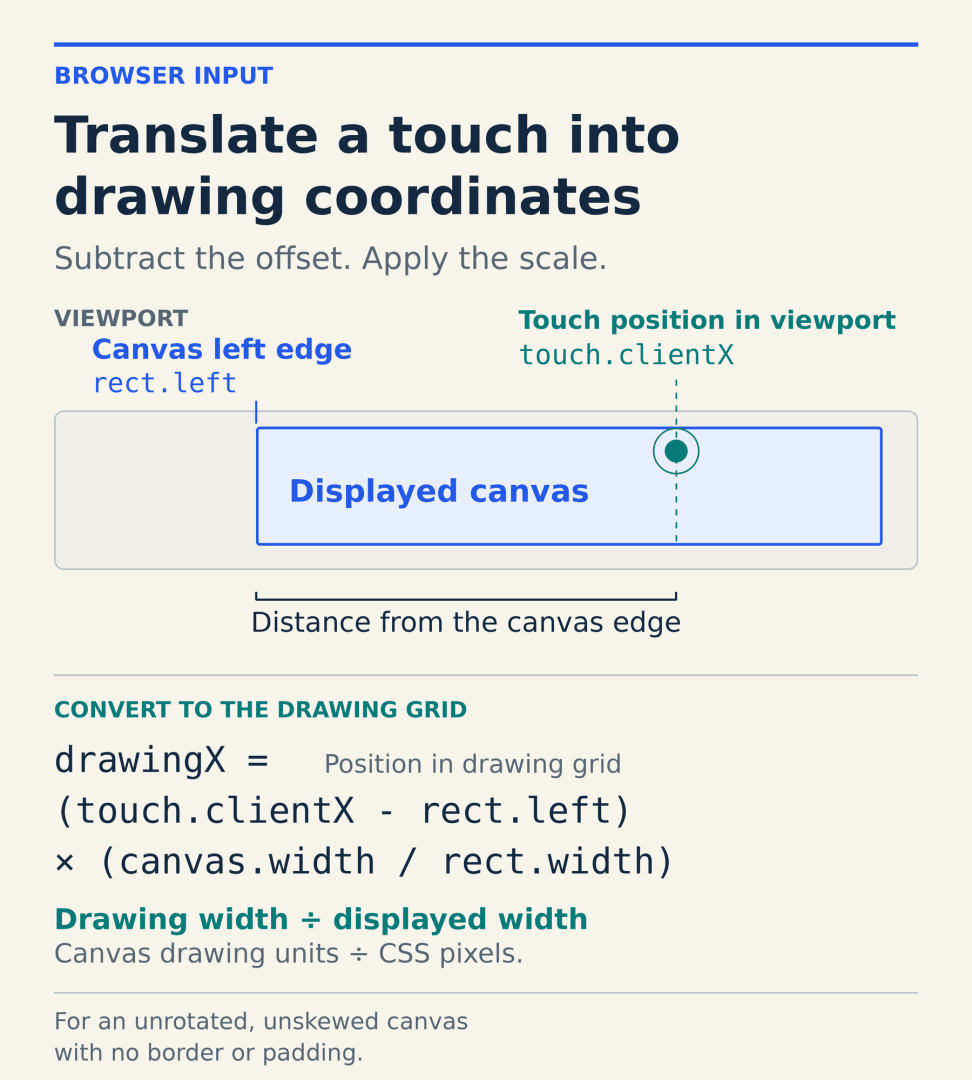
The browser’s touch position and the canvas’s location first need a common reference. In the documented implementation, the touch’s clientX value and the rectangle returned by getBoundingClientRect() are both measured relative to the viewport in CSS pixels.
The code subtracts the rectangle’s left edge from the touch’s horizontal position. That gives the distance from the displayed canvas’s left edge, rather than from the viewport’s edge. It then multiplies that distance by the canvas’s drawing width divided by its displayed width.
The resulting value identifies a horizontal position in the drawing grid. The vertical calculation follows the same relationship, using the touch’s vertical position, the top edge, drawing height, and displayed height. Each axis uses its own dimensions.
The dimensions and starting edges used in the conversion must describe the drawing area itself. Any borders or padding included in the browser’s rectangle need to be accounted for in both offsets and sizes. This simple relationship applies to an unrotated, unskewed canvas.
Reading the current rectangle keeps the conversion tied to the canvas’s current position and size. Both measurements use the viewport as their reference, so the calculation does not need a separate subtraction for page scrolling.
The result is a drawing position. A game that applies further scaling to its internal coordinates may need another conversion before using that position in its own logic. The input measurement should follow the coordinate system that receives it.
Controls need their own design
A correct position still needs an assigned action. In remarkablegames’ account of adding mobile support, Deus Ex Machina uses player-placed arrows to guide a robot through its industrial levels. Its desktop controls include clicking to place or rotate an arrow, right-clicking to erase, and the R keyboard command to restart.
The mobile adaptation introduces a toolbar with separate modes and actions. Players select whether a touch pans the camera, places an arrow, rotates it, or erases it. The developer also makes the toolbar draggable because it can cover parts of a level.
The same adaptation also separates camera gestures from editing actions. A single finger pans in Pan mode, a tap performs the selected tile action, and a two-finger pinch changes the zoom. Each response depends on how the interface interprets the gesture, beyond identifying its location.
Moving the toolbar changes where controls sit; converting a touch changes the coordinates used to locate the input within the drawing. The game’s selected control mode then determines whether that position moves the view or places, rotates, or erases an arrow.
Comments
Loading comments…