To generate a video with an AI API in Python, send a prompt in a POST request, save the generation ID from the response, and poll the status until it reads completed. Then download the file from the video URL. This tutorial builds that script with Seedance 2.0 and Wan 2.5 through one endpoint of AI/ML API.
The finished script is 89 lines long and needs only the requests library. Switching between the two models takes one word on the command line. Each step below comes with a screenshot of the code, so you can reproduce the result on your own machine.
How video generation APIs work
A video takes minutes to render, so an HTTP request cannot wait for the result. The API splits the job into two calls. A POST request to /v2/video/generations creates a task and returns its ID. A GET request to the same path with a generation_id parameter returns the status of that task.
The status field has four possible values. The values queued and generating mean the task is still running. The value completed means the video is ready, and its URL is in the video.url field. The value error means the task failed, and the error object holds a name and a message. The AI/ML API documentation gives about 3 minutes as the typical processing time for Wan 2.5 Preview.
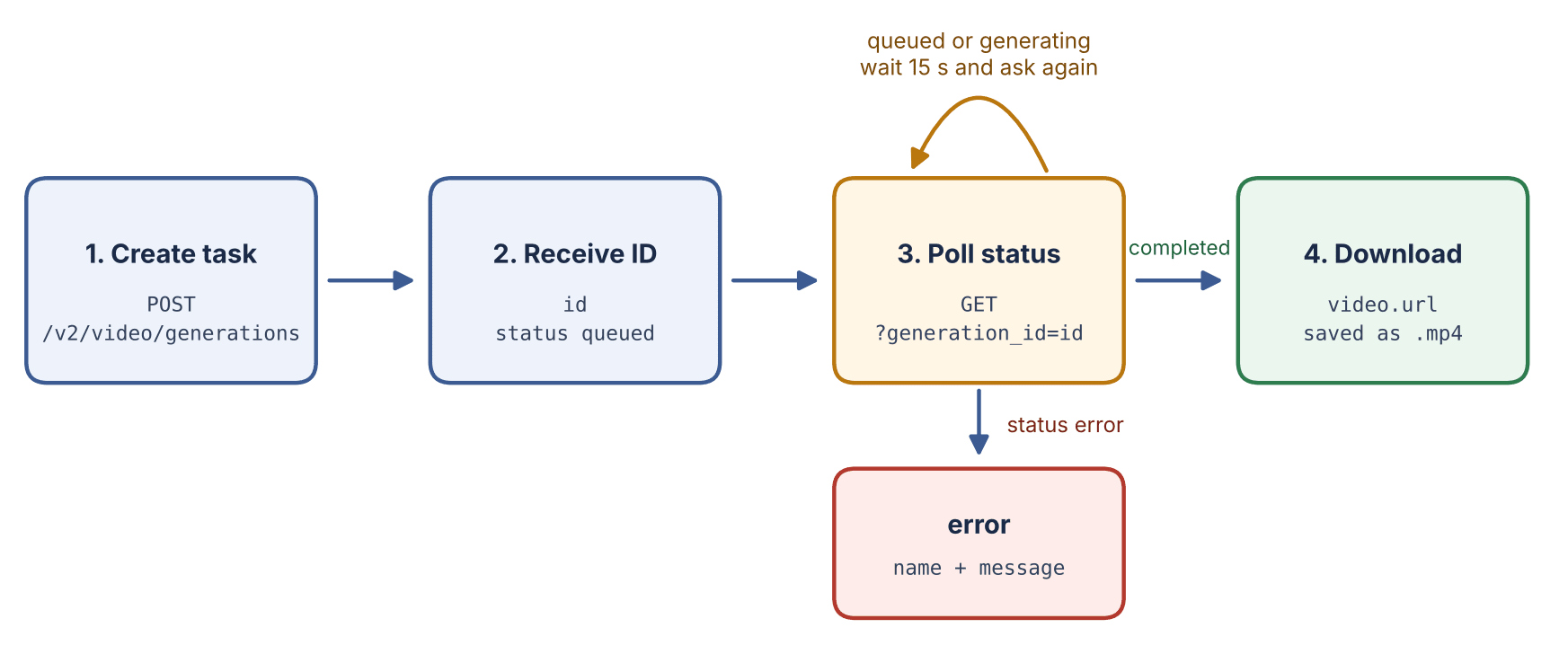
The request flow used in this tutorial.
What you need before you start
You need three things.
- Python 3 with the requests library.
- An AI/ML API key. Create an account on the AI/ML API website and generate a key there.
- A small balance. Video is billed per second of output. The Wan 2.5 model page lists $0.065 per second, so a 5 second clip costs about $0.33 at that rate. The Seedance 2.0 model page lists $0.09243 to $1.014 per second, depending on resolution.
Install the library and store the key in an environment variable. The script reads the key from the environment, so it never ends up in your source code or in a Git repository.
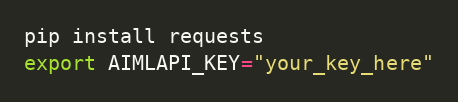
On Windows PowerShell, set the variable with $env:AIMLAPI_KEY="your_key_here" instead of the export command.
Step 1. Set up the client and the model options
Create a file named video_gen.py. The first block imports the libraries, reads the key and defines the two models.
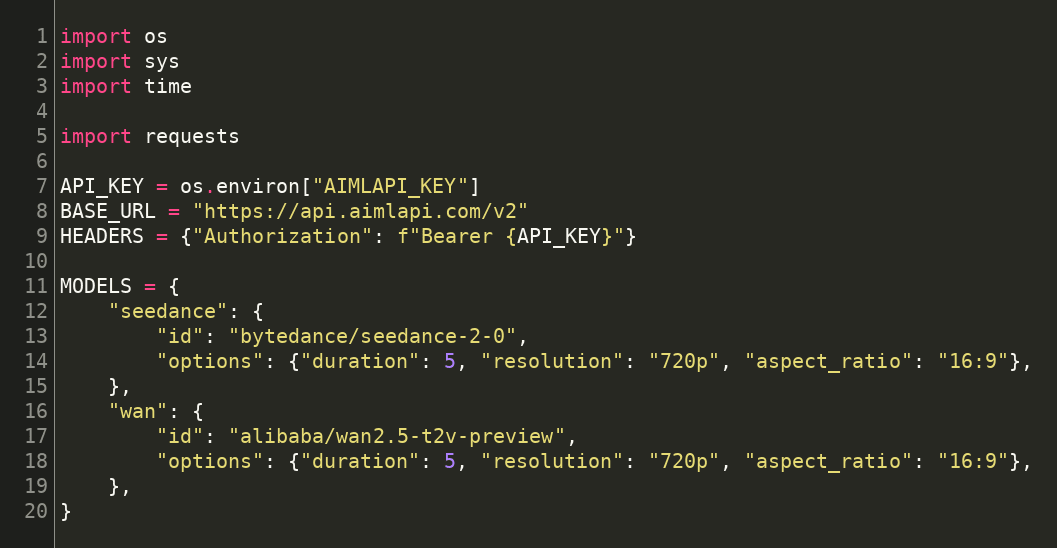
The MODELS dictionary holds the model ID and the options for each model. The options differ because the models accept different values. Seedance 2.0 takes a duration from 4 to 15 seconds. Wan 2.5 Preview takes a duration of 5 or 10 seconds. Both accept 720p and the 16:9 aspect ratio, so the script uses a 5 second 720p clip for both. That keeps the comparison fair and the cost low.
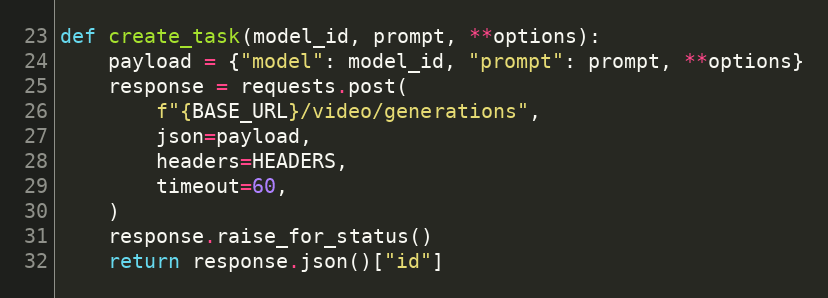
Step 2. Create a generation task
The create_task function puts the model ID, the prompt and the options into one JSON body and sends it to the API. The call to raise_for_status stops the script on any HTTP error, such as a missing or wrong key. On success, the function returns the generation ID.
Step 3. Poll until the video is ready
The wait_for_video function asks for the task status every 15 seconds. The AI/ML API documentation examples use the same interval. The loop returns the video URL when the status is completed. It raises an error with the API's own error name and message when the status is error. A timeout of 1000 seconds ends the loop if the task never finishes.
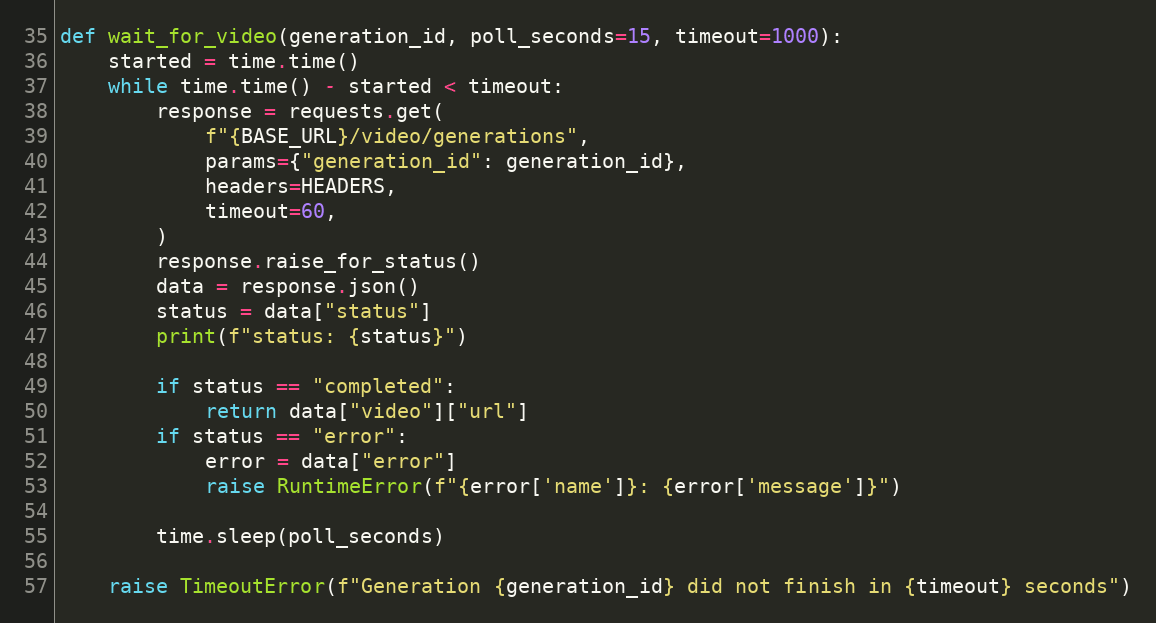
Do not shorten the interval to a fraction of a second. The task takes minutes, so frequent requests add traffic without making the video finish sooner.
Step 4. Download the file
The download function streams the file to disk in 1 MB chunks, so the whole video is never held in memory.
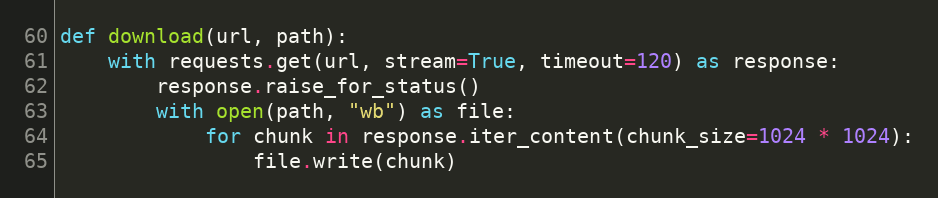
Step 5. Run the script for both models
The main function reads the model name from the command line, defaults to seedance, sends the prompt and saves the result as seedance.mp4 or wan.mp4. The prompt describes one subject, one setting and one camera movement, which is enough for a first test.
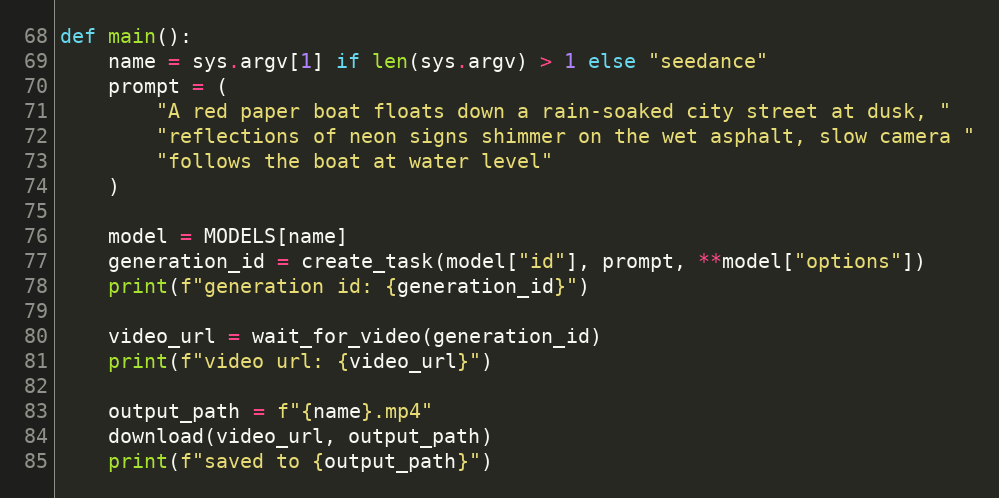
Run the script once for each model.
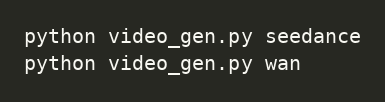
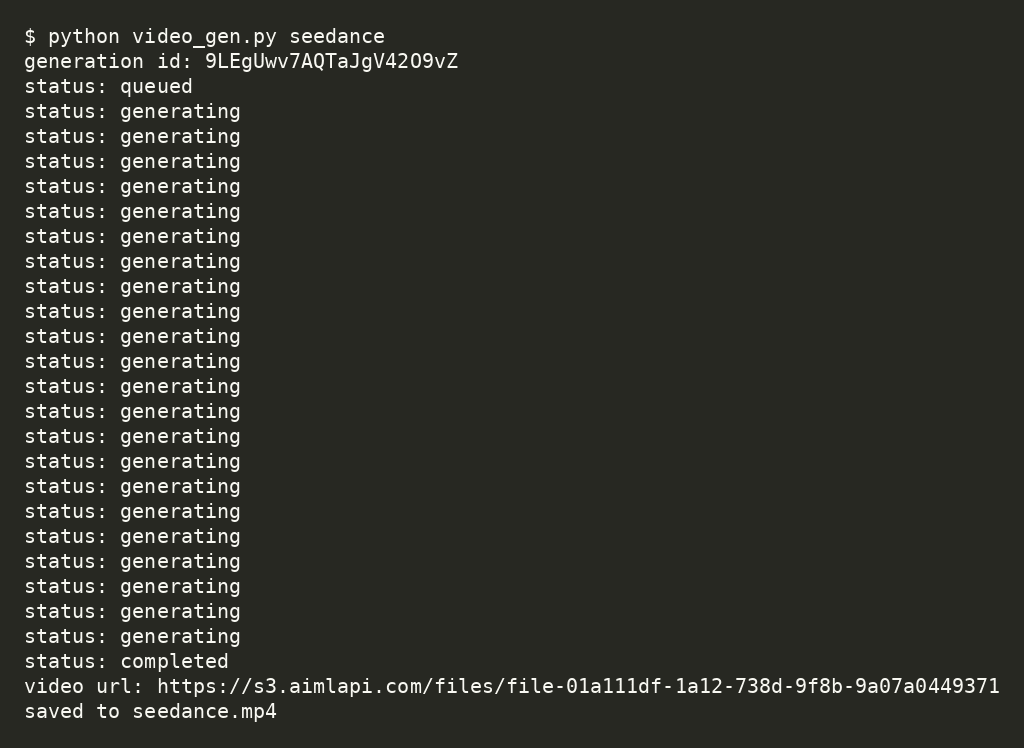
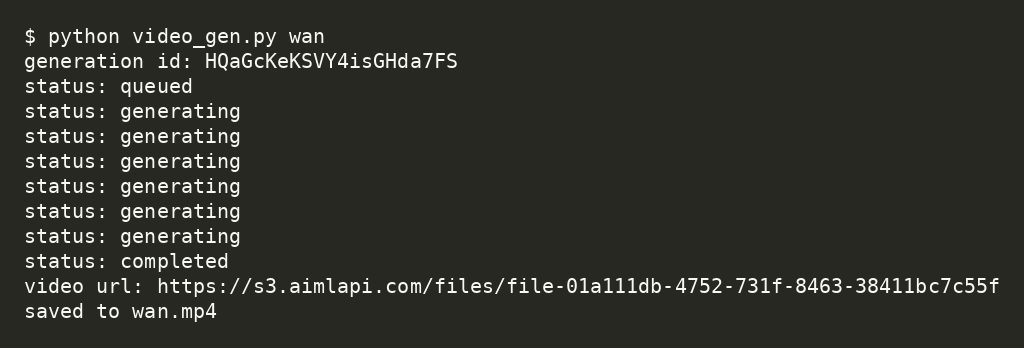
The script prints the generation ID, then one status line for each check, then the video URL and the path of the saved file.
The Seedance 2.0 run printed the output below. The task stayed in the generating status for 21 checks, which is about 5.5 minutes at a 15 second interval.
The Wan 2.5 Preview run finished after 8 status checks, which is under 2 minutes.
Both files are 1280 by 720 pixels, 5 seconds long and 24 frames per second, and both contain an audio track. Your timings will differ, because queue time depends on the load at the moment of the request.
Open both files and compare them. The prompt is the same for both models, so any difference between the two videos comes from the model. The frames below were taken at 0.5, 2.5 and 4.5 seconds.
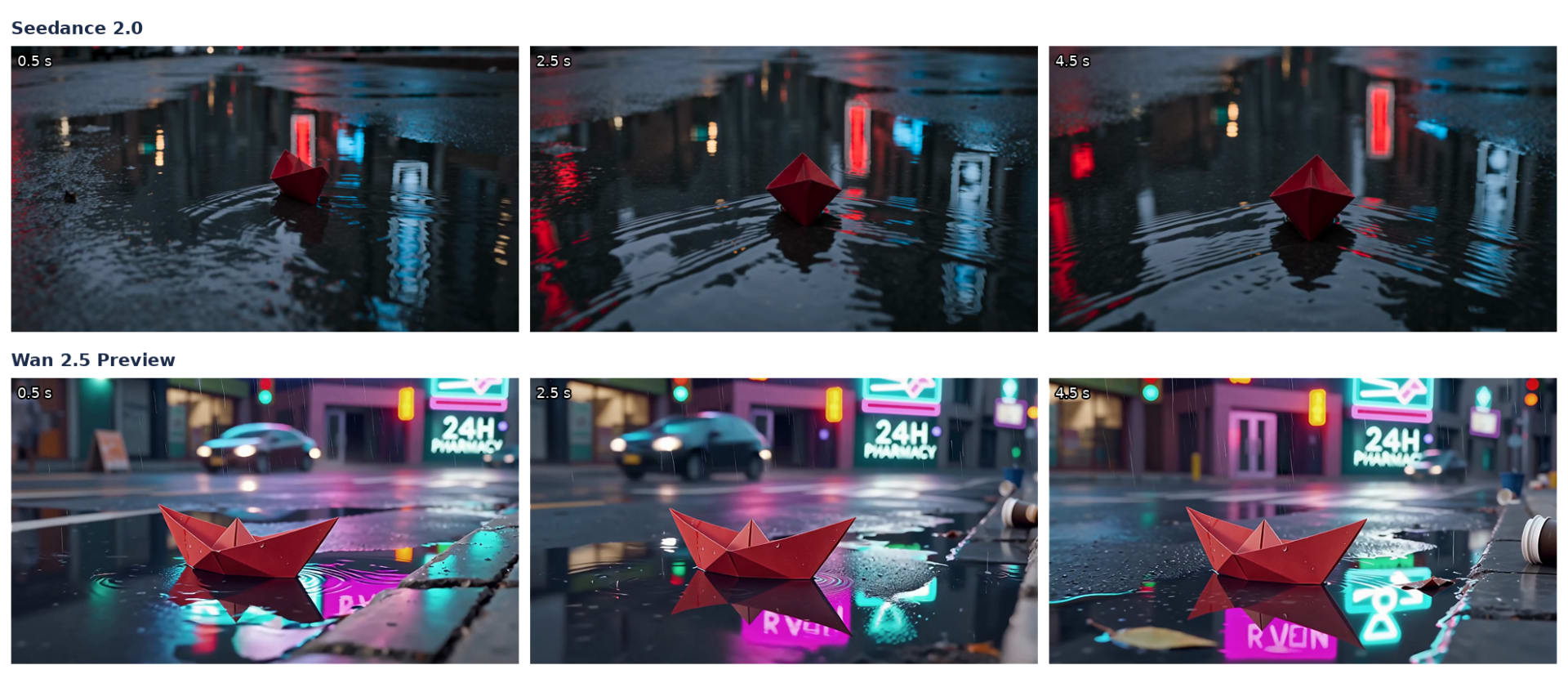
Frames from seedance.mp4 (top row) and wan.mp4 (bottom row), generated from the same prompt.
In this run, Seedance 2.0 kept the camera close to the water and rendered ripples and neon reflections in a dark puddle. Wan 2.5 Preview showed a wider street with a car, a pharmacy sign and rain, and drew a more detailed paper boat. One prompt and one run are not a benchmark, so read this as an example of the output and not as a ranking.
Seedance 2.0 options worth knowing
The Seedance 2.0 API accepts text, image, video and audio inputs. According to the model page, ByteDance released the model on April 12, 2026. The page lists native audio, lip sync and frame level motion control among its features.
| Parameter | Values | Default |
|---|---|---|
| duration | 4 to 15 seconds | 5 |
| resolution | 480p, 720p, 1080p, 4k | 720p |
| aspect_ratio | 21:9, 16:9, 4:3, 1:1, 3:4, 9:16 | 16:9 |
| generate_audio | true or false | true |
| image_url | Link or Base64 image for image to video | Optional |
| image_urls | Up to 9 reference images | Optional |
| video_urls | Up to 3 reference videos | Optional |
| seed | Integer for repeatable results | Optional |
To turn the script into an image to video generator, add an image_url key to the options of the seedance entry. Seedance 2.0 produces audio unless you set generate_audio to false.
Wan 2.5 Preview options worth knowing
The Wan 2.5 API in this tutorial is the text to video preview model from Alibaba Cloud, with the model ID alibaba/wan2.5-t2v-preview. The model page lists a release date of November 20, 2025.
| Parameter | Values | Default |
|---|---|---|
| duration | 5 or 10 seconds | 10 |
| resolution | 480p, 720p, 1080p | 1080p |
| aspect_ratio | 16:9, 9:16, 1:1 | 16:9 |
| negative_prompt | Text that describes what to avoid | Optional |
| enhance_prompt | true or false | true |
| seed | Integer for repeatable results | Optional |
If you remove the options from the script, Wan 2.5 Preview generates a 10 second clip at 1080p, which is twice as long as the test clip. The enhance_prompt option expands your prompt automatically. Set it to false if you want the model to follow your exact wording.
Seedance 2.0 compared with Wan 2.5
| Seedance 2.0 | Wan 2.5 Preview | |
|---|---|---|
| Provider | ByteDance | Alibaba Cloud |
| Model ID | bytedance/seedance-2-0 | alibaba/wan2.5-t2v-preview |
| Inputs | Text, image, video and audio references | Text prompt |
| Duration | 4 to 15 seconds | 5 or 10 seconds |
| Resolution | 480p to 4k | 480p to 1080p |
| Audio parameter | generate_audio | None listed |
| Audio track in the test file | Yes | Yes |
| Listed price per second | $0.09243 to $1.014, by resolution | $0.065 |
| Release date | April 12, 2026 | November 20, 2025 |
Best for image, video and audio references with native audio control. Seedance 2.0.
Best for low cost text to video drafts. Wan 2.5 Preview, at a listed $0.065 per second against the lowest listed Seedance 2.0 price of $0.09243.
Both models use the same endpoint and the same polling logic, so the script needs no other change when you switch between them. Only the model ID and the options differ.
Common errors and how to handle them
- HTTP 401. The key is missing or wrong. Check that AIMLAPI_KEY is set in the same terminal session that runs the script.
- Status error. The API returned an error object, and the script raises it with the name and the message. Read the message first and compare your options with the parameter tables above.
- Timeout. The script stops after 1000 seconds. Print the generation ID before you rerun anything, so you can check the same task instead of creating and paying for a second one.
Do not wrap create_task in an automatic retry loop. Each successful POST creates a new generation, and the Seedance 2.0 model page states that it bills per generation.
Summary
- Video generation is asynchronous. Create a task, poll its status and download the file from video.url.
- Both models use a POST and a GET request on /v2/video/generations.
- Seedance 2.0 accepts clips of 4 to 15 seconds. Wan 2.5 Preview accepts 5 or 10 seconds.
- Keep the API key in an environment variable and log the generation ID.
FAQ
What is an AI video generation API?
An AI video generation API is a web service that creates video from a text prompt or from reference media. You send a request with a model ID and a prompt, and the service returns a generation ID. Because rendering takes minutes, you poll that ID until the status is completed and then download the video file.
How does the text-to-video generation API work?
The API works in two calls. A POST request to /v2/video/generations sends the prompt and the options and returns a generation ID. A GET request with that ID returns the status. The status moves from queued to generating and ends as completed or error. When it reads completed, the video.url field holds the link to the file.
How to use the Seedance 2.0 API?
Send a POST request to /v2/video/generations with the model ID bytedance/seedance-2-0, a prompt and optional settings such as a duration from 4 to 15 seconds and a resolution. Save the returned ID, poll the same path with generation_id until the status is completed, and download the file from video.url. The script in this article does all of this.
How to get a Seedance 2.0 API key?
Create an account on AI/ML API and generate an API key there. The same key works for Seedance 2.0, Wan 2.5 and the other models in the catalog. Store it in an environment variable such as AIMLAPI_KEY and send it in the Authorization header as a Bearer token. Never write the key into source code.
How to add text-to-video with audio using an API?
With Seedance 2.0, audio is controlled by the generate_audio parameter, which defaults to true. Set it to false if you need silent video. Wan 2.5 Preview has no audio parameter in its documentation. In the test run for this article, both models returned files that contain an audio track.
What is the best API for video generation models?
It depends on the job. Seedance 2.0 accepts image, video and audio references and offers audio control, which suits guided scenes. Wan 2.5 Preview lists $0.065 per second, below the lowest listed Seedance 2.0 price of $0.09243, which suits text to video drafts. Run the same prompt through both before you choose.
Comments
Loading comments…