There’s a particular kind of optimism that hits when you first spin up a local LLM. You’ve downloaded a 7B parameter model, pointed Ollama at it, and suddenly you’re watching tokens stream across your terminal. No API keys. No usage meters ticking upward. No sending your private notes to someone else’s server. It feels like freedom.
And then you ask it to summarize a 50-page document, and you have time to make coffee, drink it, and contemplate your life choices before it finishes.
Local LLMs are genuinely useful. I run them daily. But the enthusiast community sometimes oversells them, and the skeptics sometimes dismiss them entirely. The truth, as usual, lives somewhere in between. If you’re a self-hoster considering whether to add local AI to your stack, the question isn’t “can I run an LLM locally?” (you almost certainly can). The question is: for which tasks does local inference actually make sense, and what does “not miserable” hardware actually look like?
This post is my attempt at an honest answer. We’ll look at where local models genuinely shine, where they reliably disappoint, what hardware gets you acceptable latency (not theoretical benchmarks, but actual usability), and how to build a hybrid workflow that uses local and cloud models for what each does best.
The appeal is real (but so are the trade-offs)
Let’s start with why self-hosters keep gravitating toward local LLMs, because the reasons are legitimate.
Privacy is the obvious one. When you’re drafting internal documentation, summarizing logs that contain IP addresses, or processing anything that touches customer data, sending that to a third-party API feels wrong. Even if you trust the provider’s privacy policy today, you’re still creating a dependency on their continued good behavior. Local inference means the data never leaves your network.
Cost predictability matters too. Cloud LLM pricing is reasonable for occasional use, but it scales with volume. If you’re processing hundreds of documents daily or running AI-assisted tooling across a team, those API calls add up. Local inference has a high upfront cost (hardware) but near-zero marginal cost per query.
Availability and latency can favor local in specific scenarios. No network round-trip, no rate limits, no outages because your provider is having a bad day. For integration into local tooling and scripts, a local endpoint that’s always there is genuinely nice.
The tinkerer satisfaction shouldn’t be dismissed either. There’s value in understanding how these systems work at a mechanical level, in being able to swap models, adjust parameters, and see exactly what’s happening. That knowledge transfers to working with cloud APIs more effectively.
But here’s where we need honesty: local models are not cloud models running on your hardware. They’re smaller, less capable models running on consumer or prosumer hardware. The largest models you can reasonably run locally (in the 70B parameter range) are still smaller than what’s behind most commercial APIs. And “running” is generous when you’re getting 2 tokens per second on an undersized GPU.
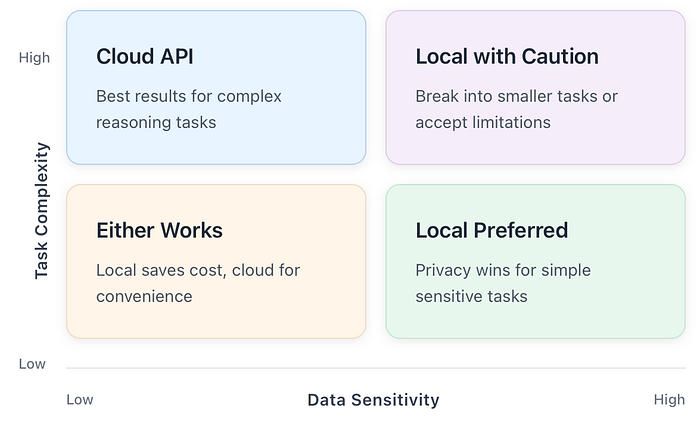
The trade-off space looks something like this:
Understanding this trade-off space is essential before we talk about specific use cases. Local AI isn’t better or worse; it’s different, and the difference matters for different tasks.
Where local LLMs actually shine
After running local models for various tasks over the past year, I’ve developed a pretty clear sense of where they earn their keep. The pattern isn’t complicated: local models work well for tasks that are private, bounded, and don’t require deep domain expertise or extensive reasoning chains.
Log summarization and triage
This is probably my most common local LLM use case, and it works remarkably well. When I’m digging through application logs, system journals, or error dumps, I don’t need the model to be smarter than GPT-4. I need it to find patterns, group similar entries, and tell me what’s unusual.
A typical prompt looks like this:
Here are the last 200 lines of nginx error logs. Group them by error type, identify the most frequent issues, and highlight anything that looks like an active attack or misconfiguration.
Local models handle this well because the task is pattern recognition over structured-ish text, not deep reasoning. The logs contain the answers; the model just needs to organize them. A 7B or 13B parameter model running at comfortable speeds will outperform a cloud API here, not because it’s smarter, but because you can iterate faster when there’s no API latency and no cost-per-token making you second-guess your prompts.
Drafting documentation and runbooks
First drafts are where local models shine. When I need to write a runbook for a deployment procedure I just figured out, or document a system I’ve been building, the model doesn’t need to know anything I don’t tell it. I’m providing the technical content; I just need help with structure and prose.
This works because the context is entirely in the prompt. I describe what the system does, what steps are involved, and what the failure modes are. The model organizes that into a coherent document. If it gets something wrong, I notice immediately because I know the system. This is very different from asking a model to explain something you don’t already understand, where you can’t easily verify the output.
Code refactoring with tight context
Local models handle specific, bounded refactoring tasks reasonably well. Things like:
- Converting a Python 2 script to Python 3
- Adding type hints to existing functions
- Extracting a method from a longer function
- Converting between data formats (JSON to YAML, for instance)
The key phrase is tight context. If the entire relevant code fits in a single prompt with room to spare, and the transformation is mechanical rather than architectural, local models work fine. The moment you need the model to understand a broader codebase, reason about architectural implications, or make judgment calls about design, you’re asking for capabilities that smaller models simply don’t have.
Text transformation pipelines
If you’re building automation that involves text processing, local LLMs can slot in nicely. Extracting structured data from semi-structured text, reformatting content between systems, generating summaries for dashboards. These tasks often involve running the same prompt template against many inputs, which is exactly where local inference economics make sense: high volume, low complexity per item.
Git commit messages and PR descriptions
This is a small thing, but I mention it because it’s a genuinely good use case. You’ve made changes, you know what they are, but writing up the commit message or PR description is friction. A local model can look at the diff and draft something reasonable in a second or two. Not perfect, but a starting point that’s faster than typing from scratch.
Where local LLMs reliably disappoint
Now for the harder part: where local models struggle. The enthusiasm in the self-hosting community sometimes papers over these limitations, but they’re real and you’ll hit them.
Deep domain correctness
If you ask a local model to explain a complex topic you don’t already understand, you’re rolling dice. Smaller models hallucinate more confidently than larger ones. They’ll give you plausible-sounding explanations that are subtly or entirely wrong.
This is fine when you’re using the model to draft content you’ll review and correct. It’s dangerous when you’re using it to learn something new or verify something you’re unsure about. I’ve seen local models confidently explain networking concepts with just enough accuracy to sound right, while getting the crucial details wrong in ways that would cause real problems if you followed the advice.
The fix isn’t to avoid local models entirely; it’s to use them for what they’re good at. If you need authoritative answers on complex topics, use a more capable model (usually cloud-based) or, better, use authoritative documentation.
Long context tasks
Context windows have gotten larger on paper, but practical context handling is another story. Most local model setups struggle with context beyond 8K-16K tokens in terms of actual coherence. The model might accept a 32K context, but its ability to reason about information across that full context degrades significantly.
This matters for tasks like:
- Summarizing long documents accurately
- Finding information across multiple files
- Maintaining coherent conversations over many exchanges
- Code understanding across a full module or package
Cloud models with 100K+ token context windows have a genuine capability advantage here. If your task requires reasoning over a lot of text, local models will miss things that larger cloud models catch.
Multi-step reasoning
Smaller models struggle with tasks that require holding multiple pieces of information in “working memory” and reasoning through implications. The classic example is logic puzzles, but this shows up in practical tasks too:
- Debugging code where the bug’s cause and manifestation are distant
- Planning that requires considering multiple constraints simultaneously
- Analysis that requires synthesizing information from multiple sources
You can sometimes work around this by breaking problems into explicit steps and feeding intermediate results back to the model, but at that point, you’re doing the reasoning and using the model as a text generator. That’s fine, but recognize what’s happening.
“Do my whole project” tasks
This is where I see the most disappointment. Someone asks a local model to “build me a monitoring dashboard” or “create a backup system for my homelab,” expecting something close to what a senior engineer would produce. What they get is a plausible-looking starting point that falls apart under scrutiny.
Local models are assistants, not replacements. They can help you move faster on tasks you know how to do. They cannot reliably do tasks you don’t know how to do, because you can’t verify their output effectively.
The “minimum viable local AI” hardware guide
Let’s talk hardware, because this is where a lot of confusion lives. The question “what hardware do I need?” depends entirely on what experience you’re willing to accept.
I think about this in tiers, defined not by specs but by what using them actually feels like.
Tier 1: CPU-only / integrated graphics
What you have: Any reasonably modern CPU (last 5–6 years), 16GB+ system RAM, no dedicated GPU.
What it feels like: Running a 7B parameter model in Q4 quantization, you’re looking at maybe 5–15 tokens per second depending on your CPU. That’s usable for short outputs but painful for anything longer. A 13B model drops to 2–5 tokens/second, which feels like watching paint dry.
What it’s good for: Quick text transforms, single-paragraph responses, commit messages, code formatting. Tasks where you’re generating maybe 100–200 tokens and the model’s response time is still shorter than typing it yourself.
What it’s bad for: Anything conversational, longer document generation, iterative refinement where you’re waiting for multiple responses.
My take: CPU-only is fine for specific, integrated use cases where the model is running in the background and results appear when you need them. It’s not fine for interactive use unless you have a lot of patience.
Tier 2: Entry-level dedicated GPU (8GB VRAM)
What you have: Something like an RTX 3060 12GB, RTX 4060, or AMD equivalent with 8–12GB VRAM.
What it feels like: A 7B model runs at 30–50 tokens/second, which feels responsive. A 13B model at moderate quantization (Q4) fits in VRAM and runs at 15–25 tokens/second, which is comfortable for interactive use. A 34B model might run partially offloaded, but you’re back in slow territory.
What it’s good for: Interactive use with models up to 13B. Comfortable enough for conversational back-and-forth, document drafting, and code assistance.
What it’s bad for: Larger models that would improve output quality. You’re constrained to the smaller end of the model spectrum.
My take: This is the entry point for “not miserable” local LLM use. If you already have a gaming GPU in this range, you can run local models comfortably. If you’re buying hardware specifically for LLMs, consider jumping to the next tier.
Tier 3: Serious local LLM setup (16–24GB VRAM)
What you have: RTX 3090, RTX 4080, RTX 4090, or AMD equivalent with 16–24GB VRAM.
What it feels like: 13B models run effortlessly at 50+ tokens/second. 34B models fit in VRAM and run at usable speeds (15–30 tokens/second). You can run larger 70B models with some quantization, though context length becomes a constraint.
What it’s good for: The full range of practical local LLM use. You can choose models based on task requirements rather than hardware constraints. Context windows of 8K-16K are usable.
What it’s bad for: State-of-the-art capabilities. Even with this hardware, you’re not matching frontier cloud models. But you’re getting genuinely useful local inference at comfortable speeds.
My take: If you’re serious about local LLMs and can afford it, this tier is where the experience becomes good rather than tolerable. The 24GB VRAM cards (3090, 4090) give you headroom that’s increasingly valuable as models improve.
Tier 4: Multi-GPU / Apple Silicon / specialized
What you have: Multiple GPUs with NVLink, a Mac Studio with 64GB+ unified memory, or specialized inference hardware.
What it feels like: 70B+ models at interactive speeds. Long context windows that actually work. Multiple models loaded simultaneously.
What it’s good for: Professional or heavy use cases where local inference is a core workflow requirement.
What it’s bad for: Cost-effectiveness for most self-hosters. At these price points, you’re often better served by a hybrid approach using cloud APIs for heavy tasks.
The hardware reality check table
Note: These are rough ranges. Actual performance varies significantly based on model architecture, quantization method, inference backend (llama.cpp, vLLM, etc.), and other system factors.
The hybrid workflow: Using the right tool for each task
Here’s my actual recommendation for most self-hosters: don’t go all-in on local, and don’t dismiss it either. Build a hybrid workflow that uses each approach for what it’s good at.
The decision framework I use is simple. For any given task, I ask two questions:
- How sensitive is the data? If it contains credentials, customer data, internal system details, or anything I wouldn’t want leaked, local is strongly preferred.
- How complex is the task? If it requires extensive reasoning, deep domain knowledge, or working with large contexts, cloud models will give better results.
This gives us a nice matrix:
The architecture
In practice, my setup looks like this:
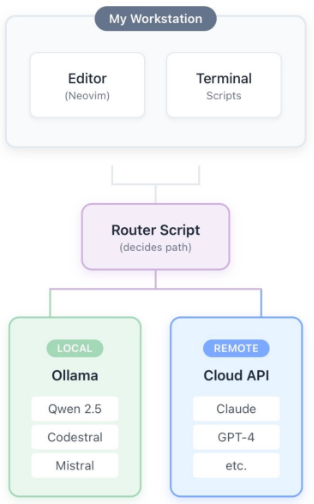
The “router script” isn’t fancy. It’s a simple configuration that maps certain tasks or commands to local models and others to cloud APIs. When I’m working with logs that contain internal IPs and hostnames, it goes local automatically. When I’m asking for architectural advice on a project design, it routes to a cloud API.
Practical routing rules
Here’s roughly how I divide things:
Local (Ollama with Qwen 2.5 or Codestral):
- Log summarization and triage
- First-draft documentation
- Commit message generation
- Code formatting and simple refactorsAny task involving production data or credentials
- High-volume repetitive text processing
Cloud (Claude, GPT):
- Architectural design discussions
- Complex debugging assistance
- Learning new concepts (with verification)
- Long document analysis
- Tasks requiring careful reasoning
- Anything where quality matters more than privacy
Either (based on convenience):
- General Q&A about technology
- Writing assistance for public content
- Brainstorming
This isn’t rigid. If I’m working offline, everything goes local. If I’m in a hurry and the task isn’t sensitive, I might use cloud for something that would normally go local. The framework is guidance, not rules.
The maintenance reality check
Self-hosted AI has the same problem as self-hosted anything: it’s another thing to maintain. Before you set this up, ask yourself honestly whether you have the maintenance budget (in time, not money) to keep it running.
Here’s what ongoing maintenance actually looks like:
Regular tasks:
- Updating the inference backend (Ollama, llama.cpp, etc.) when new versions improve performance
- Testing new model releases to see if they’re worth switching to
- Managing disk space as models accumulate
- Monitoring VRAM usage and adjusting loaded models
Occasional tasks:
- Debugging when inference breaks after system updates
- Reconfiguring when you change hardware
- Updating integration scripts when APIs change
- Performance tuning when you notice degradation
Things that break unexpectedly:
- GPU driver updates that change behavior
- Model format changes that require re-downloading
- Memory leaks in long-running inference servers
- Conflicts with other GPU workloads (gaming, transcoding)
None of this is catastrophic, but it adds up. If your homelab is already a pile of services you don’t have time to maintain, adding another probably isn’t the answer. If you enjoy this kind of tinkering and have the time for it, local LLMs are a rewarding addition.
A practical comparison: Log triage, local vs. cloud
Let me show you what the trade-off looks like in practice. I’ll take the same task and show how it plays out with a local model versus a cloud API.
The task: Analyze 500 lines of nginx error logs and identify the most significant issues.
Local (13B model, RTX 3090):
Response time: ~8 seconds
Cost: 0 USD (marginal)
Privacy: Logs never leave my machine
Quality: Good. Correctly identified rate limiting issues, 404 patterns, and a misconfigured upstream. Missed one subtle issue with header handling.
Cloud (Claude Sonnet):
Response time: ~4 seconds
Cost: ~0.02 USD
Privacy:**** Logs sent to Anthropic’s servers
Quality: Excellent. Caught everything the local model caught, plus the header issue, plus suggested a specific nginx directive to investigate.
The verdict: For this task, local wins for me. The quality difference doesn’t justify sending production logs to a third party, and 8 seconds is fine. If I were trying to learn about nginx issues I didn’t understand, the cloud model’s better reasoning would matter more.
The checklist: Is local AI worth it for you?
Before you invest time and potentially money into local LLMs, work through these questions:
If you’re checking most of these boxes, local LLMs will probably serve you well. If you’re checking few of them, you might be setting yourself up for disappointment. There’s no shame in using cloud APIs exclusively. They’re good, they’re getting cheaper, and not everything needs to be self-hosted.
Local LLMs are a legitimate tool in the self-hoster’s toolkit, but they’re not magic and they’re not a replacement for cloud AI. They’re a complement with different strengths and weaknesses.
The mental model I’d encourage is this: local models are fast, private, and cheap at the margin, but they’re less capable. Use them where those properties matter and the capability gap doesn’t.
For log analysis, first-draft documentation, code formatting, and high-volume text processing, local models earn their keep. For complex reasoning, deep domain questions, and tasks requiring large contexts, cloud models are usually worth the privacy trade-off and the cost.
The hardware requirements are real, but they’re not outrageous. A GPU in the 12GB+ VRAM range gets you into comfortable territory, and many self-hosters already have capable hardware sitting around. CPU-only can work for specific, background use cases if you’re patient.
And whatever you do, don’t make local AI another homelab pet that demands attention without delivering value. Set it up intentionally, use it for tasks where it actually helps, and don’t hesitate to use cloud APIs when that’s the better tool.
The point isn’t ideological purity about where your inference runs. The point is getting things done.
Comments
Loading comments…