Product-First AI Ad Workflows vs Generic Video Tools for Fast Ecommerce Creative Refreshes

Weekly ad refreshes sound manageable until a small team has to repeat them every week.
The product listing is live, the holiday angle is clear, and the photos are usable. Then the same blockers return: someone rewrites the hook, someone trims the product copy for a vertical placement, someone checks captions and CTA, and the draft still needs another review before it can enter testing. For an Etsy jewelry listing, that delay can matter when gifting campaigns, last-minute offers, and seasonal refreshes move quickly.
This is the more useful comparison for lean teams. A product-first workflow such as Media.io AI ads keeps the work closer to the source listing, while a broader video tool may still be better for custom motion design or fully scripted brand work.
When Product-First Workflows Fit Better Than Prompt-First Video Tools
If your team keeps returning to the same product pages, image sets, and seasonal angles, a prompt-first video tool can add work before it saves work. You still have to restate what the product is, who it is for, why someone should care, and what angle the ad should take.
Product-first ad workflows fit lean paid social teams because they begin with the material that already exists. Product title, page copy, gallery images, pricing cues, and selling points can shape the first script before the team chooses format or style. For jewelry sellers promoting giftable pieces, the job is usually not a polished brand film. It is a clean draft for Reels, Stories, or another short paid social placement.
In that context, Media.io is easier to explain as a browser-based creative workspace than as a blank prompt tool. Its AI ads workflow starts from ecommerce inputs like product URLs, uploaded product images, and reusable product assets, which reduces the amount of setup work before a first draft appears.
When A Broader Video Editor Is Still The Better Choice
A product-first ad generator is not always the right tool.
If a brand needs frame-level motion control, custom footage layering, or highly specific transitions, a broader editor may be more useful. The same is true when the source listing is weak. Thin copy, unclear benefits, or poor images leave any AI workflow with less to work from.
Policy support also has limits. Script filtering can help reduce risky superlatives and exaggerated claims, but sensitive categories still need human review before anything goes live.
The practical takeaway is simple: AI ad workflows can reduce setup time, but they do not replace strong source pages, clear positioning, or creative judgment.
Three Workflow Questions That Decide Which Option Is Faster
 Product Intake And Asset Reuse
Start with the first handoff. A prompt-first video tool usually asks the team to describe the product from scratch. That can be fine for one-off concepts, but it becomes repetitive when the same SKU needs several refreshes.
A product-first workflow starts with a URL, product images, or a saved Product Library item. From there, it can organize title language, page copy, gallery assets, pricing cues, and key selling points into a usable starting point. For teams managing many listings, this is where the second and third draft usually become faster than the first.
Script Control Before Final Rendering
Fast generation matters less if the team only discovers problems after the video is rendered.
With an ad-specific workflow, the script can be reviewed before the final video is generated. That gives the team room to adjust the hook, voiceover, captions, CTA, pacing, avatar choice, voice, and language while changes are still easy. The Media.io AI ads flow also supports AI avatars or uploaded real-person avatar references, which can help when a UGC-style delivery is needed but another shoot is not realistic.
A general AI video tool can still be useful for strong visuals. The tradeoff is that the ad logic may be less visible early, which can make revisions slower.
Variation Speed Across Formats And Markets
For weekly refreshes, variation speed often matters more than producing one perfect cut.
A jewelry team may need one version for Facebook Stories, another for Instagram Reels, and another hook for holiday gifting, last-minute buyers, or bundle offers. If the workflow supports reusable assets, editable scripts, custom styles, and formats like review, tutorial, lifestyle, or unboxing, the team can produce more distinct tests without rebuilding the concept each time.
Language versions add another layer. If the same SKU needs light localization for different markets, multilingual draft generation can shorten the first pass. It still needs review, but it is usually faster than starting from an empty script.
A Lean Test Process For Weekly Creative Refreshes
Keep the test small enough that the team can actually compare the results.
Step 1: Add Product Inputs
Launch Media.io and go to AI Ads. Paste a product URL from Etsy, Shopify, Amazon, Mercado Libre, or another supported ecommerce site, or upload product images if the listing assets are already prepared. The system can use that material to pull product cues and build the starting draft.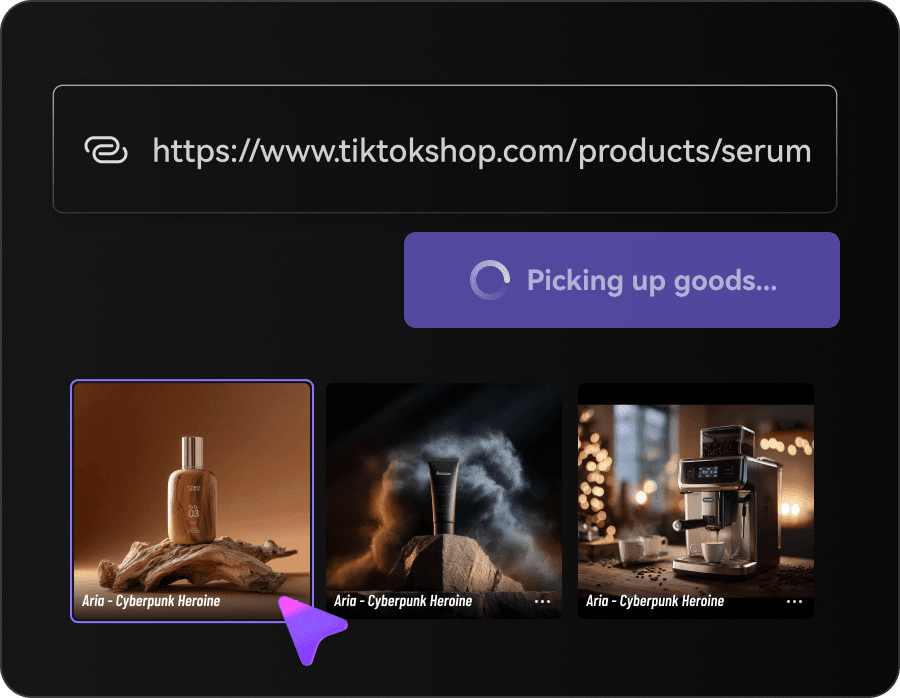
Step 2: Set The Ad Direction Before Rendering
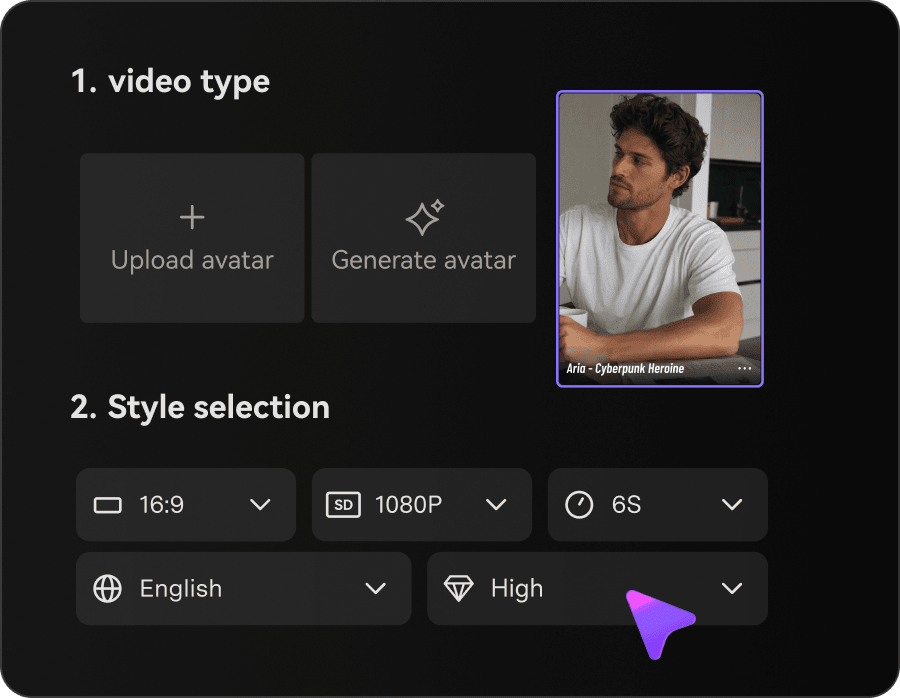
Choose the setup before the script expands: ad style, avatar or no-avatar mode, video size, resolution, duration, quality, and language. Then review the generated script. This is the point to tighten the hook, change CTA wording, refine captions, and choose a more believable persona or voice for the audience.
 Step 3: Generate The Draft And Compare Different Concepts
Render the ad, review the result, and compare two or three clearly different concepts instead of making endless tiny edits. One version might lead with gifting, another with craftsmanship, and another with urgency. Once one angle is stronger, keep the same product asset and avatar setup for the next refresh.
 One useful habit is to clean the product page before import. Better source material usually leads to tighter hooks and fewer script fixes later.
Choose Based On Catalog Rhythm, Not Feature Count
If your team repeatedly turns existing listings into paid social drafts, a product-first AI ad workflow will usually save more setup time than a blank prompt tool. It starts from product inputs, lets the team adjust ad logic before rendering, and makes reuse easier from one refresh cycle to the next.
If visual control matters more than input speed, or the source page is too thin to guide a script, a broader editor may still be the better fit. Results also depend on the quality of the listing, and some advanced output options may require a paid plan or credits.
A useful test is to run one proven jewelry listing through your current process, then run that same listing through the Media.io AI ads flow. Compare turnaround time, revision count, product accuracy, and how quickly the team reaches a publishable draft. That gives you a clearer answer than comparing feature lists.
Comments
Loading comments…