According to the Stack Overflow Developer Survey for 2025, over 55% of developers now relying on PostgreSQL, more teams than ever need the best PostgreSQL GUI to keep up. As schemas multiply and performance tuning gets more complex, a quality GUI for PostgreSQL speeds up query work. It also simplifies schema comparisons and reduces the time spent on repetitive admin tasks.
This guide compares five of the best PostgreSQL GUI tools in 2026. We break them down by SQL editing, administration, schema management, platform support, pricing, and how they fit into your workflow.
How to choose the best PostgreSQL GUI for your workflow
The right PostgreSQL GUI client usually depends on the kind of work your team does most. Some tools are better for SQL development, others for administration, multi-database work, or quick ad hoc querying and data inspection. The following table highlights the main things to look for in each workflow.
| Workflow priority | What usually matters most | What to prioritize |
|---|---|---|
| SQL-heavy development | Autocomplete, profiling, navigation, refactoring | Editor experience and query workflow depth |
| DBA administration | Permissions, backups, schema management, monitoring | Administration and synchronization features |
| Multi-database environments | PostgreSQL, MySQL, SQL Server, and their cloud versions | Broad database compatibility |
| Lightweight daily work | Fast startup, quick browsing, inline editing | Simplicity and responsiveness |
| Enterprise workflows | Schema compare, synchronization, DevOps automations | Workflow coverage and operational tooling |
| Budget-conscious teams | Licensing flexibility and core functionality | Free tiers and long-term cost efficiency |
The next step is matching those workflow priorities against the strengths of each available PostgreSQL client tools.
List of the best PostgreSQL GUI tools
Here are some of the best PostgreSQL GUI tools in 2026 for SQL development, database administration, schema management, and everyday query work. Each tool is designed for different workflows, ranging from lightweight browsing to full IDE-style PostgreSQL development.
1. dbForge Studio for PostgreSQL

Rating: 4.3/5 G2
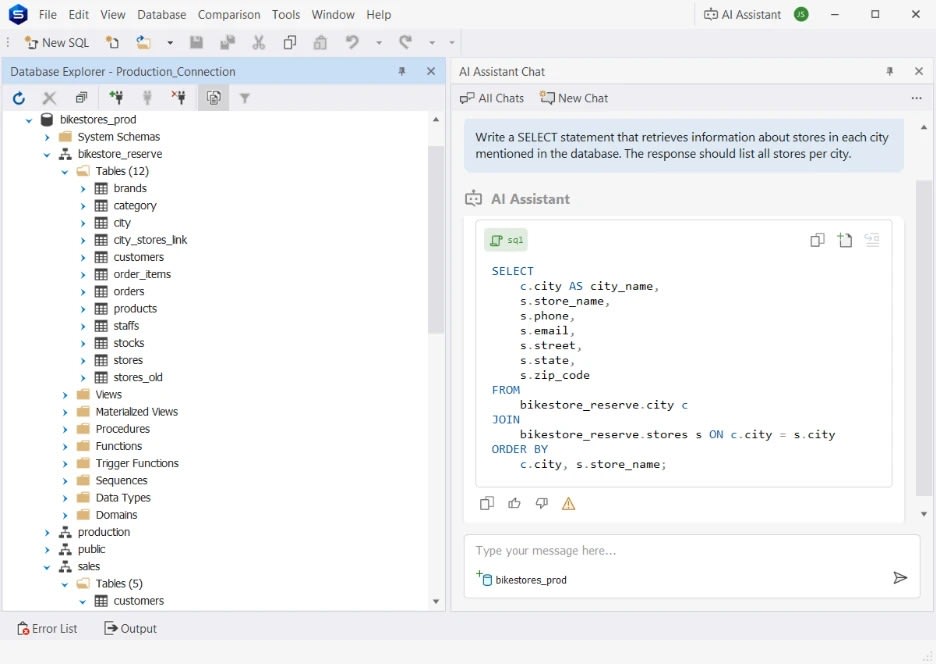
Alt text: dbForge Studio for PostgreSQL showing schema comparison and SQL differences between two databases.
dbForge Studio for PostgreSQL is built for teams that need more than a basic Postgres client for running queries and browsing tables. It’s a PostgreSQL database manager that combines SQL editing, query profiling, schema comparison and synchronization, reporting, data management, and automation tools in a single environment.
The tool is aimed at teams handling both development and administration work, reducing the need to jump between multiple tools throughout the day. For teams looking for the best GUI for PostgreSQL, it also includes an integrated AI assistant for SQL generation, explanation, and general SQL assistance.
Tool overview
| Category | Details |
|---|---|
| Vendor | Devart |
| Best for | Full PostgreSQL development and management workflows |
| Primary user | Database developers and DBAs |
| AI features | AI assistant for SQL generation, explanation, and SQL assistance |
| Deployment | Available as a native PostgreSQL client Windows application, with macOS support via CrossOver or Parallels (PostgreSQL client mac) and Linux via Wine or CrossOver. |
Features
- SQL editing with autocomplete, syntax highlighting, formatting, and coding assistance.
- Query profiling and execution plan analysis.
- Schema comparison and synchronization.
- Script generation and automation tools.
- Test data generation.
- Data import/export, reporting, and data analysis tools.
- Integrated AI assistant for SQL workflows.
Pros
- Combines SQL editing, profiling, schema comparison, reporting, automation in one tool.
- Strong schema and data comparison workflows across environments.
- Integrated AI assistant for SQL generation and query assistance.
- Works with a wide range of PostgreSQL cloud platforms and services.
- Free Express edition available.
Cons
- Bigger feature set takes longer to learn than lightweight clients.
- Paid license needed for broader workflow coverage beyond the Express edition.
- Can feel heavier than simpler query-focused tools for quick tasks.
Price
Free Express edition available. Paid plans start at $89.95/year, with perpetual licensing also available. 30-day free trial included.
Compatibility
PostgreSQL, Supabase, Amazon RDS for PostgreSQL, Amazon Aurora PostgreSQL, Azure Database for PostgreSQL, AlloyDB, TimescaleDB, Heroku Postgres, ElephantSQL, Alibaba Cloud PostgreSQL, and other PostgreSQL-compatible platforms.
User reviews
“It has a wealth of features and customizations which is very nice. It seems to be effective for power users and my organization.” — G2 review
2. pgAdmin

Rating: 4.1/5 G2
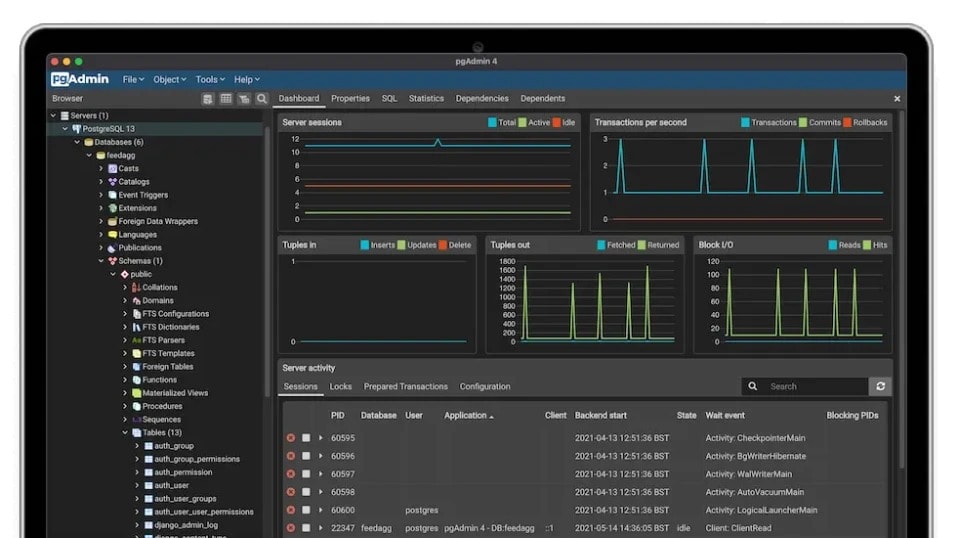
Alt text: pgAdmin 4 dashboard showing PostgreSQL server monitoring and database management tools.
pgAdmin is the official PostgreSQL GUI and one of the most widely used tools for PostgreSQL administration. It is open-source, community-maintained, and built for managing database objects, running queries, monitoring activity, handling backups, and configuring PostgreSQL servers.
The tool is commonly used by DBAs and teams that want a Postgres DB client with no licensing costs and direct access to PostgreSQL management features. pgAdmin 4 is available as a PostgreSQL GUI Windows desktop application, a web-based deployment, and a Docker-based setup.
Tool overview
| Category | Details |
|---|---|
| Vendor | PostgreSQL Global Development Group |
| Best for | PostgreSQL administration and server management |
| Primary user | DBAs and open-source teams |
| AI features | AI chat, AI reports, and AI query assistance |
| Deployment | Desktop, web-based, and Docker deployments |
Features
- SQL query tool with autocomplete and graphical EXPLAIN support.
- Object browser for tables, views, functions, triggers, indexes, and schemas.
- Role, permission, and tablespace management.
- Server monitoring and activity dashboards.
- Backup and restore support through pg_dump and pg_restore.
- ER diagram and schema visualization tools.
- AI-assisted query and reporting features.
Pros
- Completely free and open-source.
- Official PostgreSQL administration tool with broad community adoption.
- Strong monitoring, backup, and server management features.
- Web deployment works well for shared or remote environments.
- Covers most day-to-day PostgreSQL administration tasks.
Cons
- Startup can feel slow because pgAdmin 4 launches through a local web service.
- The interface feels heavier than lightweight desktop clients.
- SQL development workflows are not as deep as full IDE-style PostgreSQL tools.
- No built-in schema comparison or synchronization workflows.
- AI features require mandatory configuration with an LLM provider (OpenAI, Anthropic, or Ollama).
Price
Free and open-source.
Compatibility
All supported PostgreSQL versions.
3. DataGrip

Rating: 4.6/5 G2
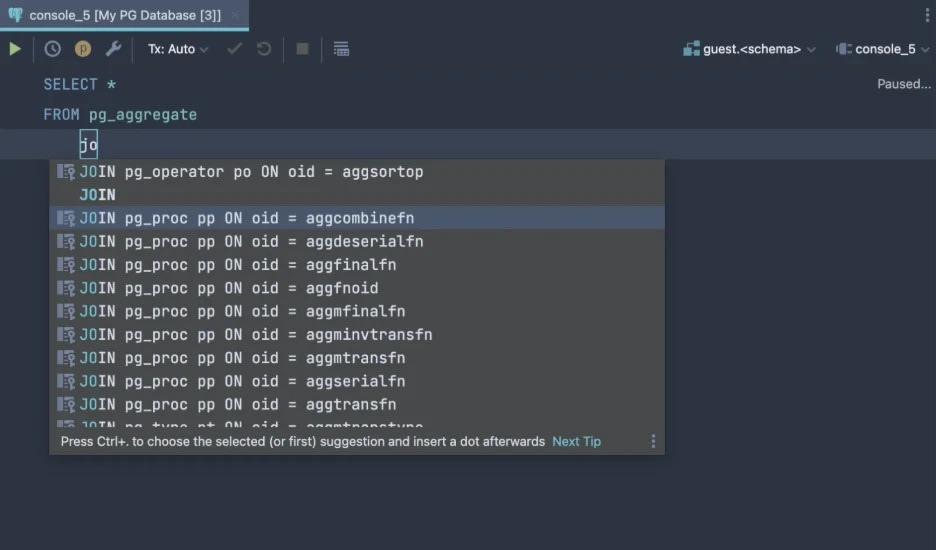
Alt text: DataGrip SQL editor showing PostgreSQL query autocomplete and code suggestions.
DataGrip is JetBrains’ database GUI and SQL IDE for developers who spend most of their time writing and debugging queries. It functions as a capable Postgres SQL client, focusing on query editing, schema navigation, refactoring, and cross-database workflows rather than PostgreSQL administration.
The tool is popular with developers already using JetBrains products like IntelliJ IDEA, PyCharm, or GoLand. It supports PostgreSQL and many other databases while providing a consistent workflow across platforms.
| Category | Details |
|---|---|
| Vendor | JetBrains |
| Best for | SQL-heavy development and query work |
| Primary user | Developers writing SQL daily |
| AI features | JetBrains AI Assistant integration available |
| Deployment | Windows, macOS, and Linux |
Features
- Context-aware SQL autocomplete and query navigation.
- Refactoring tools for tables, columns, and SQL objects.
- Execution plan analysis tools.
- Schema navigation across tables, views, procedures, and indexes.
- Git integration for SQL projects and version control.
- Support for PostgreSQL and many other database systems.
Pros
- Strong SQL editor with deep autocomplete and navigation support.
- Consistent experience across multiple database systems.
- Refactoring tools help manage large SQL codebases.
- Familiar workflow for teams already using JetBrains IDEs.
- Good Git and version control integration.
Cons
- More expensive than most PostgreSQL GUI tools in this list.
- Heavier memory usage than lightweight desktop clients.
- Startup and schema indexing can feel slow on large environments.
- No built-in schema comparison or synchronization workflows.
Price
DataGrip offers a free non-commercial version. Commercial plans start at $10.90/month (or $109/year) for individuals, $25.90/user/month (or $299/year) for organizations.
Compatibility
Supports PostgreSQL, MySQL, SQL Server, Oracle, SQLite, MongoDB, Redis, Amazon Redshift, Snowflake, Cassandra, BigQuery, and many other database platforms.
4. DBeaver

Rating: 4.4/5 G2
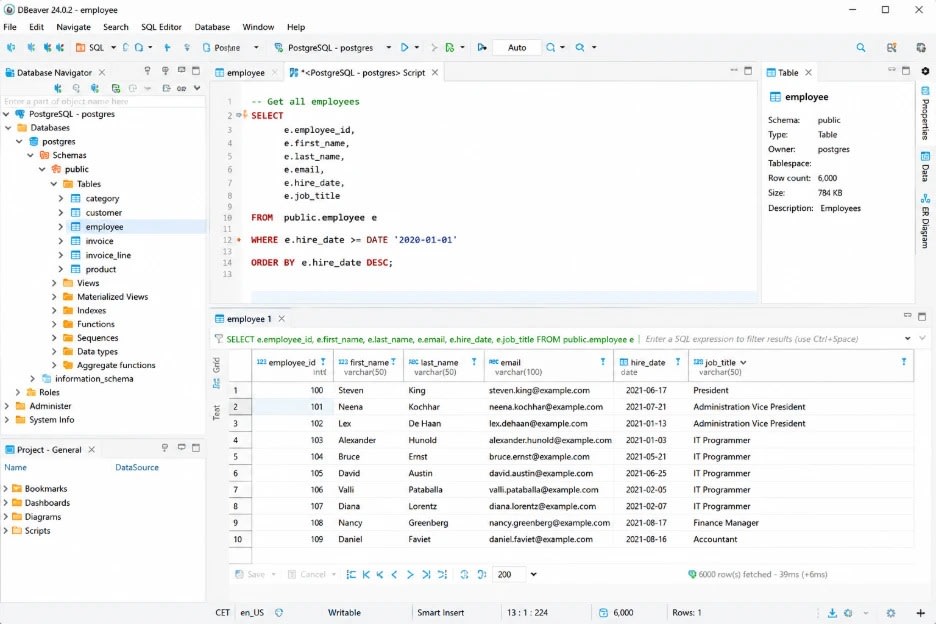
Alt text: DBeaver interface showing PostgreSQL database navigation, SQL query editor, and query results grid.
DBeaver is a widely used multi-database client built for teams managing more than one database system. The Community Edition covers SQL editing, data browsing, ER diagrams, schema navigation, and query management for free, while the commercial editions add extra administration and schema management features.
The tool is popular with developers and DBAs who want one interface for PostgreSQL, MySQL, SQL Server, Oracle, MongoDB, Redis, and other database platforms. It runs consistently across Windows, PostgreSQL GUI mac environments, and Linux, including as a PostgreSQL GUI Ubuntu client for teams working in those environments.
| Category | Details |
|---|---|
| Vendor | DBeaver Corp |
| Best for | Multi-database development and administration |
| Primary user | Developers and DBAs managing multiple database systems |
| License model | Community Edition: free/open-source; Lite, Enterprise and Ultimate: commercial |
| Deployment | Windows, macOS, and Linux |
Features
- SQL editor with autocomplete, formatting, and syntax highlighting.
- Data grid with inline editing, filtering, sorting, and export.
- ER diagrams and schema visualization.
- Support for PostgreSQL and many other database systems.
- Saved query history and script management.
- Schema compare and data transfer tools.
- PostgreSQL support for roles, partitions, policies, extensions, and foreign tables.
Pros
- Free Community Edition covers most day-to-day SQL work.
- Broad database support across multiple platforms.
- Consistent cross-platform experience.
- ER diagrams included in the free edition.
- Active open-source community and regular updates.
Cons
- Eclipse-based interfaces feel heavier than native desktop clients.
- UI can feel crowded before customization.
- Schema comparison and advanced tooling require commercial editions.
- No native PL/pgSQL-level debugging in the Community Edition.
Price
DBeaver offers Lite and Enterprise editions with monthly and annual subscriptions. Lite plans start at about $12/month, (or $113/year), while Enterprise pricing starts at about $26/month (or $255/year).
Compatibility
Supports PostgreSQL, MySQL, Oracle, SQL Server, MongoDB, Redis, Google Cloud SQL for PostgreSQL, EDB, and many other database systems.
5. TablePlus

Rating: 4.3/5 G2
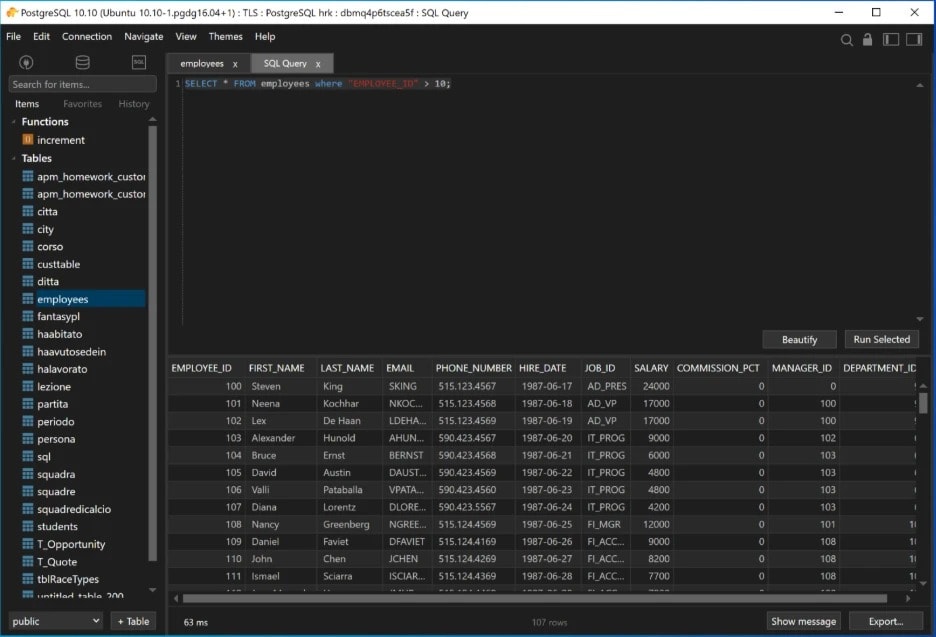
Alt text: TablePlus interface showing PostgreSQL database navigation, SQL editor, and query results.
TablePlus is a lightweight Postgres desktop client built for fast browsing, quick edits, and everyday query work. It focuses on speed and simplicity rather than deep administration or IDE-style workflows.
The tool is popular with developers who want a clean native interface without the overhead of heavier PostgreSQL desktop clients. While it started as a Mac-focused client for PostgreSQL apps, it now also supports Windows, Linux, and iOS.
| Category | Details |
|---|---|
| Vendor | TablePlus |
| Best for | Fast browsing, inline editing, and lightweight query work |
| Primary user | Individual developers and small teams |
| License model | Freemium with one-time license options |
| Deployment | macOS, Windows, Linux, and iOS |
Features
- Native desktop interface with fast startup and responsive navigation.
- Inline row editing with filtering and keyboard shortcuts.
- SQL editor with syntax highlighting and autosuggestion.
- Multiple tabs and workspace organization for database connections.
- Async query loading and streaming results.
- Native SSH support for secure connections.
- Data export to CSV, JSON, and SQL formats.
Pros
- Fast and lightweight compared to IDE-style database tools.
- Clean interface works well for browsing and quick edits.
- One-time license option available.
- Good multi-database support for daily development work.
- Consistent experience across macOS, Windows, and Linux.
Cons
- The free version limits users to 2 open tabs, 2 open windows, and 2 advanced filters at a time.
- SQL autocomplete is more limited than DataGrip or DBeaver.
- Not built for deep schema management or migration workflows.
- Limited tooling for larger DBA environments.
Price
TablePlus offers one-time licensing for individuals and teams. Pricing starts at $99/license for the Basic plan, while the Standard plan costs about $129/license with support for two devices.
Compatibility
Supports PostgreSQL, MySQL, SQL Server, SQLite, MariaDB, Redis, Amazon Redshift, Cassandra, and other database systems.
Comparison table: Best PostgreSQL GUI tools at a glance
The table below compares the five tools across the criteria that matter most for PostgreSQL selection in 2026.
| Tool | Best for | OS | Schema Compare | Free tier | Price |
|---|---|---|---|---|---|
| dbForge Studio for PostgreSQL | Full PostgreSQL development and management workflows | Windows, (Linux/macOS via CrossOver or Wine) | Yes — schema compare & sync included | Yes (Express edition) | Starts at $89.95/year |
| pgAdmin | PostgreSQL administration and server management | Windows, macOS, Linux | No | Yes (fully free/open-source) | Free |
| DataGrip | SQL-heavy development and query work | Windows, macOS, Linux | No | Yes (non-commercial version) | Starts at about $10.90/month |
| DBeaver | Multi-database development and administration | Windows, macOS, Linux | Commercial editions only | Yes (Community Edition) | Lite starts at about $12/month |
| TablePlus | Fast browsing and lightweight query work | macOS, Windows, Linux, iOS | No | Yes (limited free version) | Starts at $99/license |
How to choose the right PostgreSQL GUI client
The best Postgres client usually depends on where your team spends most of its time. Some teams live inside SQL queries all day. Others spend more time managing schemas, monitoring servers, or handling migrations across environments. The tool that works well for one workflow can feel limited in another.
SQL editing depth
If SQL work is the core of your day, pay close attention to the editor experience. Good autocomplete, query navigation, execution plan analysis, and refactoring tools start saving real time once queries and schemas get larger. This is usually the point where lightweight query tools begin to feel restrictive.
Administration and schema management
Administration-heavy workflows tend to expose different gaps. Things like role management, backups, monitoring, schema comparison, and synchronization become more important once teams start managing production environments instead of just writing queries locally.
Operating system support
Cross-platform support is easy to overlook until teams start mixing Windows, macOS, and Linux machines. Some tools stay consistent across all three, while others clearly feel more optimized for a single platform or require extra setup to work smoothly.
Performance and workflow size
Lightweight clients are great for quick edits and browsing tables, but larger environments usually need stronger tooling around schema navigation, automation, query analysis, and multi-database management. The bigger the environment gets, the more workflow depth starts to matter.
Budget and licensing
Most teams can handle everyday PostgreSQL work with free tools. The real question is whether paid tooling removes enough manual work to justify the cost. That usually becomes easier to answer once schema comparison, profiling, migration support, or broader team workflows enter the picture.
Which PostgreSQL GUI tool is best for you?
The best PostgreSQL GUI clients usually depend on the kind of work your team does most often.
- Need an all-in-one PostgreSQL workflow? → dbForge Studio for PostgreSQL
- Need a fully free PostgreSQL administration tool? → pgAdmin
- Spend most of the day writing SQL? → DataGrip
- Need one client across multiple database systems? → DBeaver
- Want a lightweight client for quick database work? → TablePlus
Final thoughts
The best Postgres client usually comes down to workflow fit. Lightweight tools are great for quick queries and local development, while larger environments tend to need stronger tooling around schema management, profiling, migrations, and administration.
Teams handling both development and PostgreSQL administration often benefit from a full Postgres database manager instead of juggling multiple clients. Teams focused mostly on SQL work may care more about editor quality and query navigation, while cross-platform or budget-conscious environments usually prioritize flexibility and licensing costs.
The easiest way to narrow the choice down is to test a few tools against the kind of work your team actually does every day.
Try the free 30-day trial to test it against your actual workflow before committing.
Comments
Loading comments…