How AI agents plan, generate, execute, and heal Playwright tests — turning a single JIRA story into fully automated, self-repairing tests and a living Angular dashboard in few minutes.
What covered In this blog
1> Project Structure
2> Project architecture
3> The 8-Step Playwright MCP Multi-Agent Automation Framework
4> Complete 8-Step Video for Playwright MCP Multi-Agent Framework
5> The Healing Guardrails
6> About The Angular Dashboard
Every QA team knows the painful cycle reading a user story, drafting a test plan, writing brittle automation scripts, chasing flaky failures, updating JIRA, and producing reports that gather digital dust.
What if an AI-powered pipeline, with humans always in the loop, handled the entire journey — from story intake to create tests, executed tests, healing, reporting, and a live dashboard? This framework does exactly that.
It combines Claude Code multi-agents, Playwright’s Model Context Protocol (MCP), and a modern Angular 21 dashboard into a seamless end-to-end system: JIRA → Test Plan → Scripts → Execute/Heal → Report → JIRA Update → Git Push → Live Dashboard.
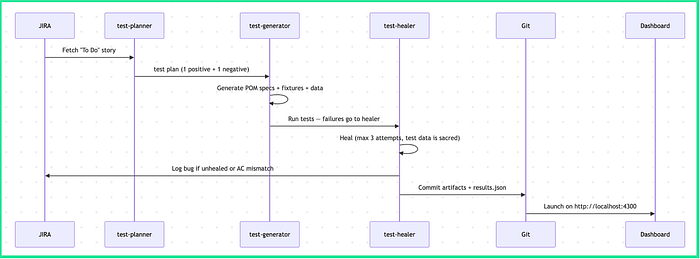
The Big Picture
The framework has two halves that meet at a single JSON file:
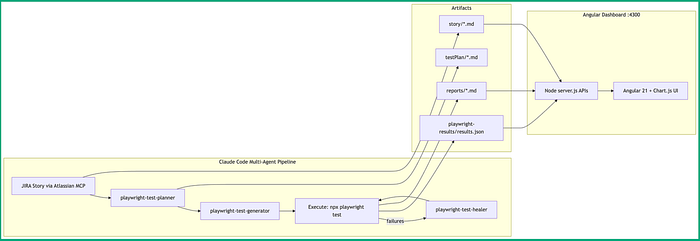
- The Playwright Agent side — three specialized AI agents (planner, generator, healer) that turn a JIRA story into executed test results.
- The Angular Dashboard side — a standalone Angular 21 app that reads
results.json, enriches it with story and report markdown, and visualizes everything with Chart.js.
What This Architecture Achieves
- End-to-end automation from a single JIRA ticket. A “To Do” Story picked up via Atlassian MCP flows automatically through planning, script generation, execution, and reporting — no manual handoff between QA planning and test coding.
- Self-healing test execution reduces maintenance overhead. The
Execute → failures → playwright-test-healer → Executeloop lets flaky/broken selectors get automatically diagnosed and fixed (up to 3 attempts) without a human re-writing scripts every time the app markup shifts. - Full traceability from requirement to result. Every stage persists its own durable artifact —
story/*.md(what was asked),testPlan/*.md(what was planned),playwright-results/results.json(what actually happened) — so anyone can audit why a test exists and what it proved, long after the run finishes. - Decoupled reporting layer via a thin API server.
Node server.js APIsexposes the filesystem artifacts (story,reports,results.json) over simple REST-style endpoints, meaning the Angular dashboard never touches the pipeline's internals directly — the two systems can evolve independently. - A live, always-current visual dashboard for stakeholders.
Angular 21 + Chart.js UIturns raw JSON/markdown into pass/fail charts and browsable reports at:4300, giving non-technical stakeholders (PMs, JIRA reviewers) a real-time view of automation health without reading test code or JSON.
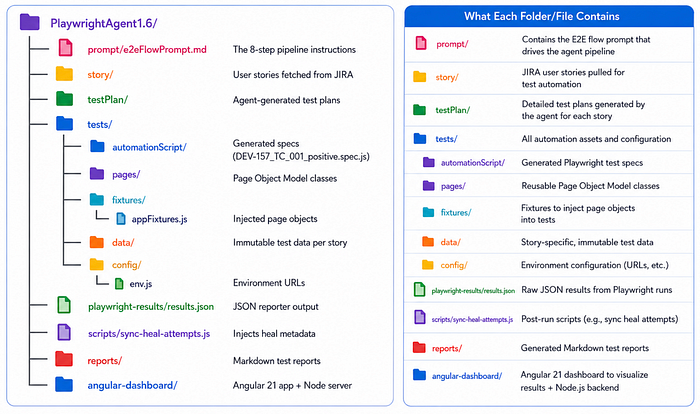
Project Structure at a Glance
Project Structure follows a well-organized project structure that automates the complete testing workflow from user story to reporting. The prompt folder stores the AI workflow instructions, while story contains user stories imported from JIRA. Based on these stories, the agent generates detailed test plans in the testPlan folder. The tests directory holds all automation assets, including Playwright test scripts, reusable Page Object Model (POM) classes, fixtures, test data, and environment configurations. During execution, Playwright produces JSON results, which are enhanced with healing metadata using custom scripts.
Finally, Markdown reports are generated and displayed through the Angular 21 Dashboard, providing an interactive view of execution status, healing attempts, and overall test results. This modular structure makes the framework scalable, maintainable, and easy to extend for enterprise-grade AI-powered test automation.
Below the project structure and each folder purpose explained
The 8-Step Playwright MCP Multi-Agent Automation Framework
Once we run the prompt which under prompt/ … folder Playwright Agent’s 8-step pipeline triggered and automates the complete testing lifecycle — from fetching JIRA user stories and generating test plans to creating Playwright scripts, executing tests, enriching results with self-healing metadata, and publishing interactive reports through an Angular 21 dashboard for end-to-end visibility.
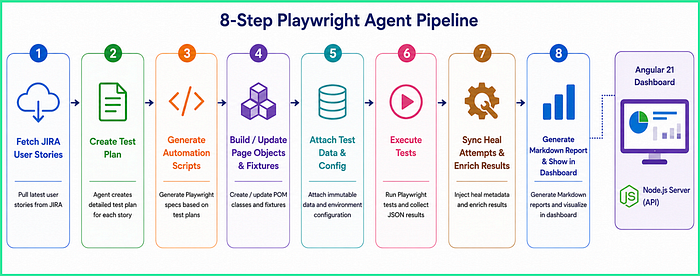
Step 1 — Read the story. The pipeline fetches a JIRA story with status “To Do” (never creating one) and saves acceptance criteria verbatim to story/userStory{ID}.md. Verbatim matters: if the AC says "Thank you for your order John Smith", the expected value keeps the name.
Step 2 — Plan. The playwright-test-planner agent derives exactly one positive and one basic negative test case — only from the acceptance criteria, never invented scenarios.
Step 3 — Generate. The playwright-test-generator agent scans existing page objects first, then writes specs that follow strict Page Object Model rules. A generated spec looks like this:
test('TC_001 - Register, login, verify Accounts Overview, and logout', async ({
  registerPage, paraBankLoginPage, accountOverviewPage,
}) => {
  const username = `${newUser.usernamePrefix}${Date.now()}`;

  await registerPage.goto();
  await registerPage.register(registrationDetails, username, newUser.password);
  await registerPage.expectRegistrationSuccess(username, messages.registrationSuccess);

  await accountOverviewPage.logout();
  await paraBankLoginPage.login(username, newUser.password);
  await accountOverviewPage.expectOnAccountsOverview(messages.accountsOverviewHeading);
  await accountOverviewPage.logout();
});
Notice what’s not there: no page.locator(), no hardcoded URLs, no inline strings. Page objects arrive through fixtures:
const test = base.test.extend({
  registerPage: async ({ page }, use) => { await use(new RegisterPage(page)); },
  accountOverviewPage: async ({ page }, use) => { await use(new AccountOverviewPage(page)); },
});
Step 4 — Execute and heal. Tests run with npx playwright test. Failures go to the playwright-test-healer agent, which may fix selectors, waits, and page-object methods — with a hard cap of three attempts. One rule is absolute: test data is sacred. If the app shows "Thank you" but the AC promised "Thank you John Smith", the healer must not edit the expected value to make the test pass. Instead, it logs a JIRA bug labeled ac-mismatch and lets the test fail. Changing test data to green-wash a build hides real product bugs.
Steps 5–8 — Report, update JIRA, push, launch. The pipeline writes a markdown report, transitions the story to “Done” with a summary comment, commits all artifacts, and finally launches the dashboard.
Video — 8-Step Playwright MCP Multi-Agent Automation Framework
Below the VIDEO for all 8 steps including creating Angular dashboard
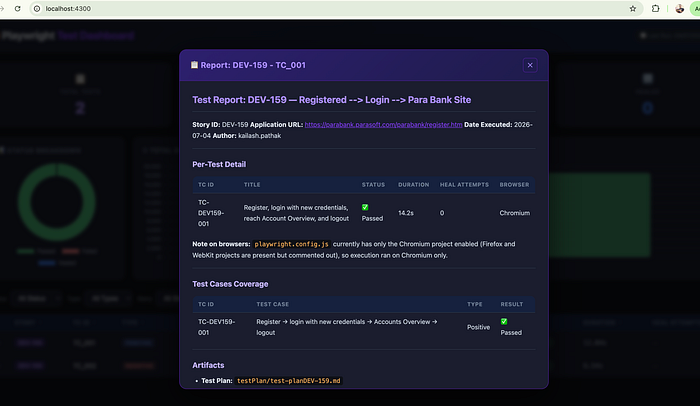
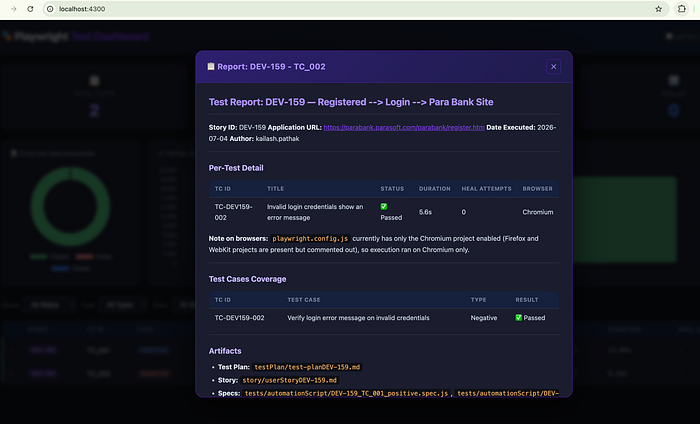
Some screenshot of Angular Dashboard
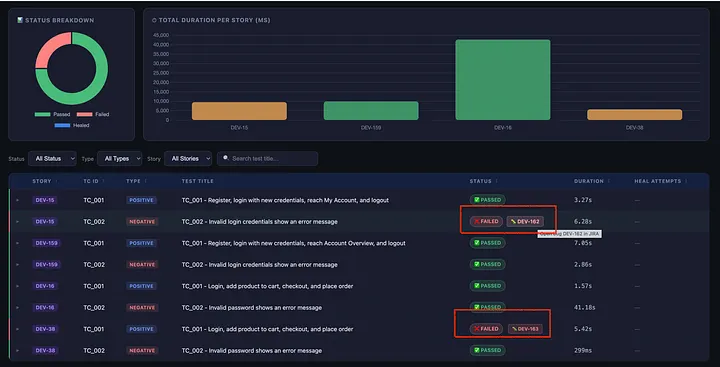
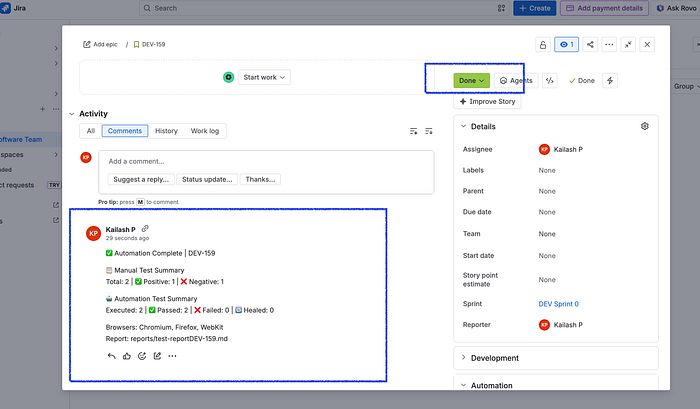
After execution test cases STATUS is update in JIRA and Angular Dashboard display the executed status of each test case. Some of the screenshot attached here.
JIRA Screenshot
Angular Dashboard Screenshot
The Healing Guardrails
These guardrails ensure the PlaywrightAgent healing process remains reliable, transparent, and trustworthy.
- Test data is immutable during healing. Never edit
tests/data/*_testData.js. This is the single most important rule — it's what stops the healer from "passing" tests by rewriting expectations, which would silently hide real product bugs. - Heal the mechanics, not the assertions. The healer may change selectors,
waitFor, navigation, andawaithandling in spec/page files — but never assertion strings or expected values. This clean split is what makes healing safe. - Hard cap of 3 heal attempts. After 3 failures, stop and mark “Could not be healed.” Prevents infinite loops and runaway agent cost/time.
- AC mismatch is unfixable — log a bug, don’t retry. If expected (from AC) ≠ actual (from app), it’s a product defect, not a flaky test. Log the JIRA bug after attempt 1, leave the test FAILED, and don’t re-run it.
- Protected file boundaries. The healer must not touch
config/env.js,testPlan/,story/, or spec names. These are the framework's source-of-truth inputs; letting healing mutate them breaks traceability and reproducibility. - Failures are recorded, not hidden. A test that can’t be healed stays FAILED in the report with a linked bug ID — the dashboard and JIRA reflect reality rather than a green-washed run.
- Never pass
--reporteron the CLI. Not "healing" per se, but essential during the execute/heal step — it breaksresults.jsongeneration, which the entire dashboard depends on. - Prefer
data-testid, fall back to role-based, then label-based, and only drop to CSS/XPath as a last resort. Combined with the rule that selectors live only in POM classes (neverpage.locator()in specs), this is the framework's locator contract.
The Angular Dashboard
The Angular 21 Dashboard is the visualization and reporting layer of the framework — it turns the raw output of the agent pipeline into a single screen a human actually wants to look at. After the agents run, execute, and heal the tests, everything they produce (results.json, the user stories, and the markdown reports) is scattered across the filesystem. The dashboard pulls it all back together.
Here’s what it does in the framework:
- Reads the pipeline output. A lightweight, dependency-free Node server (
server.json port 4300) serves the pre-built Angular app and exposes three file-backed APIs:/api/results(the Playwright JSON),/api/story/{ID}, and/api/report/{ID}. No database — the filesystem is the backend. - Enriches and correlates the data. The
ResultsServiceuses RxJSforkJointo load results, stories, and reports in parallel, then walks Playwright's nested suite tree, derives the Story ID and Test-Case ID straight from the spec filename (DEV-157_TC_001_positive.spec.js), sums retries into durations, and regex-mines the reports to link each failed test to its auto-logged JIRA bug. - Presents it through five components. Angular 21 app with five components —
summary-cards,charts,filters,test-table, andstory-modal— powered by Chart.js and ngx-markdown. Its heart isResultsService, which fans out with RxJSforkJointo load results, stories, and reports in parallel:
load(): Observable<DashboardData> {
  return this.http.get<any>('/api/results').pipe(
    switchMap(raw => {
      const parsed = this.parseResults(raw);
      // fetch story + report markdown for every story in parallel
      return forkJoin({ stories: forkJoin(storyFetches),
                        reports: forkJoin(reportFetches) });
    })
  );
}
The parser walks Playwright’s nested suite tree, extracts the story and test-case ID straight from the spec filename convention (<Story_no>_TC_001_positive.spec.js), sums retries into durations, and even regex-mines the markdown reports to link failed tests to their auto-logged JIRA bug IDs. The result: click any row and you see the exact test-case section from the report, the original user story, and the bug — all in one screen.
Conclusion
AI agents are transforming Playwright test automation by planning, generating, executing, and even healing tests from a single JIRA story within minutes. This significantly reduces repetitive effort, speeds up feedback cycles, and improves test maintenance.
However, AI is not a replacement for experienced QA engineers. Humans must always remain in the loop to validate business requirements, review AI-generated code, approve self-healing changes, and ensure critical scenarios are accurately covered.
The most effective approach combines AI’s speed and automation capabilities with human expertise, enabling teams to deliver faster releases while maintaining high quality, reliability, and confidence in their testautomation.
Comments
Loading comments…