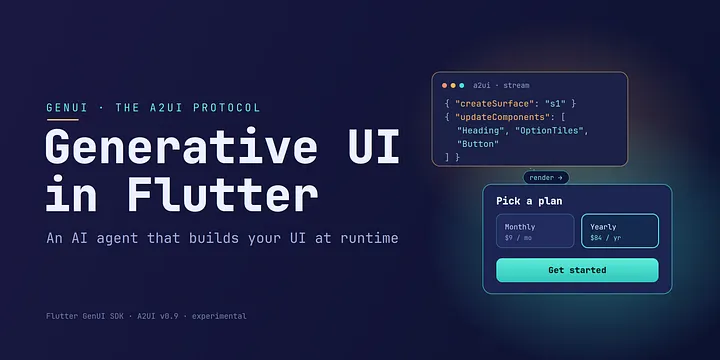
The shift: from fixed widget trees to runtime-composed UI
In a traditional Flutter app, the developer defines a widget tree at build time. Data flowing through the app can change what those widgets display, but the structure of the screen which widgets exist, how they are arranged is decided in advance and frozen in the compiled code. A button is a button forever.
Generative UI (GenUI) overturns that model. Instead of hard-coding the layout, you hand an AI agent a kit of approved UI components and a goal, and the agent composes a real Flutter interface at runtime based on what the user is actually trying to accomplish. The screen can be assembled on the fly no predefined layout, no app-store update required.
This was the headline architectural story of the Flutter 3.44 release cycle, spotlighted at Google I/O 2026 in a session titled “Flutter + A2UI = GenUI” and widely described as the most architecturally significant Flutter announcement of the year.
What GenUI and A2UI actually are
Two distinct things work together here, and it helps to keep them separate.
The GenUI SDK for Flutter is a suite of packages (the core one is genui) that lets a large language model Gemini, or any other LLM generate dynamic, personalized UI inside your app while still respecting your brand and design system. It is currently in alpha and explicitly experimental.
A2UI (“Agent-to-UI”) is the protocol underneath it: a declarative UI protocol for agent-driven interfaces. In plain terms, it is an open, JSON-based serialization format for UI that an LLM produces. It was built in collaboration with Google’s A2A (Agent-to-Agent) team and the Opal team at Google Labs, and is open (or soon to be fully open source) so that any framework and any agent, whether Gemini, Claude, GPT-class models, or a local model can speak it. Flutter’s GenUI SDK currently targets A2UI version 0.9.
The cleanest mental model for A2UI is a screen recipe. The agent doesn’t draw the screen; it describes one. A message might say: create a surface, place an image-option-tiles component on it, bind the selected value to a particular data path, and render it using the app’s own widgets. The app then builds that recipe with native Flutter widgets.
The single most important point to internalize: the LLM never emits Dart code. It emits structured JSON messages that reference components from a catalog the developer defined ahead of time. The client receives those messages, validates them, and maps them onto native widgets. The AI describes intent; the app renders it.
The problem it solves
There are two problems, really.
The obvious one is experience. Agents and chatbots tend to answer with a “wall of text.” GenUI replaces that with interactive graphical UI a row of labeled buttons, a date picker, a comparison view — so the user can manipulate data and controls directly instead of reading a paragraph and typing a reply. This raises the interaction bandwidth and makes tasks faster to complete.
The subtler one is maintenance. If you build your own pipeline to turn LLM output into UI, you end up owning your own schemas, your own streaming parser, your own event format, and your own error-repair loop — a bespoke framework with, as one engineer put it, an audience of one. A shared protocol changes the economics: A2UI is a contract that the model, the transport layer, and the UI all agree on, so the bug-prone middle of the system (buffering partial messages, managing surface lifecycle, wiring two-way data binding) is written once and hardened by every app that adopts it, rather than reinvented in each project.
How it works: the architecture
GenUI is essentially an orchestration layer coordinating the flow of information between the user, your widgets, and the agent. The main pieces are:
- Catalog the vocabulary of widgets the agent is allowed to use. Each catalog item has three things: a name, a data schema describing the data that widget expects, and a builder function that turns that data into a real Flutter widget. The catalog is the safety boundary: the agent can only compose from what you put in it.
- ContentGenerator: the abstraction over your chosen AI provider. Critically, your app depends on GenUI, and GenUI depends on the ContentGenerator: your UI code never depends directly on the AI SDK.
- Transport / A2uiTransportAdapter: parses the raw text streaming out of the LLM into structured A2UI messages.
- SurfaceController (a.k.a. GenUiManager) the runtime engine that applies incoming A2UI messages, manages the lifecycle of UI surfaces, and updates the data model.
- DataModel: the centralized, client-side state that the generated UI binds to.
- Surface / GenUiSurface the widgets that actually render the agent-generated content and rebuild reactively when their bound data changes.
- Conversation / GenUiConversation the high-level facade that wires everything together and manages the back-and-forth loop with the agent.
The A2UI messages themselves are a small set of instructions — the “verbs” of the protocol — such as create a surface, update components, update the data model, and delete a surface, along with streaming signals like begin-rendering.
The interaction loop: what makes it “generative” rather than just “dynamic”
The flow looks like this:
- The user provides a prompt and the app calls the conversation to send the request.
- The conversation invokes the LLM through the content generator.
- The LLM streams back A2UI messages (JSON, not code).
- The transport adapter parses the chunks; the surface controller updates the data model and the surfaces.
- The relevant Surface widgets rebuild automatically.
- The user interacts taps a tile, types text, picks a date.
- When appropriate, the resulting state is sent back to the agent as context for its next turn, which may refine or extend the UI.
One nuance is worth emphasizing because it surprises people: tapping a component does not automatically call the model again. The tap updates the local data model, and anything subscribed to that data path updates immediately and cheaply. The model is only re-engaged when the app decides to send new state back for the next turn. That round trip of UI state flowing back into the model is precisely what makes the system generative rather than merely dynamic.
The key principle: the agent decides what, the app controls how
This is the design idea that keeps the whole thing from becoming fragile. The agent operates strictly inside the catalog boundary. It decides which components to show and how to arrange them. The application decides how those components are actually rendered, and it retains ownership of layout rules, validation, and side effects.
Because state is centralized, rendering stays under the app’s control, events are explicit, and updates are incremental, the AI is never in a position to break Flutter’s rules. What makes GenUI powerful is not simply that it uses AI plenty of tools do but that the AI is confined to a structured, predictable boundary.
Why Flutter is a natural fit
Flutter aligns unusually well with this model. The framework is already built from composable widgets, each with a defined contract, which maps almost one-to-one onto the notion of catalog components turning an existing widget into a reusable building block is a natural extension of how Flutter already works. Flutter’s declarative rendering also provides strong guarantees that dynamically generated layouts will render safely without corrupting structure or behavior. And mature state management (Riverpod and similar) lets generated widgets bind to live application data while the app keeps control over data integrity.
There is a tradeoff to name honestly: unlike web-based systems, Flutter does not use CSS, so the amount of runtime styling flexibility is more limited than on the web.
What you can build with it
Concrete examples make the idea click:
- An AI shopping assistant that composes product cards, a price filter, a comparison view, and a checkout summary on demand, all from one catalog.
- A self-reconfiguring dashboard. Ask for “Project Overview” and the agent assembles metric cards, progress charts, and key insights; ask for “Risk View” and the same catalog reconfigures into risk heatmaps, blocker boards, and action items.
- A personalized content generator: for instance a card maker that builds the actual interactive UI rather than just returning text.
- An image-assisted language-learning flow, where the practice screen is composed at runtime.
- Runtime localization. Because the visible text can come from the model, it can return labels in the user’s own language instead of relying on a fixed set of pre-translated strings while the app still controls the widgets, layout, and validation.
- Google’s own Gemini app ships an experimental visual-layout feature built on Flutter generative UI.
How to get started
- Requirements: the current stable Flutter SDK (Dart 3.9+, which shipped with Flutter 3.35); the GenUI packages require Flutter 3.35.7 or newer. For Firebase-based setups you also need a Firebase project with Firebase AI Logic enabled, and the Blaze plan is recommended for more generous token limits.
- Add the packages: the core
genuipackage, plus an integration package such asgenui_a2ui(orgenui_a2a) when connecting to an A2A server. - Choose a content generator. The common options are: the Google Gemini API for experimentation and local testing; Firebase AI Logic for production apps that talk to the LLM entirely from the client without a server (Firebase also manages your API key securely); an A2UI/A2A server for client/server architectures where the agent runs remotely; or a custom adapter you build yourself.
- Wire it up: define your catalog of allowed widgets, create a surface controller and a transport adapter, pass them into a conversation, and render the output with Surface widgets.
- The official repository ships sample apps and markdown “skill” files that teach coding agents how to use the APIs, which is a fast way to scaffold a first project.
Status and caveats
GenUI is experimental and in alpha the API is expected to change, sometimes drastically. A2UI sits at version 0.9 and is still evolving. The protocol is transport-agnostic, meaning the JSON messages can travel over A2A, AG-UI, plain WebSockets, server-sent events, or a homemade channel. The honest framing for late 2026: this is a technology to prototype and experiment with today, not one to build a frozen production surface on without expecting churn.
Quick context from Google I/O 2026
The ecosystem backdrop helps explain why this shift is being taken seriously. At I/O 2026 the Flutter team reported that pub.dev had passed 1.3 billion package downloads in a single 30-day window, that the active monthly developer count had grown roughly 50% year over year, and that Flutter had become the second most popular mobile development SDK on both the App Store and Google Play. Against that growth, GenUI and A2UI were positioned not as a side experiment but as the direction the framework is heading: from a UI toolkit toward a layer for building intelligent, agent-driven products.
Comments
Loading comments…