A support agent at an online retailer might export recent orders from the help desk to investigate a disputed charge. In this example, the file lands in the Downloads folder of a work laptop. The ticket closes, but the file stays.
Your privacy policy describes how the business collects and uses personal information. It doesn't inventory that laptop, confirm its operating system is current, or check whether its disk is encrypted. Those device checks belong in your customer-data protection practices.
Endpoint management is the IT discipline that keeps work devices known, updated, and configured. For a privacy or compliance lead, it matters because customer information doesn't always stay inside the central application.
The FTC's guide for businesses on protecting personal information says no inventory is complete until you've checked everywhere sensitive data might be stored, including laptops and mobile devices.
Key takeaways
- Know which devices can reach customer information. Pair your data map with a device list to identify places to check for copies.
- Verify security controls. Confirm that updates, access limits, multi-factor authentication, and encryption are in place.
- Retain evidence and keep privacy workflows separate. Patch records support a review; deletion requests and retention decisions need their own processes.
Where endpoint management fits in customer data protection
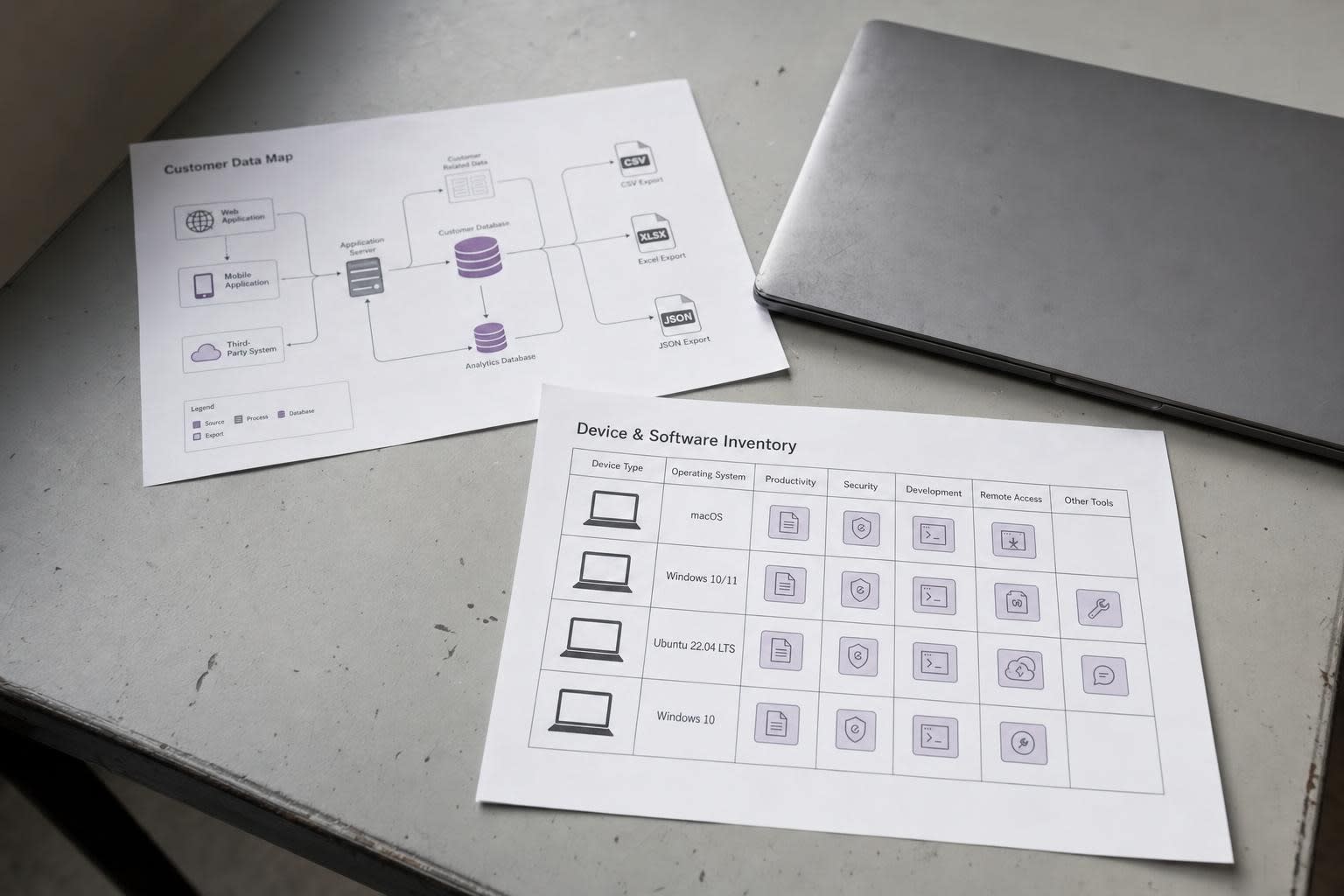
An endpoint is a work device that stores or accesses customer information. This can include laptops, desktops, and phones or tablets used for support or fulfillment.
Products vary in the devices they manage, and some cover computers but not phones, so use this definition to set the scope of your inventory. The same scoping problem applies to AI tools, since staff can reach outside services from personal devices that sit beyond corporate monitoring, a gap explored in this guide to enterprise Gen AI security.
Endpoint management covers identifying devices, keeping their software current, deploying approved applications, and fixing problems remotely.
Vendor pages in this category typically describe patching, software deployment, and remote troubleshooting.
Related security functions have separate jobs: endpoint threat detection watches for malicious behavior, identity management controls who can log in, and backups restore data after loss. These functions complement device management rather than replace it.
Connect the data and device inventories. A customer-data inventory records what personal information the business holds and where it originates. A device and software inventory identifies machines that could hold a copy. Privacy teams often build the data side with data mapping tools, while IT maintains the device list.
Together, they help you decide where to check for exports. In the support-agent example, the help desk belongs on the data map and the laptop belongs on the device list. Further checking is needed to establish which files were saved.
Keep privacy responsibilities in scope. Consumer rights, collection decisions, retention schedules, and vendor oversight need their own processes. California's CCPA, for instance, gives consumers a right to request deletion of their personal information, subject to exceptions. Patching a laptop doesn't fulfill that request.
The Delaware Department of Justice's business guidance on the state's Personal Data Privacy Act says businesses must have reasonable security measures that keep external and unauthorized internal individuals from accessing personal data, but whether the law applies to your company requires a separate legal assessment.
Endpoint controls can support security obligations and evidence gathering without establishing complete legal compliance or eliminating breach risk.
Turn device risks into repeatable security controls
The checklist below is a practical recommendation drawn from public guidance, not a statutory list. Confirm which safeguards your chosen product and plan can manage, which need another system, and how staff will verify each one.
Assign an owner to each device. List every device that handles customer information and record who is responsible for it. Include employee laptops and other possible storage locations beyond central servers.
Verify updates. NIST's guide to enterprise patch management frames patching as preventive maintenance that helps prevent compromises, data breaches, and operational disruptions.
Verizon's 2026 Data Breach Investigations Report, covering incidents from November 2024 through October 2025, found that exploitation of software vulnerabilities accounted for 31% of breaches, overtaking credential abuse as the leading way in.
That figure covers many kinds of systems, not only employee devices, and doesn't measure any endpoint product's effectiveness. It does support making timely software updates a security priority.
Limit access by business need. The FTC's Start with Security guidance advises restricting access to sensitive data to employees with a legitimate business need.
Application and identity-system controls enforce those permissions; the device inventory helps identify the machines employees use to reach the data.
Check MFA and encryption. The FTC's small-business cybersecurity guidance recommends requiring multi-factor authentication to access sensitive information and encrypting devices and media that hold sensitive personal information, including laptops, tablets, and smartphones.
Treat these as complementary safeguards and confirm how each is configured and checked, since an endpoint-management tool may not enforce them.
Enable device locks. The FTC's consumer guidance on phone security recommends setting phones to lock when not in use and protecting them with a passcode of at least six digits. Include this check for any phone used for customer support.
A staged patch process starts by identifying affected devices and prioritizing them by risk, including their access to customer information.
Test the change, deploy it, and confirm the result. NIST acknowledges that patching immediately isn't always realistic, so choose a testing approach that balances the risk of disruption against the risk of leaving a known flaw open. Record failed updates and assign follow-up work.
When evaluating automated endpoint patching, tools such as PDQ cover patching, software deployment, and remote troubleshooting for Windows and macOS desktops and laptops.
Its documentation notes that the macOS agent doesn't support iPhones or iPads, and that macOS operating-system updates aren't managed through the platform, while vulnerable third-party Mac applications can be patched where a package is available.
Map those boundaries against your device list before deciding which machines the tool will cover, and confirm which features your selected plan includes.
Use endpoint records to support compliance reviews
An internal auditor, a customer completing a security questionnaire, or a regulator may need to see what changed, when, on which devices, and how exceptions were handled. Keeping those records is a separate task from performing the security work.
Many endpoint tools keep a deployment history showing what was deployed, when, and to which machines, and some add an audit log of administrative actions.
This visibility can help IT document update activity for a review. Deployment records are only one part of the evidence; the table below is a suggested recordkeeping template, not a list of artifacts any single tool produces.
| Control | Evidence to retain | Evidence owner |
|---|---|---|
| Device inventory | Dated device list with an assigned owner for each machine | IT |
| Patching | Deployment results plus follow-up notes on failed installs | IT |
| Access | Periodic access-review record for the customer-data application | System owner |
| Encryption | Configuration-status evidence per device | IT |
Keep technical and privacy records together. For a deletion request under the CCPA, retain the request, verification steps, and the deletion outcome or exception applied.
Access-review records can help document measures against unauthorized internal access, which Delaware's guidance specifically calls out. Patch logs address a different control, so keep each record tied to the responsibility it supports.
Check California's applicability and deadlines. The California Privacy Protection Agency's regulations covering cybersecurity audits, risk assessments, and automated decisionmaking technology took effect January 1, 2026, with phased compliance dates.
Automated decisionmaking requirements apply from January 1, 2027, the first risk-assessment attestations are due April 1, 2028, and cybersecurity audit certifications are staggered from April 1, 2028 to April 1, 2030 based on a business's revenue.
These obligations apply only to businesses that meet specific criteria, so ask counsel whether they cover your company. Where they do, inventory and patch records can contribute to the review alongside other required evidence.
Build a manageable device-protection routine
Use the following sequence as a starting point and adjust it to your business's risks and responsibilities.
- Assign an accountable owner for device protection, usually in IT, with a named privacy counterpart.
- Identify every device that handles customer information, following the FTC's advice to check all possible storage locations.
- Address the highest-risk gaps first, including devices missing updates for known exploited flaws and accounts with access beyond business need.
- Verify each change using the relevant records, and log failures with an owner and next step.
- Schedule a recurring review at an interval your team can sustain.
For that review, consider tracking managed-device coverage, overdue high-priority updates, and failed deployments awaiting follow-up.
Define coverage as devices enrolled in management divided by all in-scope devices. Count updates as overdue against your own risk-based targets.
For failed deployments, track installs that haven't completed and have no recorded next action. Agree on the scope and definitions before setting targets.
When IT shortlists tools, a privacy lead can help check operating-system coverage, management of remote devices without office-network or VPN access, and whether a non-technical reviewer can understand the reports.
Also confirm whether cloud-managed or on-premises deployment fits the business, and which identity, automation, and ticketing integrations the selected plan includes. Check how each connection is configured and what records it produces.
To begin, trace one customer-data access path from the application to the devices that receive exports. Ask IT for evidence of the controls along that path, then assign an owner and next action for any missing checks or records.
Comments
Loading comments…