
How to measure per-tool MCP token cost, cut the MCP menu tax, and enforce a hard budget on any MCP server — with under 2% added latency.
TL;DR: How to measure per-tool MCP token cost, cut MCP "menu tax," and enforce a hard budget on any MCP server — with under 2% added latency.
A while back I added Bright Data’s MCP to Claude Code, asked it to fetch a docs page, and watched it crash and burn spectacularly:
Error: MCP tool “scrape_as_markdown” response (278649 tokens) exceeds maximum allowed tokens (25000). Please use pagination, filtering, or limit parameters to reduce the response size.
278k tokens consumed before the LLM itself had read a single line, formed a thought, or done any of the work I actually asked for. That’s more than most LLMs’ context windows! Claude Code actually rejects everything above 25k tokens (configurable via MAX_MCP_OUTPUT_TOKENS), but some other clients have no explicit cap at all — they just let the context fill until quality degrades (which is arguably worse.)
So let’s actually fix this. I’ll show you how to count which MCP server is costing you how many tokens, then some zero-effort fixes, and finally, a tiny client-agnostic proxy you can put in front of any MCP server to enforce a hard token budget — shrink the MCP payload before your LLM sees it.
Why Are MCP Responses So Large?
MCP responses are large because servers optimize for fidelity, not frugality — they return full pages, files, or JSON blobs because they cannot know which slice you need. A second cost, the tools/list “menu tax,” injects every mounted tool’s schema into context each turn.
💡 MCP servers are essentially APIs for LLMs, but the response still has to fit in a buffer with a hard size limit (the context window). Our token-budgeting proxy sits between those two worlds as an impedance-matcher — forwarding calls upstream and trimming responses before they reach the model.
This compounds across three dimensions:
- The payload itself. A single result can be enormous regardless of domain. Bright Data MCP’s
scrape_as_markdownon a long wiki page or API doc can hit 100k–150k+ tokens, GitHub MCP'sget_file_contents/get_pull_request_diffreturn a whole file or diff, and Playwright MCP'sbrowser_snapshotdumps the entire accessibility tree. - The number of results. Calls that enumerate a collection multiply per-item cost with no ceiling — e.g. GitHub’s
search_codeorlist_*endpoints returning 100 hydrated items per page. - The
**tools/list**overhead — Most people don’t know that using MCP, every tool’s schema from every connected server gets injected into context before a single tool runs — this “menu tax” varies wildly by server.
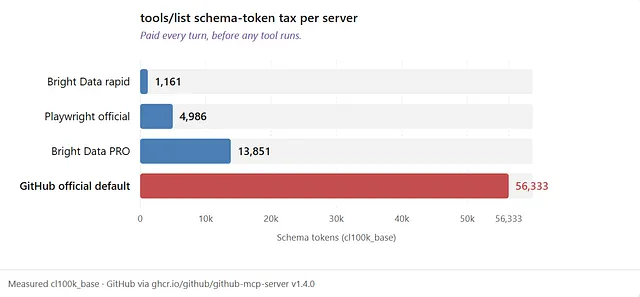
The official Github MCP is particularly bad at this - its schema tax is nearly 3x the size of an actual tool response.
What Do Large MCP Responses Actually Cost You?
They cost you twice: in dollars per API call and in context window capacity, before the LLM even sees any of the data.
To put this in perspective, here are my results from the Bright Data MCP’s scrape_as_markdown tool fetching different pages, converted from tokens to dollar cost (assuming Sonnet pricing):
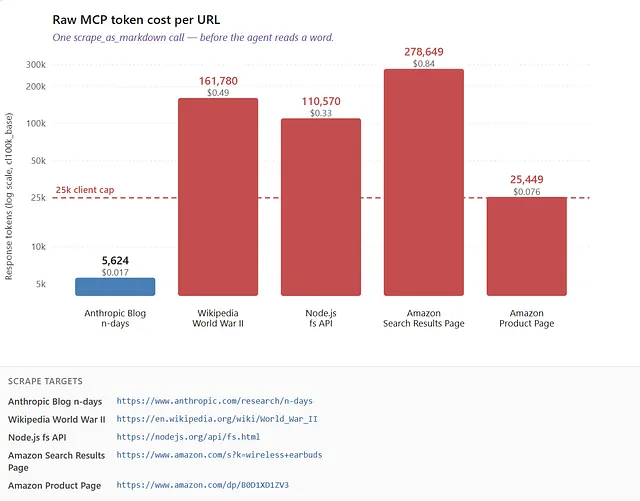
Notice the color split. Blue (the blog post) is the only bar under the Claude Code 25k cap. Everything else — even the “small” product page fetch — is already over budget.
How To Measure MCP Token Cost
Measure MCP token cost with a harness that calls tools/list and one representative tool per server, then counts tokens with tiktoken (cl100k_base). Run it per server to see both the per-turn schema tax and per-call payload size — the two separate sinks that drive total MCP cost.
measure.py
# Measures 1) tools/list schema tax
# and 2) token count of one representative call per server
import asyncio, json, os
import tiktoken
from mcp import ClientSession, StdioServerParameters, types
from mcp.client.stdio import stdio_client

ENC = tiktoken.get_encoding("cl100k_base")  # close enough for budgeting

def ntokens(text: str) -> int:
    return len(ENC.encode(text))

def all_text(res: types.CallToolResult) -> str:
    """Count every text block — TextContent and EmbeddedResource (GitHub file reads)."""
    parts = []
    for c in res.content:
        if isinstance(c, types.TextContent):
            parts.append(c.text or "")
        elif isinstance(c, types.EmbeddedResource):
            t = getattr(c.resource, "text", None)
            if t:
                parts.append(t)
    return "".join(parts)

AMAZON_SERP = "https://www.amazon.com/s?k=wireless+earbuds"

SERVERS = [
    # Add your own here
    ("Bright Data rapid", StdioServerParameters(
        command="npx", args=["-y", "@brightdata/mcp"],
        env={**os.environ, "API_TOKEN": "<your-bright-data-token>"},
    )),
    ("Bright Data PRO", StdioServerParameters(
        command="npx", args=["-y", "@brightdata/mcp"],
        env={**os.environ, "API_TOKEN": "<your-bright-data-token>", "PRO_MODE": "true"},
    )),
    ("Playwright", StdioServerParameters(
        command="npx", args=["-y", "@playwright/mcp@latest"],
    )),
    ("GitHub official", StdioServerParameters(
        command="docker",
        args=["run", "-i", "--rm", "-e", "GITHUB_PERSONAL_ACCESS_TOKEN",
              "ghcr.io/github/github-mcp-server"],
        env={**os.environ, "GITHUB_PERSONAL_ACCESS_TOKEN": "<your-github-token>"},
    )),
]

PROBES = {
    "Bright Data rapid": ("scrape_as_markdown", {"url": AMAZON_SERP}),
    "Bright Data PRO":   ("scrape_as_markdown", {"url": AMAZON_SERP}),
    "GitHub official":   ("get_file_contents", {
        "owner": "modelcontextprotocol", "repo": "python-sdk", "path": "README.md",
    }),
}

async def measure(label: str, server: StdioServerParameters):
    async with stdio_client(server) as (read, write):
        async with ClientSession(read, write) as session:
            await session.initialize()

            # 1) How much does tools/list alone cost?
            tools = await session.list_tools()
            schema_tokens = ntokens(json.dumps([t.model_dump() for t in tools.tools]))
            print(f"tools/list ({label}): {len(tools.tools)} tools, {schema_tokens:,} tokens")

            # 2) How much does one real call cost?
            if label == "Playwright":
                await session.call_tool(
                    "browser_navigate",
                    arguments={"url": "https://en.wikipedia.org/wiki/World_War_II"},
                )
                tool, args = "browser_snapshot", {}
            else:
                tool, args = PROBES[label]
            res = await session.call_tool(tool, arguments=args)
            body = all_text(res)
            tag = "error message" if res.isError else "response"
            print(f"{tool} ({label}): {ntokens(body):,} tokens in {tag}")
            print()

async def main():
    for label, server in SERVERS:
        await measure(label, server)

asyncio.run(main())
To follow along, the Bright Data MCP needs you to sign up here and get your API_TOKEN from the Control Panel set as an env var. Run the server with npx -y @brightdata/mcp. Do NOT setPRO_MODE=true for now. That adds browser tools backed by their remote Scraping Browser, which can dump snapshots just as fat as Playwright.
GitHub needs your GITHUB_PERSONAL_ACCESS_TOKEN from Settings → Tokens, and also Docker. Playwright needs nothing extra.
Run the harness with:
pip install mcp tiktoken
python measure.py
Output of running this against all four MCP servers I had:
tools/list (Bright Data rapid): 5 tools, 1,161 tokens
scrape_as_markdown (Bright Data rapid): 278,649 tokens in response   # Amazon SERP

tools/list (Bright Data PRO):   74 tools, 13,851 tokens
scrape_as_markdown (Bright Data PRO): 278,649 tokens in response   # same, only adds tool cost

tools/list (Playwright):        23 tools, 4,986 tokens
browser_snapshot (Playwright):  293,164 tokens in response            # Wikipedia WWII

# this one is hilarious, the schema cost is ~3X more than the actual tool call.
tools/list (GitHub official):   43 tools, 56,333 tokens
get_file_contents (GitHub official): 19,406 tokens in response      # python-sdk/README.md
The tools/list cost is the one that absolutely horrified me — this schema or “menu” tax is something you pay every turn, on every conversation, forever — and with the GitHub MCP it is almost 3X the size of an actual response from a tool call!
Four Ways To Reduce MCP Response Size
First, understand that there are two different token sinks. Every turn you pay twice:
- Once for the
tools/listschema "menu" tax (the description of every tool, injected before anything runs), and - Once for the response payload each tool call returns.
You can reduce these using four approaches: (1) mount fewer tools to cut the tools/list schema tax, (2) use native server limiting parameters, (3) deploy a token-budgeting proxy for the response payload, and (4) spill oversized response payloads to disk. So methods 1–2 target schema overhead; methods 3–4 target response payloads.
Method #1: Stop Loading Tools You Don’t Use
The only surefire way to cut the per-turn cost of announcing tools to the LLM is to shorten the menu — unmount servers you don’t need, hide individual tools in your client config, or enable lean tool modes on the server itself.
(a) Don’t mount that server in the first place. If a task never touches GitHub, leave the Github MCP disabled i.e. out of your client’s config entirely. A server that isn’t connected can’t put anything in tools/list and can't incur the token cost.
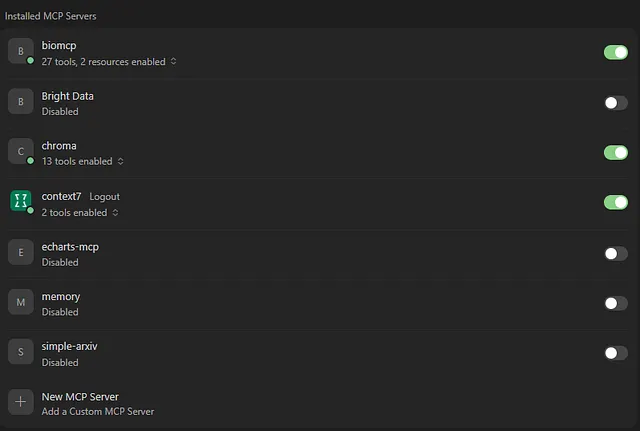
All MCP clients let you do this in the UI, but modifying the JSON config works too.
(b) Hide extraneous tools on a server you do mount. Most clients let you pick and choose individual tools within enabled servers (Cursor does this in the UI, Claude Code has permission deny rules like mcp__github__*; and others have allowedTools / excludeTools). Tools denied in such a fine-grained way leave context entirely; they’re not simply blocked at call time.
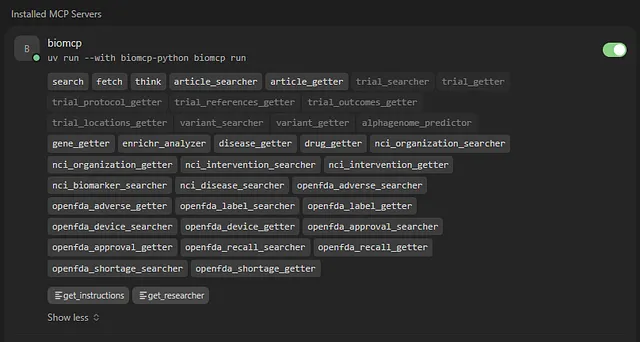
Fine grained control over an MCP server’s tools in Cursor. A dimmed tool means it was hidden.
(c) Let the server trim itself. Rare, but some MCP servers use a lean selection of tools by default while letting you opt-in to more if you need them. For example, Bright Data defaults to 5 tools / 1,161 tokens and only exposes its full catalog at PRO_MODE=true (74 tools / 13,851). GitHub's --toolsets/--tools and Playwright's --caps options do the same thing.
Basically, shorten the “menu” to what the agent actually needs for your use-case.
Method #2: Ask For a Smaller Response, Natively.
Check whether the server already lets you ask for a smaller response payload — it’s strictly better to limit at the source than to download 300k tokens and throw most away.
This “asking for less” can take different forms. Some MCP servers let you paginate (max_results, per_page), ask for fewer fields (fields=[...]), or adjust format/verbosity (format: "compact").
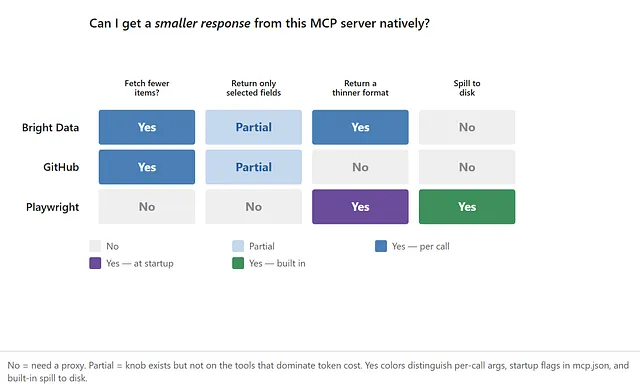
Can you get a smaller response from this server natively? Three popular MCP servers compared. “Spill to disk” only counts native methods here.
The catch is that most MCP servers have no such setting, and per-call params depend on the model setting them every time; server authors are wary of open-ended field selection because models hallucinate field names, preferring to enforce a sane default.
When native limits are missing or unreliable, you need a token-budgeting proxy that enforces a hard ceiling on every response regardless of what the model requests.
Method #3: Build a Token-Budgeting Proxy
A token-budgeting proxy is a thin MCP server you write that sits between your client and the real server, forwards every call upstream, and post-processes each response down to a hard token budget (e.g. 8,000 tokens) before the model sees it — using strip, JSON projection, or disk spill depending on payload shape.
The agent talks to this proxy. Your proxy talks to the actual MCP server. Neither one knows the difference.
┌──────────┐   stdio    ┌────────────────┐   stdio    ┌───────────────────┐
│  Client  │ ─────────► │  budget-proxy  │ ─────────► │ Bright Data MCP   │
│ (Claude) │ ◄───────── │  (your code)   │ ◄───────── │ (@brightdata/mcp) │
└──────────┘  trimmed   └────────────────┘   raw      └───────────────────┘
              ≤ budget                     300k tokens
I’ll walk you through it. We’ll use FastMCP for the server half and the official Python MCP client SDK (again) for the upstream half.
The examples below spawn an MCP server locally over stdio, so swap
stdio_clientforstreamablehttp_client_if your upstream is a remote HTTP MCP server instead.
This proxy isn’t a compressor that magically shrinks any response. It’s a circuit breaker with shape-aware routing. Its job is to guarantee the client never chokes on an oversized payload, and it does so by sending each response down the least destructive path for its shape — projecting JSON, stripping noise from prose, and spilling to disk whatever is still too big to return inline.
When a payload spills beyond a token budget you set (I picked 8k) the model still receives a preview plus a file handle, and can grep or read the rest on demand — pretty much any LLM these days is smart enough to do this.
We’ll build the router up in stages. Start with the path every prose/text payload takes — two passes that already cover most of the work.
Step 1: Strip Known Garbage + Spill To Disk If Needed
First, we’ll strip the obvious noise — tracking URLs, base64 inlined images, etc. Then, if the result is still over budget, we’ll write the full payload to disk and return a preview, and a file path.
Full code for compact.py here: https://gist.github.com/sixthextinction/7ba52d1cc9f8f7b0b688de129c26a2c9Full code for spill.py here: https://gist.github.com/sixthextinction/b5e322f7ca9b97d7b0a6c1dc8a272baf
# compact.py + spill.py
# strip noise, then spill to disk if still over budget
import re
import tiktoken
import pathlib

ENC = tiktoken.get_encoding("cl100k_base")

def ntokens(s: str) -> int:
    return len(ENC.encode(s))

# Pass 1: strip the obvious garbage. On e-commerce scrapes, long tracking-param
# URLs in markdown link parens are often the biggest win.
_DATA_URI = re.compile(r"!\[[^\]]*\]\(data:image/[^)]+\)")
_LONG_URL = re.compile(r"\(https?://[^)]{200,}\)")

def strip_noise(text: str) -> str:
    text = _DATA_URI.sub("[image removed]", text)
    text = _LONG_URL.sub("(url removed)", text)
    text = re.sub(r"\n{3,}", "\n\n", text)
    return text.strip()

# Pass 2: if still over budget, spill full text to disk; preview fills inline budget.
def prose_spill_or_pass(text, tool, arguments, budget, spill_dir):
    cleaned = strip_noise(text)
    if ntokens(cleaned) <= budget:
        return cleaned, "pass_through", None
    path = write_spill(spill_dir, tool, arguments, cleaned)
    header = f"[budget-proxy] Full result ({ntokens(text):,} tokens) saved to:\n  {path}\n\nPreview:\n\n"
    footer = "\n\nUse grep or a file-reading tool to pull specific sections on demand."
    preview_budget = budget - ntokens(header) - ntokens(footer)
    preview = truncate_to_budget(cleaned, preview_budget)[0]
    body = header + preview + footer  # total ≤ budget
    return body, "spill", path
Here’s what this actually did across a spread of real URLs, budget set to 8k:
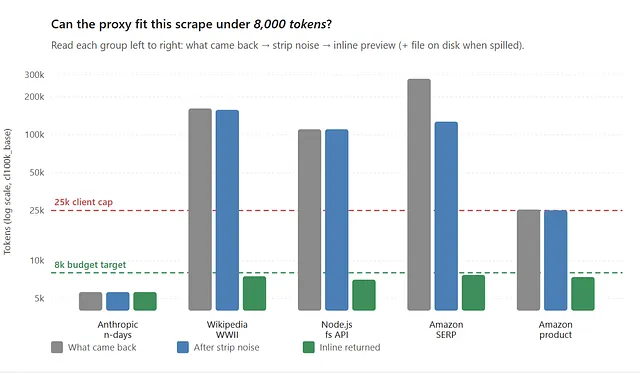
Green bar = yes, it fits the 8k inline budget. Dashed green line is the budget target. Dashed red line is Claude Code’s 25k MCP cap.
So the two passes divide labor, essentially. The**strip_noise** deletes genuine garbage, and spill offloads the bulk without losing a byte. When a payload spills, the inline response fills the budget — header plus as much preview as fits, not a token teaser — while the complete payload waits on disk for the moment a grep or a deeper read needs it.
A nice little bonus of this strategy is that re-running the same call is free — because spill.py keys files by {tool, arguments} hash.
💡 The mature servers are starting to ship this too. Playwright MCP has exactly this pattern as a native flag:
--output-mode filewrites snapshots, console messages, and network logs to disk (in--output-dir, with--output-max-sizeevicting old files) instead of streaming them into context.
Before going further, wire the code above into a small router.
budget.py
from dataclasses import dataclass
import pathlib

from lib.compact import strip_noise
from lib.spill import prose_spill_inline
from lib.tokens import ntokens


@dataclass
class BudgetResult:
    text: str
    strategy: str  # pass_through | spill


def budget_text(text, tool, arguments, budget, spill_dir):
    if not text.strip():
        return BudgetResult(text="", strategy="pass_through")
    cleaned = strip_noise(text)
    if ntokens(cleaned) <= budget:
        return BudgetResult(text=cleaned, strategy="pass_through")
    _path, body, _, _ = prose_spill_inline(
        tool, arguments, text, spill_dir, budget
    )
    return BudgetResult(text=body, strategy="spill")


def budget_from_extracted(extracted_text, tool, arguments, budget, spill_dir, *, preview_tokens=1500):
    return budget_text(extracted_text, tool, arguments, budget, spill_dir)
Step 2: Setting Up The Proxy Server
Now the wrapper — i.e. a runnable MCP server that wraps the upstream server. This opens one upstream connection at startup (via FastMCP’s lifespan), exposes a single call tool that forwards to any upstream tool by name, and runs every response through our budgeting router above (budget.py):
Full code for budget_proxy.py here: https://gist.github.com/sixthextinction/9a9b3b9a51bfebce401133d164a71f5f
# budget_proxy.py — token-budgeting MCP proxy with a single `call` wrapper
import os
import pathlib
from collections.abc import AsyncIterator
from contextlib import asynccontextmanager

from mcp import ClientSession, StdioServerParameters, types
from mcp.client.stdio import stdio_client
from mcp.server.fastmcp import Context, FastMCP

from lib.budget import budget_from_extracted

# Inline ceiling: pass through if under this; else spill + preview filling remaining budget.
TOKEN_BUDGET = int(os.getenv("MCP_TOKEN_BUDGET", "8000"))
PREVIEW_TOKENS = int(os.getenv("MCP_PREVIEW_TOKENS", "1500"))  # JSON spill short preview only
SPILL_DIR = pathlib.Path(os.getenv("MCP_SPILL_DIR", "./mcp_spill"))

UPSTREAM = StdioServerParameters(
    command="npx",
    args=["-y", "@brightdata/mcp"],
    env={"API_TOKEN": os.environ["API_TOKEN"]},
)


def text_from_result(res: types.CallToolResult) -> str:
    return "".join(c.text or "" for c in res.content if isinstance(c, types.TextContent))


@asynccontextmanager
async def upstream_lifespan(_server: FastMCP) -> AsyncIterator[ClientSession]:
    async with stdio_client(UPSTREAM) as (read, write):
        async with ClientSession(read, write) as session:
            await session.initialize()
            yield session


mcp = FastMCP("bright-data-budgeted", lifespan=upstream_lifespan)


@mcp.tool()
async def call(tool: str, arguments: dict, ctx: Context) -> str:
    """Proxy any upstream Bright Data tool, budgeted via strip + spill-or-pass."""
    session: ClientSession = ctx.request_context.lifespan_context
    res = await session.call_tool(tool, arguments=arguments)
    text = text_from_result(res)

    result = budget_from_extracted(
        text, tool, arguments, TOKEN_BUDGET, SPILL_DIR,
        preview_tokens=PREVIEW_TOKENS,
    )
    return result.text


if __name__ == "__main__":
    mcp.run()
Then point your client at the proxy instead of the actual MCP:
{
  "mcpServers": {
    "Bright Data (budgeted)": {
      "command": "python",
      "args": ["budget_proxy.py"],
      "env": {
        "API_TOKEN": "<your-token>",
        "MCP_TOKEN_BUDGET": "8000"
      }
    }
  }
}
The agent only ever sees one tool — call — and passes the real upstream name and args inside it: call(tool="scrape_as_markdown", arguments={"url": "..."}).
Behind that, the proxy fetches the full 278k-token response, strips the noise, spills the remainder to disk if it's still over budget, and returns a budget-filling preview, plus the file path to the actual bytes on disk.
The first time I ran that Amazon URL through the proxy, the inline response fell from 278,649 tokens to ~7,700 while the full 127k-token stripped scrape sat on disk. When the task only needed the top listings, that preview was enough on its own; when it needed a product buried halfway down the page, Claude could simply grep the saved file and read it in parts.
The trade-off of this approach is that the model must be smart enough to route through the call tool rather than calling the MCP’s tools directly, and — when a result spills — to follow up with a grep or a partial read. Neither is a problem for a frontier model.
How Much Latency Does the MCP Proxy Add?
Measured on the same Amazon SERP scrape, the upstream fetch took ~8.6s — that’s their Web Unlocker infra loading the page, not our proxy server. The strip + spill pass (write to disk + preview on a 278k-token payload) added ~175ms — about 2% of the fetch time.
On smaller pages, the entire pass was always in the ~10–12ms range and essentially free.
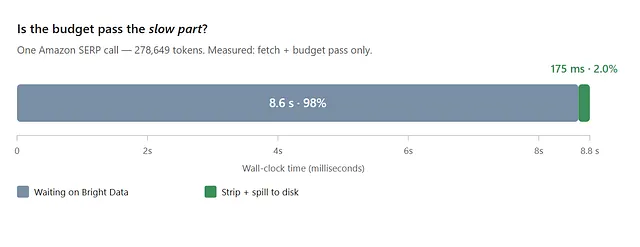
The budget pass is ~2% of fetch time on this payload.
Sure, you’re paying for an extra stdio hop and JSON framing on top of that, but against an 8-second network fetch it’s noise. The expensive part of the proxy isn’t the proxy — it’s still the upstream call you’re making anyway.
How To Shrink MCP Responses Based on Payload Shape
Our strategy above keeps any simple text payload under budget without losing data, but there are a couple things that can trip us up, still:
- Some MCP’s like GitHub hide text in an
EmbeddedResourceand notTextContent. - Not all text is safe to line-truncate. Remember: JSON is also technically “text”. Minified JSON responses arrive as a single line of text with no boundary to cut on, so any blind trim turns it into garbage.
Essentially, the proxy needs a decision tree for routing by shape. Here is that router.
Failure 1 — Text the proxy can’t see.
GitHub MCP'sget_file_contents tool splits its response into two blocks: a short TextContent status line and the actual file in an EmbeddedResource.
Fetching python-sdk/README.md with this as an example gives us:
- Legacy
**text_from_result**(TextContent only) —TextContentstatus line ("successfully downloaded text file (SHA: …)"). This is the only thing we receive — just 31 tokens. - The file itself (completely missed) —
EmbeddedResource(markdown). 19,376 tokens. - Full response — both blocks. 19,406 tokens.
So the proxy that was supposed to shrink a 19k-token file instead cheerfully passed through 31 tokens — and the model never saw the actual file at all. That’s definitely not what we want.
The fix is to extract every text-bearing block, not just TextContent:
Full code for extract.py here: https://gist.github.com/sixthextinction/7c412d2b8901a71f23a6395236748756
# extract.py — read TextContent AND EmbeddedResource.text
from mcp import types

def all_text_from_result(res: types.CallToolResult) -> tuple[str, list[str]]:
    parts, kinds = [], []
    for block in res.content:
        kinds.append(type(block).__name__)
        if isinstance(block, types.TextContent):
            parts.append(block.text or "")
        elif isinstance(block, types.EmbeddedResource):
            resource = block.resource
            text = getattr(resource, "text", None)
            if text:                       # text resource (file, diff)
                parts.append(text)
            elif getattr(resource, "blob", None):   # binary — don't inline it
                parts.append(
                    f"[budget-proxy] Binary resource at {getattr(resource, 'uri', '?')} "
                    f"({len(resource.blob)} bytes base64 — not inlined)."
                )
    return "".join(parts), kinds
Next, MCPs that return JSON as a response.
Failure 2 — Truncating JSON Naively Will Produce Garbage.
GitHub’s list/search tools return minified JSON in a single TextContent block. Line-boundary truncation would be catastrophic here: a 25k-token JSON object on one line has no line boundary to cut on, so the truncator either keeps the whole thing or (with a hard char cap) slices mid-object and hands the model invalid JSON.
So what do we do? Simple — don’t truncate JSON at all. Project the fields you need before serializing. JMESPath is a small query language for JSON that will help us with this.
GitHub - jmespath/jmespath.py: JMESPath is a query language for JSON
You write an expression that picks fields, slices arrays, and renames keys, and it returns a smaller JSON object. Think SQL SELECT for a JSON blob — items[:5].{title: title, url: html_url} keeps five list entries with just the columns you care about, and drops the rest. Perfect for our needs.
Using jmespath in our proxy, we wire this up as a registry — a dict keyed by upstream tool name, each value a jmespath expression tuned for that tool’s JSON shape. When a response parses as JSON, we look up the tool in JMESPATH_REGISTRY:
- If there’s a match, we run
jmespath.search(expr, data)and re-serialize the result. - No match? Fall through to generic structural shrink.
- Not JSON at all? Leave it for the prose/compact path.
You write this expression once per tool you know for sure returns heavy responses, and the proxy applies it on every call — the model never has to remember to ask for fewer fields.
Full code for shrink_json.py here: https://gist.github.com/sixthextinction/8d313cb753e02deb15f9fc3408f0ad28
# Project structured tools instead of truncating them
import json, jmespath

PREVIEW_ITEMS = 5
JMESPATH_REGISTRY = {
    "search_code": (
        "{total_count: total_count, incomplete_results: incomplete_results, "
        f"items: items[:{PREVIEW_ITEMS}].{{name: name, path: path, sha: sha, "
        "repository: repository.full_name, html_url: html_url}}"
    ),
    "list_pull_requests": (
        f"[:{PREVIEW_ITEMS}].{{number: number, title: title, state: state, "
        "user: user.login, html_url: html_url, created_at: created_at}"
    ),
    # … search_repositories, search_issues, get_commit, get_gist …
}

def shrink_json_text(text: str, tool: str) -> tuple[str | None, str]:
    """Return (shrunk_json, method) where method is jmespath|generic|none."""
    try:
        data = json.loads(text)
    except json.JSONDecodeError:
        return None, "none"                      # not JSON — leave it for the prose path
    expr = JMESPATH_REGISTRY.get(tool)
    if expr:
        shrunk = jmespath.search(expr, data)
        if shrunk is not None:
            return json.dumps(shrunk, indent=2), "jmespath"
    return json.dumps(_generic_shrink(data), indent=2), "generic"  # cap arrays, trim strings
Valid tokens measured across GitHub’s heavy hitters at an 8k budget, with jmespath and without:
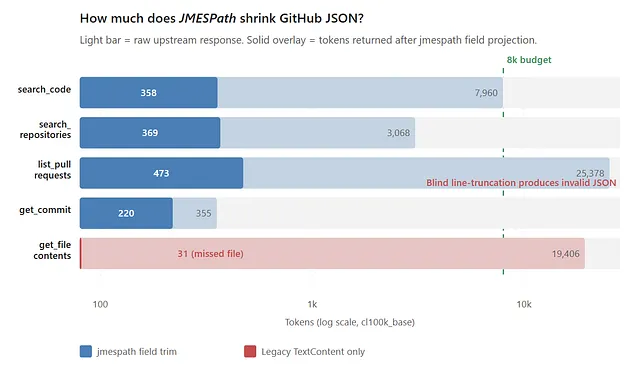
Raw upstream vs JMESPath-projected tokens (log scale, 8k budget)
Look at list_pull_requests: blind compact returns 0 valid tokens — it cut the single minified line and produced unparseable JSON. But the jmespath strategy worked correctly -- while still shrinking properly -- turning 25,378 tokens into 473, still valid JSON the model can parse.
For tools without a registered projection, you could always use a generic structural shrink (cap arrays to N items, truncate long string values) — less surgical than jmespath, but still valid JSON.
Putting It All Together
Extend the budget.py from earlier like this. The proxy then becomes a small decision tree keyed on what the payload actually is:
Full code for the new budget.py here: https://gist.github.com/sixthextinction/c40cfe9552466612868ffe22e5d5e7c8
# new budget.py
# replace budget_text(), but keep BudgetResult + budget_from_extracted() from Step 1
def budget_text(text, tool, arguments, budget, spill_dir, *, preview_tokens=1500):
    if not text.strip():
        return BudgetResult(text="", strategy="pass_through")

    # 1) JSON → project (jmespath) or structurally shrink; spill if still huge.
    shrunk, method = shrink_json_text(text, tool)
    if method != "none" and shrunk is not None:
        if ntokens(shrunk) <= budget:
            return BudgetResult(text=shrunk, strategy=f"json_{method}")
        path, preview, _ = spill_response(
            tool, arguments, text, spill_dir, preview_tokens=preview_tokens, suffix=".json"
        )
        body = f"[budget-proxy] Full JSON saved to:\n  {path}\n\nPreview:\n\n{preview}"
        return BudgetResult(text=body, strategy="spill")

    # 2) Prose — same path as Step 1 (unchanged).
    cleaned = strip_noise(text)
    if ntokens(cleaned) <= budget:
        return BudgetResult(text=cleaned, strategy="pass_through")
    _path, body, _, _ = prose_spill_inline(tool, arguments, text, spill_dir, budget)
    return BudgetResult(text=body, strategy="spill")


def budget_from_extracted(extracted_text, tool, arguments, budget, spill_dir, *, preview_tokens=1500):
    return budget_text(extracted_text, tool, arguments, budget, spill_dir, preview_tokens=preview_tokens)
This is a least-destructive-first strategy. Structured data gets projected — the smallest output, exact, and still valid JSON — while prose/text gets stripped and, if it’s still too big, saved to disk. Nothing is ever line-truncated and thrown away.
Update the Step 2 call tool in budget_proxy.py to use extract.py and the expanded router:
# In budget_proxy.py
# replace the call tool from Step 2
from lib.extract import all_text_from_result

@mcp.tool()
async def call(tool: str, arguments: dict, ctx: Context) -> str:
    """Proxy any upstream MCP tool with tiered token budgeting."""
    session: ClientSession = ctx.request_context.lifespan_context
    res = await session.call_tool(tool, arguments=arguments)
    text, _ = all_text_from_result(res)        # Failure 1 fix — merges EmbeddedResource.text
    result = budget_from_extracted(
        text, tool, arguments, TOKEN_BUDGET, SPILL_DIR,
        preview_tokens=PREVIEW_TOKENS,
    )
    return result.text
Same proxy, same 8k budget, run live against each upstream — each server naturally exercises a different branch, and the agent never sees a payload over ~8k:
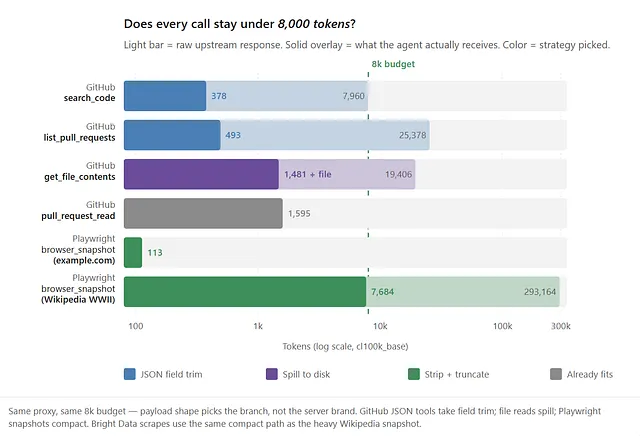
Only one “call” tool with four strategies, picked by payload shape rather than by which server you happened to mount.
Frequently Asked Questions
What does “MCP tool response exceeds maximum allowed tokens” mean in Claude, and how do I fix it?
It means a single MCP tool returned more tokens than your client allows in one response — for example, Claude Code rejects tool results above 25,000 tokens by default. The fix, in order of effort: (1) expose fewer tools to cut tools/list overhead, (2) use native limiting parameters like max_results or per_page, (3) put a token-budgeting proxy in front of the server that trims every response to a hard ceiling (we use 8,000 tokens), and (4) spill oversized payloads to disk and return a file handle instead.
What is the MCP output token limit in Claude Code, Claude Desktop, and Cursor?
There is no single MCP standard — every client sets its own limit. Claude Code rejects tool results above 25,000 tokens (configurable via MAX_MCP_OUTPUT_TOKENS). Claude Desktop uses roughly a 150,000-character cap (per the connector docs). Cursor and VS Code Copilot don’t document a clean number and instead truncate or degrade. Some clients have no explicit cap at all and simply let the context fill until quality drops.
Why are MCP responses so large?
MCP servers return a whole page, file, or JSON blob because it can’t know which slice you actually need. The menu tax is the other half of the problem. Before any tool runs, the client injects every mounted tool’s name, description, and parameter schema from tools/list into context, and you pay that on every turn whether you call those tools or not. Mount many servers with dozens of tools, and that alone can dwarf a single call's output.
How do I reduce MCP token usage?
Build a small token-budgeting proxy — a thin MCP server of your own that forwards each call to the real server and post-processes the response down to a fixed inline budget before it reaches the model. It routes each payload to the cheapest correct strategy: strip + spill-to-disk for text (full payload on disk, preview filling the ~8k inline budget), JMESPath field projection for JSON (so you never hand the model invalid truncated JSON).
Why not just raise the client’s token limit instead?
Because raising the limit treats the symptom, not the cause. A 300k-token tool result would fit in a 1M-token context window, but it evicts everything else the agent needs to remember and costs far more per turn. The limit is really a feature. Also, not every client exposes that setting.
Does trimming MCP responses hurt answer quality?
Stripping known garbage like tracking URLs, base64-images, and markdown noise is usually a pure win. Spilling preserves full fidelity on disk — task quality depends on the agent following up with grep or partial reads, not on silently losing the tail. The only failure, really, is treating the preview as the whole payload.
How much latency does an MCP proxy add?
Very little. On a 278k-token Amazon SERP scrape, the upstream fetch took ~8.6 seconds while the compaction pass (strip + truncate) added only ~175ms — about 2%. On a small 5.6k-token page, compaction is ~12ms and effectively a no-op. The expensive part is the upstream network call you were making anyway; the proxy’s extra stdio hop and token counting are noise against it.
Summary: How to Fix MCP Token Bloat
MCP token bloat comes from two sinks — the tools/list schema “menu tax” and oversized tool response payloads. Pick the fix based on which sink is hurting you:
- Schema tax too high? Mount fewer servers and tools (Method #1). GitHub’s official MCP costs 56,333 tokens in
tools/listalone — nearly 3x a typical tool response. - Response too big, but the MCP server supports limits? Use native pagination and field filtering first (Method #2), then add a proxy for anything still oversized.
- Response huge but you may need any part of it? Deploy a token-budgeting proxy (Method #3) that spills to disk and returns a preview + file path — full fidelity on disk, ~8k inline. MCP’s native pagination only covers list operations (
tools/list,resources/list), not tool-call results — so for oversized payloads you invent your own handle-and-fetch scheme.
Measure first with a tiktoken harness, fix the menu tax, limit at the source where possible, and enforce a hard inline budget everywhere else.
Be adaptable! The mistake is using one hammer for all three — mounting every tool on every server when the agent only scrapes, or pulling a megabyte page inline when max_results=3 at the source would have been enough.
Some links in this article are tracking links used for analytics purposes only. I do not receive any commission or compensation from them.
Comments
Loading comments…