It’s simpler than you think — and once you see it, you’ll spot it in every agent framework.
You have heard the term “AI agent” a hundred times. Autonomous reasoning. Tool use. Multi-step planning. It sounds complex. It is not.
At its simplest, an AI agent is a while loop. The LLM calls a tool, sees the result, decides what to do next — and repeats until it has an answer. That is the core pattern. Everything else — memory, planning, RAG — is bolted on top of this loop.
Here is the minimal version. Fifty lines. One concept. Once you see it, you cannot unsee it in every agent framework.
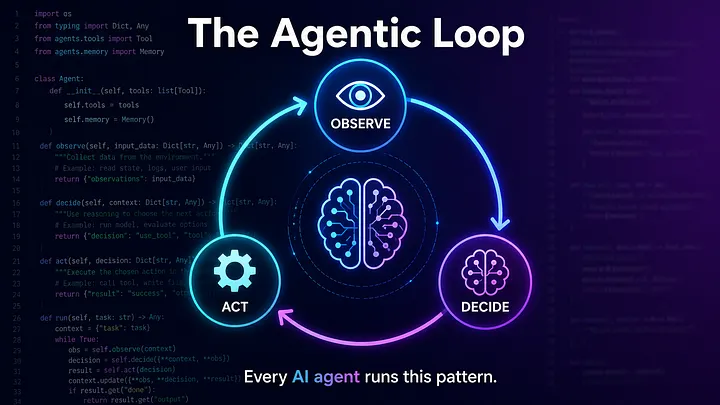
The Pattern: Observe → Decide → Act → Repeat
Every AI agent — Copilot, ChatGPT with plugins, Claude with tool use — runs the same core loop:
while True:
    response = ask_LLM(messages + tool_definitions)

    if response has tool_calls:
        execute tools
        feed results back to LLM
    else:
        done — return final answer
The LLM is not “running code”. It is choosing which function to call based on what it knows. The application executes the function and sends the result back. The LLM sees the new information and makes its next decision. This is the agentic loop.
What We Are Building
A trivially simple agent with three tools:
- check_greeting — returns “hi” or “hello” randomly
- handle_hi — runs if check_greeting returned “hi”
- handle_hello — runs if check_greeting returned “hello”
The LLM must:
- Call check_greeting and observe the result
- Decide which handler to call based on that result
- Produce a summary
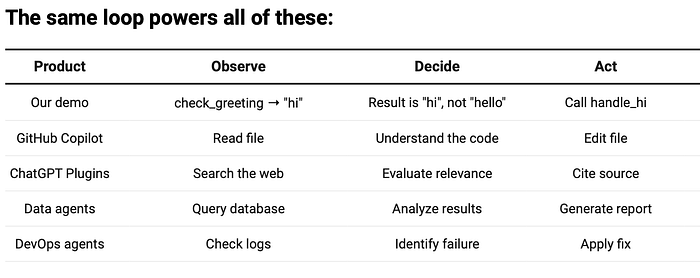
This is deliberately simple. The point is not the tools — it is the decision-making loop. Replace these with “query the database”, “analyze results” and “generate report” and you have a data agent.
The Tools: What the LLM Can See and Call
Tools are just Python functions plus a JSON schema that tells the LLM what each tool does.
import random

def check_greeting() -> str:
    """Randomly returns either 'hi' or 'hello'."""
    result = random.choice(["hi", "hello"])
    print(f"  [check_greeting] Randomly picked: '{result}'")
    return result

def handle_hi() -> str:
    """Called when check_greeting returned 'hi'."""
    message = "handle_hi here — You got 'hi'!"
    print(f"  [handle_hi] {message}")
    return message

def handle_hello() -> str:
    """Called when check_greeting returned 'hello'."""
    message = "handle_hello here — You got 'hello'!"
    print(f"  [handle_hello] {message}")
    return message
Now the JSON schema — this is what the LLM actually reads. One example:
{
    "type": "function",
    "function": {
        "name": "check_greeting",
        "description": "Returns a random greeting: either 'hi' or 'hello'. Call this first.",
        "parameters": {"type": "object", "properties": {}, "required": []},
    },
}
The other two tools follow the same structure — handle_hi (call this when check_greeting returned “hi”) and handle_hello (call this when check_greeting returned “hello”). The LLM dispatches via a simple lookup:
TOOL_MAP = {
    "check_greeting": check_greeting,
    "handle_hi": handle_hi,
    "handle_hello": handle_hello,
}
Note: the LLM never sees the Python implementation. It only sees the name, description, and parameter schema. The description is the contract — if it says “call this when check_greeting returned ‘hi’ ” the LLM will follow that instruction.
The Agentic Loop: Where the Magic Happens
This is the entire agent. Read it carefully — this pattern powers billion-dollar products:
import json
import os
from dotenv import load_dotenv
from openai import AzureOpenAI

load_dotenv()

client = AzureOpenAI(
    azure_endpoint=os.environ["AZURE_OPENAI_ENDPOINT"],
    api_key=os.environ["AZURE_OPENAI_API_KEY"],
    api_version=os.environ.get("AZURE_OPENAI_API_VERSION"),
)
deployment = os.environ["AZURE_OPENAI_DEPLOYMENT"]

messages = [
    {
        "role": "system",
        "content": (
            "You are a helpful assistant with access to three tools.\n"
            "Your task:\n"
            "  1. Call check_greeting to get a random greeting.\n"
            "  2. If the result is 'hi', call handle_hi.\n"
            "     If the result is 'hello', call handle_hello.\n"
            "  3. After calling the handler, summarize what happened."
        ),
    },
    {
        "role": "user",
        "content": "Please start by calling check_greeting, then call the appropriate handler.",
    },
]

# === THE AGENTIC LOOP ===
while True:
    response = client.chat.completions.create(
        model=deployment,
        messages=messages,
        tools=TOOL_DEFINITIONS,
        tool_choice="auto",
    )

    reply = response.choices[0].message

    if reply.tool_calls:
        messages.append(reply)

        for tool_call in reply.tool_calls:
            tool_name = tool_call.function.name
            result = TOOL_MAP[tool_name]()

            messages.append({
                "role": "tool",
                "tool_call_id": tool_call.id,
                "content": result,
            })
    else:
        print(reply.content)
        break
That is it. Thirty-eight lines of logic (excluding imports and setup).Here is what you actually see when you run python main.py:
python main.py
============================================================
  Hello World LLM Tool-Calling Demo
============================================================

[main] Sending initial request to LLM...

[main] LLM wants to call: check_greeting
  [check_greeting] Randomly picked: 'hi'

[main] LLM wants to call: handle_hi
  [handle_hi] handle_hi here — You got 'hi'!

------------------------------------------------------------
[main] LLM final response:

  I called check_greeting, which returned 'hi'. Since the result
  was 'hi', I called handle_hi. All steps complete.

============================================================
Three turns. Two tool calls. One final answer. The LLM decided at every step. Let’s break down what happens at each turn.
What Happens When You Run This
— Turn 1 — LLM sees tools and instructions:
The LLM reads the system prompt (“call check_greeting first”), sees three tool definitions, and returns a structured tool_calls response instead of text:
{
  "tool_calls": [
    {
      "id": "call_abc123",
      "function": { "name": "check_greeting", "arguments": "{}" }
    }
  ]
}
The application looks up TOOL_MAP[“check_greeting”], calls it, gets “hi”— then sends the result back:
{"role": "tool", "tool_call_id": "call_abc123", "content": "hi"}
— Turn 2 — LLM observes and decides
Now the LLM sees: “check_greeting returned ‘hi’.” It reads the tool descriptions, finds handle_hi (call this when check_greeting returned ‘hi’), and issues another tool call:
{
  "tool_calls": [
    {
      "id": "call_def456",
      "function": { "name": "handle_hi", "arguments": "{}" }
    }
  ]
}
The application executes handle_hi() and sends the result back.
— Turn 3 — LLM produces final answer
The LLM has now completed both steps. Instead of returning tool_calls, it returns a text response:
"I called check_greeting, which returned 'hi'. Since the result was 'hi',
I called handle_hi, which confirmed the greeting. All steps complete."
The loop exits. Done.
Why This Matters More Than You Think
This trivial demo encodes the same architecture as:
The Message Array Is the Agent’s Memory
Notice that every tool call and result gets appended to messages. This is the agent’s working memory — it grows with each turn:
messages = [
    {"role": "system", "content": "..."},              # Instructions
    {"role": "user", "content": "..."},                # User request
    {"role": "assistant", "tool_calls": [...]},        # LLM's decision
    {"role": "tool", "content": "hi"},                 # Tool result
    {"role": "assistant", "tool_calls": [...]},        # Next decision
    {"role": "tool", "content": "handle_hi: ..."},     # Next result
    {"role": "assistant", "content": "Summary..."},    # Final answer
]
The LLM sees the entire conversation history on every turn. That is how it “remembers” that check_greeting returned “hi” when deciding which handler to call next. No external memory store, no RAG — just the growing message array.
This is also the limitation: once the array exceeds the model’s context window, the agent loses track. Production agents solve this with summarization, sliding windows, or external memory — but the pattern stays the same.
Who Decides What Happens Next — You or the LLM?
The tool_choice parameter controls who decides what happens:
- auto — The LLM decides whether to call a tool or return text. This is what makes it an agent — it chooses.
- required — Force the LLM to call a tool (useful for first turn).
- none — Prevent tool calls (useful for forcing a final answer).
In our loop, auto is the correct choice: we want the LLM to call tools when it has work to do and return text when it is done. The exit condition of the loop (`else: break`) depends on this.
What’s Next
This agentic loop has a problem: the LLM is in the loop for every decision. Each turn costs latency and money. For simple single-tool calls, that is fine. But when you need to call three agents in parallel, or execute a multi-step plan with dependencies — you do not want the LLM deciding at every step.
That is where the orchestrator pattern comes in: ask the LLM once for routing, then execute deterministically. Same tools, same agents — but the LLM makes one decision instead of five.
That is the next article in this series.
The agentic loop is the foundation of most AI agents you interact with today. Once you understand this, frameworks like LangChain, CrewAI, and AutoGen are just abstractions over the same while loop. Build it from scratch first — then decide if you need the framework.
Comments
Loading comments…