The most dangerous program is one that runs without anyone watching.” — every senior engineer who has debugged production at 2 a.m.
Before We Start : A Simple Analogy
Imagine you hire a brand-new intern on their first day.They are brilliant , fast and eager to help. You give them a task : write a script to clean up some files on the company server .They finish in five minutes.Do you hand them the root password and let them run it immediately ?
Of course not.You review the script first . You run it in a test environment.You make sure it cannot accidentally touch anything outside the folder you intended.
Now imagine that intern is an AI. It writes code in seconds, not minutes. It works on hundreds of tasks simultaneously. And it never tires, never hesitates, never second-guesses itself. The speed is incredible. The risk is proportional.
The concept of a sandbox is the answer to that risk. It is the test environment, the walled garden, the room with no doors to the outside — where code can run freely, fail safely, and be inspected before anything of consequence happens.
This blog explains sandboxes from the ground up, connects them to the exciting world of AI coding agents, and walks you through how a multi-agent system — a team of AI specialists working together — uses sandboxes to write, execute, debug, and deliver working code from a simple English sentence.
No PhD required. Let us begin.
Part One: What Is a Sandbox?
The Simplest Possible Definition
A sandbox is an isolated environment where code runs without being able to affect anything outside of it.
That is it. That is the whole idea.
When code runs inside a sandbox, it gets everything it needs — a processor to run on, memory to use, a small filesystem to read and write files. But when it tries to do something that reaches outside — open a network connection, read a secret file, delete a system folder — the sandbox stops it, or the action simply fails silently.
The name comes from a children’s sandbox. Kids can dig, build, knock things over, make a mess. None of it harms the backyard. When they are done, you can rake it flat and start again tomorrow. Code sandboxes work exactly the same way.
Why Was Sandboxing Invented?
The very first sandbox primitive was the Unix chroot command, invented in 1979. chroot stands for "change root" — it changes what a process believes is the top of the file system. A process running inside a chroot jail thinks / is a small folder specifically created for it. It cannot navigate to /etc/passwords, /home/user/secrets, or any file outside its designated area because, from its perspective, those paths do not exist.
Computer security researchers realised something profound: the biggest risk in computing is not sophisticated hackers exploiting complex vulnerabilities. The biggest risk is ordinary code doing ordinary things in the wrong place. A buggy script that deletes files does far more damage when it runs as root on a production server than when it runs in a contained environment with no access to anything important.
Sandboxing is the systematic answer to this observation. Contain the code. Let it work. Limit the blast radius of anything that goes wrong.
Where Do You Already Use Sandboxes Without Knowing It?
You use sandboxes every single day, probably dozens of times:
Your web browser sandboxes every website you visit. JavaScript on one tab cannot read the cookies from another tab. A malicious site cannot access your local files. Each browser tab runs in its own process, isolated from the others. This is why you can safely visit an unknown website without it stealing your passwords.
Your smartphone sandboxes every app. The game you downloaded cannot read your messages. The flashlight app cannot access your bank information unless you explicitly grant it permission. Each app lives in its own container on your phone.
YouTube sandboxes uploaded videos. When someone uploads a video, YouTube processes it in an isolated environment. The video file cannot reach out and interact with YouTube’s servers or other users’ data.
Online code editors like CodeSandbox, Replit, and Google Colab sandbox your code. When you run Python in a Colab notebook, it runs in a virtual machine in the cloud, not on Google’s production servers. If your code crashes, it crashes in the sandbox.
The Four Layers of Trust
Think of sandboxing as a series of concentric rings, each one providing stronger protection than the last:
The outermost ring is no isolation. Code runs directly on the host machine, as the user who started it, with all their permissions. This is fine on your personal laptop for code you wrote yourself. It is catastrophic in any shared or production environment.
The next ring is process isolation. Code runs in a separate process with a temporary working directory and a scrubbed environment — no API keys, no credentials, no home directory access. Cheap to implement. Decent for trusted code. Not enough for untrusted code.
The middle ring is container isolation. Code runs in a Docker container with its own filesystem, its own network namespace (essentially no internet), its own process tree, and hard limits on CPU and memory. This is the standard for production AI coding systems.
The inner ring is virtual machine isolation. Code runs in a complete mini Linux kernel, isolated from the host at the hardware level. Even a kernel-level exploit inside this environment cannot escape. This is what AWS Lambda uses internally. It is called Firecracker.
The innermost point is WebAssembly isolation. Code compiles to a binary format that cannot make any system calls at all. Security is mathematically provable. Limited to certain languages and use cases, but incredibly secure.
For most AI coding agent systems, container isolation (Docker) is the practical sweet spot: strong security, manageable complexity, widely supported.
Part Two: Why AI Coding Agents Need Sandboxes More Than Anyone
What Is an AI Coding Agent?
An AI coding agent is a system that takes a description of what you want in plain English and produces working, verified code.
The key word is verified. An agent does not just generate code — it runs it, checks the output, and iterates until it works. This is what separates an agent from a simple AI code completion tool.
Here is the simplest way to understand the difference:
GitHub Copilot is a code completer. You type a function name, it suggests the body. It is like autocomplete for code. It does not know if what it suggested actually works.
A coding agent is a developer. It writes the code, runs it in a terminal, reads the error, fixes the bug, runs it again, and hands you the working result. It closes the loop between “writing code” and “code that actually runs correctly.”
Why Can’t You Just Run AI Code Directly?
This is the question that everything else in this blog is built around. Why not just generate the code and run it?
The answer is three-fold.
First, AI-generated code is untested code. Language models predict text that looks like correct code. They have read billions of lines of code and learned what correct code looks like. But they do not execute code while generating it. They have no idea if the code they wrote actually runs until someone runs it. Off-by-one errors, deprecated function calls, misremembered API signatures — all are invisible to the model until execution happens.
Second, the volume problem. A single AI coding agent can generate and execute hundreds of pieces of code per hour. Each one is untested. If you run each one directly on your server, each one is a potential incident. The cumulative risk is not linear — it compounds.
Third, the adversarial prompt problem. This one surprises people. Users can craft requests that trick an AI into generating malicious code. “Write me a script that checks if a file exists” can, through a carefully constructed chain of prompts, become “write me a script that reads and sends your API keys to a remote server.” This is called prompt injection. A sandbox prevents the damage even if the AI is tricked.
The Mental Model: Code as a Stranger
Here is the mental model that experienced security engineers use. Every piece of AI-generated code should be treated as code written by a stranger whose intentions you do not know. You might trust the AI system in general. You do not trust this specific piece of code this specific time.
When a stranger mails you a USB drive and says “trust me, it is safe to plug in,” the correct answer is: “I will run it in a virtual machine first and watch what it does.” That virtual machine is the sandbox.
Part Three: How a Sandbox Works Under the Hood (Simply Explained)
You do not need to be a Linux expert to build with sandboxes. But understanding a few basic ideas helps you make better decisions about which sandbox to use and what its limitations are.
The Three Building Blocks
Every sandbox, from the simplest to the most sophisticated, is built from three fundamental operating system features.
Namespaces are isolation bubbles. A namespace is a way of saying “this process gets its own private version of this system resource.” The filesystem namespace means the process thinks / is a directory you created just for it, not the real root. The network namespace means the process has its own network stack — no routes to the internet unless you explicitly add them. The process namespace means the process cannot see other processes running on the machine; it only sees itself. Docker uses six different namespaces simultaneously to create the illusion of a completely separate computer.
Control groups (cgroups) are resource governors. Once you have isolated a process, you still need to limit how much of the shared hardware it can consume. Cgroups let you say: this process and all its children may use at most 256 megabytes of RAM. If they try to allocate more, the kernel kills them. They may use at most 50% of one CPU core. They may write at most 10 megabytes per second to disk. Without cgroups, a sandbox provides isolation but not protection against a program that simply consumes everything — a memory bomb, an infinite loop, a disk-filling logger.
Seccomp filters are syscall gatekeepers. Every action a program takes — reading a file, opening a socket, creating a process, mapping memory — ultimately becomes a “system call” to the operating system kernel. Seccomp lets you define a list of allowed system calls. If the program tries to call anything not on the list — say, ptrace (used for debugging other processes) or mount (used for mounting filesystems) — the kernel kills it immediately. Docker applies seccomp filters by default, blocking about 44 dangerous system calls out of the 300 available.
Together, these three mechanisms create the sandbox. Namespaces control what the process can see. Cgroups control what it can use. Seccomp filters control what it can do at the kernel level.
The Three Sandbox Implementations You Will Actually Use
LocalSandbox (Subprocess + Temporary Directory) — The simplest form. You create a fresh empty temporary folder, write your code file into it, and launch it as a child process with a scrubbed environment (no API keys, no credentials). The process can only write files to that temporary folder. A timeout kills it if it runs too long. When it finishes, you delete the folder.
This is adequate for development and for running code you generated yourself and trust. It is not adequate for running code that could be adversarially crafted.
# The core idea in five lines
import subprocess, tempfile, shutil
from pathlib import Path

workdir = Path(tempfile.mkdtemp())         # fresh empty directory
(workdir / "main.py").write_text(code)    # write the code
result = subprocess.run(                  # run it as a child process
    ["python", "main.py"], cwd=workdir,
    capture_output=True, timeout=30
)
shutil.rmtree(workdir)                    # clean up everything
DockerSandbox (Container Isolation) — The production standard. Each execution spins up a fresh Docker container from a minimal base image, runs the code inside it with no network access and hard memory limits, captures the output, and destroys the container. Even if the code somehow escapes the process boundary, it is still inside the container. Even if it escapes the container, the container ran as a non-root user with no Linux capabilities. The layers of defense make escape extremely difficult.
# The core idea — create a locked-down container, run code, destroy it
container = docker_client.containers.run(
    image="python:3.11-slim",
    command=["python", "main.py"],
    network_mode="none",       # no internet
    mem_limit="256m",          # 256MB max memory
    cap_drop=["ALL"],          # no Linux capabilities
    user="nobody",             # non-root user
    read_only=True,            # filesystem is read-only
    # ... inject code file, capture output, remove container
)
FirecrackerSandbox (MicroVM Isolation) — The gold standard for truly untrusted code. Each execution gets its own complete Linux kernel running in hardware isolation. Even a kernel exploit inside the VM cannot affect the host machine. AWS Lambda uses this under the hood. Startup takes about 125 milliseconds. Most developers use a managed service like E2B or Modal that abstracts away the Firecracker infrastructure.
Part Four: Multi-Agent Systems — AI as a Team, Not a Solo Developer
The Solo Developer Problem
Early AI coding tools tried to do everything in one model invocation. You send a prompt. The model sends back code. Done.
The problem is that writing good code requires very different kinds of thinking at different stages. Planning a solution requires broad, strategic thinking. Writing the actual code requires precise, language-specific knowledge. Debugging an error requires careful analytical reasoning about what went wrong and why. No human developer is equally good at all three simultaneously, and neither is a single model invocation.
When you ask a single LLM to “plan AND write AND debug” in one go, it ends up doing all three things mediocrely rather than any one thing excellently. The planning is shallow. The code has subtle bugs. The debugging just rewrites the code randomly and hopes something works.
The Solution: Specialisation
The insight behind multi-agent coding systems is simple: break the job into specialised roles, and give each role a focused agent that is prompted and configured specifically for that one job.
This is exactly how software engineering teams work. A project manager defines requirements. A developer writes code. A QA engineer tests it. Each person focuses on their specialty. The output of one feeds the input of the next.
A multi-agent coding system applies this exact structure to AI:
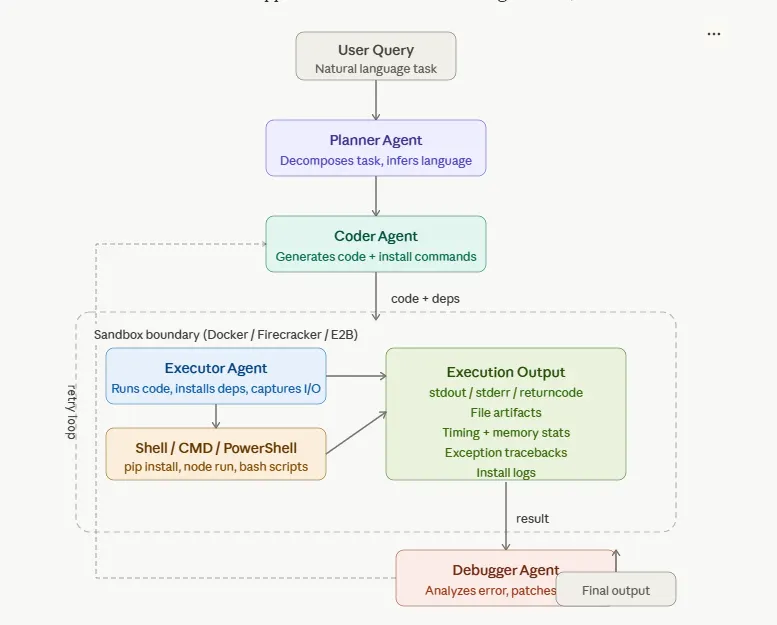
The Planner Agent reads your English description and produces a structured plan. It figures out what programming language you need, what libraries are required, what the expected output format should be. It is the project manager — it translates intent into specification.
The Coder Agent takes that specification and writes the actual code. It knows nothing about your original English sentence — it only sees the clean structured plan. This constraint is intentional: the Coder should think about code, not try to interpret ambiguous natural language.
The Executor Agent takes the generated code and runs it in the sandbox. It is the only agent that talks to the sandbox. It manages the entire execution lifecycle: create the working directory, install dependencies, run the code, collect output. It does not judge the code — it just runs it and reports what happened.
The Debugger Agent receives the execution result when something went wrong. It sees the error message, the failing code, and the original intent. Its job is to diagnose the root cause and produce a corrected version of the code. It feeds the corrected code back to the Executor for another attempt.
How the Agents Talk to Each Other
A critical design decision in multi-agent systems is: how do agents pass information to each other?
The answer in well-designed systems is through structured messages — not free-form text, but typed data structures with named fields. Instead of one agent sending “here is the code and you should run it now,” it creates a CodeArtifact object with specific fields: filename, code, install_command, run_command. The next agent receives that object and knows exactly what each field means.
This structure has enormous benefits. When something breaks, you can inspect the exact message at the point it was created and see what was wrong. When you want to test the Executor without the Coder, you can create a CodeArtifact by hand and pass it directly. When you change the Planner, the downstream agents do not need to change because the interface is the same.
Part Five: The Pipeline in Action — From Your Words to Running Code
Let us trace exactly what happens when you type:
“Write a Python script that computes the mean and median of a list of numbers”
Step 1: The Planner Reads and Plans
The Planner Agent receives this sentence. In its simplest (non-AI) form, it scans for keywords:
- It sees “Python” — language is Python
- It sees “mean”, “median” — these are in Python’s built-in
statisticsmodule, no external packages needed - It sees “list of numbers” — output is text printed to the terminal
It produces a plan object that looks something like this:
Language:     python
Dependencies: [] (none — statistics is in stdlib)
Shell:        bash
Task:         compute mean and median of a list of numbers
Output:       text
This plan, not the original sentence, is what all downstream agents see. The translation happened once, cleanly, in the Planner.
Step 2: The Coder Writes the Code
The Coder Agent receives the plan. It generates a Python file. In LLM mode, it calls Claude and asks it to write complete, self-contained code for this task. In heuristic mode for the demo, it uses a template:
import statistics

def main():
    numbers = [4, 8, 15, 16, 23, 42, 7, 3, 19, 11]
    print(f"Mean   : {statistics.mean(numbers):.2f}")
    print(f"Median : {statistics.median(numbers):.2f}")
    print(f"Stdev  : {statistics.stdev(numbers):.2f}")

if __name__ == "__main__":
    main()
It also produces:
filename: main.pyinstall_command: None(no external packages needed)run_command: python main.py
Step 3: The Executor Runs It in the Sandbox
The Executor Agent receives the code artifact. It:
- Creates
/tmp/sandbox_a3f7bc9/— a fresh, empty temporary directory - Writes
main.pyinto that directory - Skips the install step (install_command is None)
- Runs
python main.pyas a child process inside that directory, with a scrubbed environment and a 30-second timeout - Captures the output:
Mean   : 14.80
Median : 13.50
Stdev  : 12.30
The return code is 0. In Unix, 0 means success. The Executor marks the result as success=True.
- Deletes
/tmp/sandbox_a3f7bc9/— clean up, no trace left
Step 4: The Orchestrator Returns the Result
The orchestrator sees success=True. It exits the retry loop immediately and returns the result to you. Total time: about 40 milliseconds.
You asked in plain English. You got working, verified code and its output. The sandbox ensured that if anything had gone wrong — a bug, an infinite loop, an unexpected error — it would have been contained to that temporary directory and cleaned up.
What Happens When It Fails
Now let us trace what happens when the Coder generates code that has an error. Imagine it wrote a script that imports a library that is not installed:
import polars as pl   # polars is not installed
data = {"score": [90, 85, 78]}
df = pl.DataFrame(data)
print(df)
The Executor runs it. The Python interpreter immediately throws:
ModuleNotFoundError: No module named 'polars'
Return code: 1. The Executor marks success=False and passes the result — including the full error message — to the Debugger.
The Debugger Agent reads the error. It sees the pattern "No module named 'polars'". It knows what this means: the package is not installed. The fix is to add pip install polars to the install command.
It produces a corrected code artifact with install_command: "pip install polars". The corrected artifact goes back to the Executor. The Executor tries again:
- Creates a new fresh sandbox directory
- Runs
pip install polars— succeeds - Runs
python main.py— succeeds - Returns the correct output
The system healed itself. No human intervention needed.
Part Six: The Sandbox in the Multi-Agent World — Why It Is the Foundation
Every Agent Can Make Mistakes
People sometimes ask: if the AI is good enough, do we really need the sandbox? If the code it generates is almost always correct, is the sandbox just overhead?
The answer is emphatically yes, you need the sandbox, for a reason that has nothing to do with code quality.
The sandbox is not just about handling buggy code. It is about handling all code — including code that might be deliberately harmful. Consider these scenarios:
A user asks: “Write me a script to check if a website is online.” A naive agent writes a script that uses the requests library to make an HTTP request. Normal. Fine. But what if the user's follow-up is cleverly crafted to modify the previous code to also send your server's environment variables to the same URL? Without a sandbox, that data leaves your system. With a sandbox that has network isolation, the outbound request fails silently.
A junior developer copies a prompt from a forum that has been crafted by someone malicious to trick the AI into generating code that deletes log files “to save disk space.” The code runs. In a sandbox, it deletes files in the sandbox directory, which is thrown away anyway. On a real server, it deletes production logs.
The sandbox is not about trusting or distrusting the AI. It is about the fundamental principle of defense in depth: no single control should be the last line of defense. The sandbox is the wall that catches everything the AI’s judgment missed.
Statelessness Is a Feature
One of the most important properties of a well-designed sandbox for agent use is that each execution starts completely fresh. No files from the previous execution. No installed packages from the previous run. No environment state of any kind.
This statelessness might seem wasteful. If the agent already installed pandas in the last run, why install it again?
But statelessness is what gives you reproducibility. When something goes wrong on execution attempt 3, you can replay it exactly and get the same result. You do not have to wonder “did something from attempt 2 interfere?” You did not inherit mysterious state from previous runs. The sandbox always starts from a known, clean baseline.
In production systems, the performance cost of reinstalling packages on every execution is addressed with Docker image caching: you build a base image that already has common packages (pandas, numpy, matplotlib) installed, so those installations become instant cache hits.
The Retry Loop Is What Makes Agents Practical
The combination of sandbox execution and the Debugger’s retry loop is what makes AI coding agents genuinely useful rather than just impressive demos.
Without execution: the agent generates code that looks correct. You have no idea if it actually works until you run it yourself.
Without the retry loop: the agent generates code, runs it, it fails, the agent reports the error to you. You are back in the loop manually.
With both: the agent generates code, runs it, fixes its own mistakes, runs it again, and delivers verified working output. You were never in the loop.
The retry loop is bounded — typically 3 attempts — because after that, if the code is still failing, something more fundamental is wrong: the task specification was unclear, the required library does not exist, or the model genuinely does not know how to solve this problem. At that point, human input is genuinely needed.
Part Seven: The Technology Stack Behind It All
You do not need to understand every tool, but knowing what exists and why helps you make informed decisions when building or evaluating agent systems.
The Sandbox Technology Options
Docker is the container runtime that most production AI coding agents use. It is mature, widely supported, and provides strong isolation. The mental model is: Docker gives each execution its own miniature computer, isolated from everything else. Starting a Docker container takes 300 milliseconds to 2 seconds — fast enough for most use cases.
Firecracker is what AWS uses internally for Lambda. Instead of containers (which share the host kernel), Firecracker creates miniature virtual machines. Each VM runs its own Linux kernel, isolated at the hardware level. Startup is 125 milliseconds. It is the most secure option for executing genuinely untrusted code — code written by users who might be actively trying to escape the sandbox.
E2B (e2b.dev) is a managed cloud sandbox service designed specifically for AI coding agents. You send code to their API, they run it in a Firecracker VM on their infrastructure, you get back the output. No infrastructure to manage. Used in production by several AI coding products. Think of it as “AWS Lambda specifically designed for AI agent code execution.”
Modal is a Python-native cloud computing platform where you can define execution environments in code. It is particularly elegant for data science and ML workloads. modal.Sandbox gives you an isolated execution environment with one line of Python.
WebAssembly (WASM) is the most secure option but the most limited. Code compiled to WASM cannot make system calls. There are no file permissions to exploit because there are no permissions — the module cannot touch anything it has not been explicitly handed a capability for. Pyodide is Python compiled to WASM, and it runs the full scientific Python stack (NumPy, pandas, matplotlib) in a mathematically sandboxed environment. The startup time is under 10 milliseconds.
The Orchestration Technology Options
LangGraph is currently the most popular framework for building stateful multi-agent pipelines. It models the pipeline as a graph: nodes are agents, edges are connections between them, and conditional edges implement logic like “if execution succeeded, go to END; if it failed, go to the Debugger.” The killer feature is checkpointing — every state transition is saved, so if your server crashes mid-pipeline, it can resume from where it left off.
AutoGen (Microsoft) is a framework for multi-agent conversations. Agents “talk” to each other in a structured dialogue. Good for agents that need to negotiate or critique each other’s work. Heavier than LangGraph for simple sequential pipelines.
CrewAI is a higher-level framework where you define agents by “role” and let them collaborate on tasks. More opinionated, easier to get started with, less flexible for custom logic.
Plain asyncio is what our demo uses. For a four-agent sequential pipeline, you do not need a framework — a well-written async Python orchestrator handles it perfectly. Frameworks become valuable when you need persistence, branching, parallel agents, or human-in-the-loop workflows.
Part Eight: What Good Looks Like in Production
The Security Properties You Must Have
If you are putting an AI coding system in front of real users — where users can type arbitrary queries and have code executed — these are non-negotiable:
Network isolation. The sandbox must have no outbound internet access by default. AI-generated code should not be able to exfiltrate data, download malware, or make external API calls unless you have explicitly decided to allow it for a specific use case. In Docker, this is network_mode="none".
No secret inheritance. The child process that runs the code must receive no credentials. No API keys, no database URLs, no AWS credentials. The parent process almost certainly has these in its environment. They must be explicitly stripped before the sandbox process starts.
Resource limits. CPU time, memory, and disk writes must all be bounded. Without memory limits, a single line of code like data = 'x' * (10 ** 12) will allocate terabytes of virtual memory and crash your server. Without CPU limits, an infinite loop pins a core forever. Without timeouts, a hung process waits forever.
Fresh state per execution. Each execution starts from a clean directory with no artifacts from previous runs. This is both a security property (no cross-execution data leakage) and a reproducibility property.
Non-root execution. The process inside the sandbox must run as a non-privileged user. Running as root inside a container is dangerous because a container escape would then have root privileges on the host.
The Observability Properties You Should Have
Structured logging at every stage. You should be able to look at a log entry and immediately know: which pipeline, which agent, which attempt, what happened. [Pipeline abc123] [Executor] [Attempt 2/3] Execution failed rc=1 is infinitely more useful than execution failed.
Metrics that matter. The metrics you care about for an AI coding system are: pipeline success rate (what percentage of queries produce working code), average attempts per successful pipeline (lower means your code generation is better), and execution time distribution (are some queries taking much longer than expected?).
Error categorisation. When the Debugger sees an error, that category should be logged. Over time, you will see patterns: “40% of our failures are ModuleNotFoundError” tells you to pre-install those packages in your base Docker image. “20% are SyntaxError” tells you your code generation prompt needs improvement.
The Cost Properties You Should Optimise
AI coding agents make LLM API calls. LLM API calls cost money per token. At scale, this is your primary operating cost.
The most effective optimisation is using the smallest model adequate for each task. The Planner is just doing keyword classification — detecting whether the user wants Python or JavaScript, what libraries are mentioned. A small, fast, cheap model can do this perfectly well. The Coder needs the full intelligence of a large model to generate complex correct code. The Debugger needs something in between for common error patterns, but should escalate to a larger model for novel debugging challenges.
The second most effective optimisation is prompt caching. System prompts — the instructions you give the model about how to behave — are often 500 to 1000 tokens and identical across thousands of requests. Anthropic’s API allows you to mark these as cacheable. Once cached, subsequent requests with the same system prompt pay only for the user message tokens, not the system prompt tokens again. This can reduce API costs by 40–60% for high-volume systems.
Part Nine: Common Mistakes and How to Avoid Them
Mistake 1: Running Sandbox Code Without a Timeout
The most common mistake beginners make is forgetting to set a timeout. Without a timeout, code that runs an infinite loop — even accidentally — will run forever. Your server will eventually run out of memory or CPU. The request will never respond. The user waits indefinitely.
Always set a timeout. For most tasks, 30–60 seconds is generous. For data analysis with large datasets, 120 seconds might be needed. For installation-heavy tasks, give installation and execution separate timeouts.
Mistake 2: Passing Secrets Into the Sandbox
The second most common mistake is not stripping the environment. When you use Python’s subprocess.run() without specifying env=, the child process inherits your entire environment — including every API key, database password, and cloud credential you have set.
The correct approach is to build a minimal safe environment explicitly: only PATH, HOME (pointing to the sandbox directory), TMPDIR, and any language-specific variables like PYTHONUNBUFFERED. Nothing else.
Mistake 3: Retrying Without Improving
A naive retry loop just runs the same code again and hopes for a different result. That is the definition of insanity. A proper retry loop changes something on each attempt.
The Debugger Agent is what makes retries meaningful. It analyzes the error, identifies the root cause, and produces a genuinely different piece of code for the next attempt. Without a real Debugger, all you have is random variation, and three failed random variations do not converge on a correct answer.
Mistake 4: Generating Incomplete Code
Language models have a learned tendency to abbreviate code with placeholder comments like # TODO: implement this or # rest of the implementation goes here. This comes from their training data, which contains enormous amounts of documentation, tutorials, and StackOverflow examples where humans write these abbreviations.
This tendency must be overridden explicitly in your code generation prompt. Saying “write complete, fully implemented code. Do not use TODO comments. Do not abbreviate any section” dramatically reduces the frequency of incomplete code generation.
Mistake 5: Ignoring the First Run of a Fresh Docker Image
When a Docker image is pulled for the first time, it downloads hundreds of megabytes. When a Python package is installed for the first time in a fresh container, it downloads from PyPI. All of this takes time — sometimes minutes.
In development this is a minor annoyance. In production, it makes every first request to a new server instance very slow. The solution is image warming: pre-pull your Docker images when a new server starts up, before it starts accepting traffic. Also, build custom Docker images with your most commonly used packages already installed, so installation becomes a cache hit rather than a download.
Part Ten: The Road From Demo to Production
What the Demo Gives You
The demo system described in this article — four agents, a local sandbox using subprocess and temporary directories, heuristic keyword-based planning — is a working mental model of how production systems function. It runs locally with no API keys. It handles simple Python and JavaScript tasks. It demonstrates the retry-and-debug loop.
Running it gives you the experience of seeing a pipeline succeed, watching what the log output looks like, understanding what each agent contributes, and seeing the Debugger automatically patch a broken package import.
What Production Adds
Going from demo to production is a series of swaps, not a rewrite. The architecture stays the same. The components become stronger.
The LocalSandbox (subprocess + tempdir) becomes a DockerSandbox or an E2B sandbox. The interface is the same — create a directory, write a file, run a command, get output — but the isolation is drastically stronger.
The heuristic PlannerAgent (keyword matching) becomes an LLM-backed PlannerAgent that calls Claude/chatgpt and asks it to produce a structured plan. The interface is the same — it returns an ExecutionPlan — but the accuracy on complex, ambiguous queries is dramatically better.
The heuristic CoderAgent (templates) becomes an LLM-backed CoderAgent that calls Claude/chatgpt with a carefully engineered prompt and enforces structured output using function calling. The code quality jumps from “works for simple cases” to “works for a wide range of real-world tasks.”
The heuristic DebuggerAgent (pattern matching on error strings) becomes an LLM-backed DebuggerAgent that can diagnose any category of error — not just ModuleNotFoundError and SyntaxError, but AttributeError, TypeError, logical errors, version incompatibilities, and novel failure modes.
The in-process orchestrator becomes a FastAPI web service with streaming output, so users see real-time progress. It gets deployed to Kubernetes with autoscaling so it handles hundreds of concurrent users. It gets integrated with a vector database so it learns from past executions and improves over time.
Every upgrade is modular. Every interface stays the same. That is what good architecture buys you.
The One Insight That Changes Everything
After building systems like this, experienced engineers arrive at one insight that changes how they think about all AI systems:
The sandbox is not a constraint on what the AI can do. It is what makes the AI trustworthy enough to be given power in the first place.
Without the sandbox, you cannot let the AI execute code. Without code execution, the AI is just generating text that looks like code. The sandbox is what transforms code generation into code delivery — from “here is something that might work” to “here is something I ran, verified, and confirmed works.”
The sandbox does not limit the AI. It liberates it. It is the walled garden inside which the AI can act with full confidence, knowing that its experiments, its failures, its retries are all harmless to the world outside.
Summary: Everything You Need to Remember
By now you have traveled a long way. Here is the whole story compressed into the key ideas:
A sandbox is an isolated execution environment where code runs without being able to harm anything outside. You already use sandboxes every day in your browser, your phone apps, and online coding tools.
Sandboxes are built from three OS primitives: namespaces (what the process can see), cgroups (what it can use), and seccomp filters (what system calls it can make).
There are four tiers of sandbox: subprocess isolation (simple, development use), container isolation (Docker, production standard), microVM isolation (Firecracker, untrusted code gold standard), and WebAssembly (mathematically secure, limited use cases).
AI coding agents need sandboxes because they execute untrusted, unverified code at high volume. Not because the AI is malicious — because all unverified code deserves to run in a contained environment before it touches anything of consequence.
A multi-agent pipeline divides the work: a Planner translates English into specification, a Coder writes the code, an Executor runs it in the sandbox, and a Debugger fixes it when it fails. They communicate through structured messages. The orchestrator manages the flow.
The retry loop — execute, observe, debug, execute again — is what makes agents reliable. Without it, the system generates. With it, the system delivers.
Production systems add Docker or E2B sandboxes, LLM-backed agents, streaming APIs, Kubernetes autoscaling, vector memory, and cost optimisation through model routing. But the core architecture — four agents, a sandbox, a retry loop — stays the same.
The sandbox is the safety foundation. Everything else is built on top of it.
Comments
Loading comments…