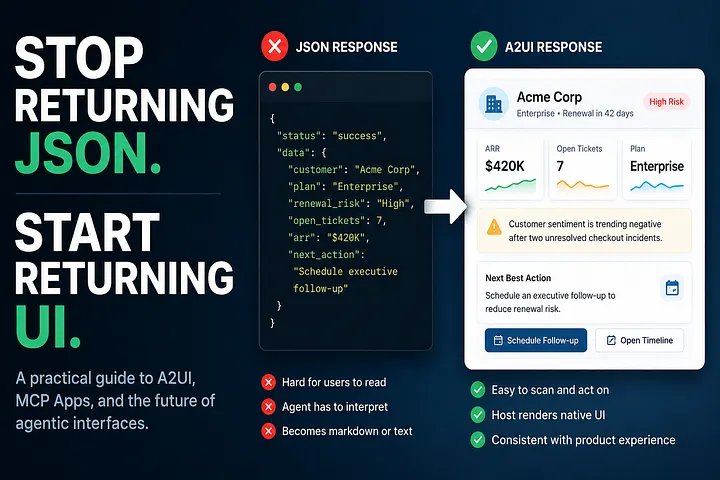
A builder’s guide to A2UI, MCP Apps, and the interface layer agentic products are missing
If you have built an MCP server, you already know the moment.
The tool works. The JSON is clean. The agent understands the response.
And then the product experience falls apart.
The user asks for something useful, the agent calls your tool, your server returns a perfectly valid payload, and the final output becomes a markdown table sitting awkwardly inside chat.
Or the opposite happens.
You ship a full MCP App in an iframe. It works, technically. But it looks like a tiny website trapped inside another product. The fonts are different. The buttons feel off. Dark mode is almost right but not quite. The scroll behavior is weird. The whole thing feels bolted on.
That is the uncomfortable truth about agentic UX right now:
Agents can reason. Tools can act. But the interface between them is still mostly improvised.
MCP gave agents a standard way to call tools.
But what should those tools return?
For most servers today, the answer is still:
{
  "status": "success",
  "data": {
    "customer": "Acme Corp",
    "plan": "Enterprise",
    "renewal_risk": "High",
    "next_action": "Schedule executive follow-up"
  }
}
That is useful for a machine.
It is not a product experience.
A human should not have to read that as raw JSON. And an agent should not have to guess whether this deserves a card, a table, a button, a warning, or an approval flow.
That missing layer is where A2UI becomes interesting.
Instead of returning only data, your MCP server can return UI intent.
Not just:
“Here is the customer record.”
But:
“Render this customer summary card, highlight the renewal risk, and show the next action button.”
That shift sounds small.
It is not.
It changes how agentic products get built.
The Problem Is Not JSON. The Problem Is Expecting JSON to Become UX.
Developers like JSON because it is structured, portable, and easy to debug.
Users do not care.
A user does not want a payload. A user wants a decision. A user wants a next step. A user wants something they can read, trust, and act on.
Right now, too many MCP flows work like this:
- The user asks a question.
- The agent calls an MCP tool.
- The tool returns structured data.
- The agent decides how to explain it.
- The UI becomes whatever the agent improvises.
That last step is fragile.
Sometimes the agent summarizes too much. Sometimes it hides important fields. Sometimes it creates a table that should have been a card. Sometimes it gives the user prose when the user needed buttons. Sometimes it renders an answer, but not an interface.
This is not really a model problem.
It is a contract problem.
The server knows the domain. The host knows the design system. The agent knows the task.
But today, the server usually returns data and hopes the other layers figure out presentation.
A2UI changes that contract.
The Iframe Was a Good Escape Hatch. Then We Started Using It for Everything.
MCP Apps made rich tool experiences possible by letting builders ship HTML, CSS, and JavaScript inside an iframe.
That was a good idea.
Some interfaces need full control.
A map needs gestures. A document editor needs selection state. A 3D viewer needs custom rendering. A seat picker needs zooming, dragging, and thousands of clickable regions.
You are not going to describe all of that elegantly with a few JSON components.
So yes, iframes matter.
But iframes also come with a cost.
They do not automatically inherit the host’s typography, spacing, theme, accessibility behavior, or component system. They bring their own runtime, their own layout work, and their own state boundary.
One iframe is fine.
Five iframes inside an agent workspace starts to feel like a product made of spare parts.
The issue is not that iframes are bad.
The issue is that they became the default answer for “I need better UI.”
Most tool outputs do not need a custom app.
They need a native-feeling response surface.
A card. A form. A table. A chart. A confirmation screen. A set of actions.
That is exactly the class of UI A2UI is designed for.
A2UI in One Simple Mental Model
A2UI is a declarative UI protocol.
Your server does not ship a React app.
Your server ships a description of the interface.
Something like this:
{
  "type": "card",
  "title": "Acme Corp",
  "subtitle": "Enterprise account · Renewal in 42 days",
  "sections": [
    {
      "type": "metricRow",
      "items": [
        { "label": "Renewal Risk", "value": "High" },
        { "label": "Open Tickets", "value": "7" },
        { "label": "ARR", "value": "$420K" }
      ]
    },
    {
      "type": "text",
      "value": "Customer sentiment is trending negative after two unresolved checkout incidents."
    }
  ],
  "actions": [
    {
      "type": "primary",
      "label": "Schedule executive follow-up",
      "action": "schedule_followup"
    },
    {
      "type": "secondary",
      "label": "Open account timeline",
      "action": "open_timeline"
    }
  ]
}
The host receives that payload and renders it using native components.
On one platform, it may look like a Material-style card. On another, it may look like a mobile-native sheet. Inside an enterprise product, it may use that company’s internal design system.
The server describes the intent.
The host controls how it looks.
That is the separation we have been missing.
The First Pattern: Let the MCP Server Return the Interface
The simplest version is also the one most teams should start with.
Your MCP server returns an A2UI payload using a MIME type like:
application/a2ui+json
The host sees the MIME type, passes the payload to an A2UI renderer, and displays the result inline.
No iframe. No custom CSS. No front-end bundle. No markdown-table fallback.
Your tool response stops being “data the agent might explain.”
It becomes “an interface the host can render.”
A minimal MCP tool response might look like this:
return {
  content: [
    {
      type: "resource",
      resource: {
        uri: "ui://account-summary/acme",
        mimeType: "application/a2ui+json",
        text: JSON.stringify({
          type: "card",
          title: "Acme Corp",
          subtitle: "Enterprise · Renewal risk: High",
          sections: [
            {
              type: "text",
              value:
                "Acme has 7 open support tickets and negative sentiment from the last two interactions."
            }
          ],
          actions: [
            {
              type: "primary",
              label: "Draft follow-up email",
              action: "draft_followup"
            }
          ]
        })
      }
    }
  ]
};
The important part is not the exact schema.
The important part is the direction:
The tool is no longer returning only information. It is returning the shape of the user experience.
Imagine a Support Rep at 4:55 PM
A support rep is about to end the day.
A message comes in:
“Can you check what is going on with Acme?”
The agent calls the CRM MCP server and the support MCP server.
Without A2UI, the user gets a summary:
Acme Corp is an enterprise customer with seven open tickets. Sentiment appears negative. Suggested next step: escalate.
That is useful, but incomplete.
With A2UI, the server can return a card:
- account name
- plan
- latest ticket
- SLA status
- customer sentiment
- open blockers
- recommended next step
- button to escalate
- button to draft a reply
- button to open the account timeline
The rep does not just learn what happened.
They can act immediately.
That is the difference between an answer and an interface.
Now Imagine an Engineer During an Incident
The checkout service is failing in Europe.
An engineer asks:
“What changed before the error spike?”
The observability MCP server could return raw logs, deployment metadata, service health, and error rates.
That is technically correct.
But during an incident, technically correct is not enough.
The engineer needs a battle-ready surface:
- current status
- error rate
- affected region
- suspected deploy
- related logs
- rollback option
- owner on call
- incident channel
- confidence level
That should not be a paragraph.
It should not be a generic table.
It should look like an incident panel.
A2UI lets the DevOps tool return something closer to the real workflow:
{
  "type": "alertPanel",
  "severity": "critical",
  "title": "Checkout errors spiking in EU-West",
  "sections": [
    {
      "type": "metricRow",
      "items": [
        { "label": "Error Rate", "value": "18.4%" },
        { "label": "Started", "value": "12 min ago" },
        { "label": "Suspected Deploy", "value": "checkout-api@8f31c" }
      ]
    },
    {
      "type": "text",
      "value": "The spike began 3 minutes after the latest checkout-api deployment."
    }
  ],
  "actions": [
    {
      "type": "primary",
      "label": "Open rollback plan",
      "action": "open_rollback"
    },
    {
      "type": "secondary",
      "label": "Join incident channel",
      "action": "join_incident_channel"
    }
  ]
}
Now the agent is not improvising a response from observability data.
The tool is giving the user the interface the situation demands.
The Second Pattern: Keep the Page Native, Embed Only the Weird Part
Not every interface should be declarative.
A2UI is great for common product surfaces:
cards, forms, lists, charts, summaries, buttons, approvals, and status views.
But some components are different.
A flight map. A seat picker. A document editor. A 3D product viewer. A visual workflow builder.
These need local interaction, custom rendering, and state that changes too quickly for an agent to track.
That is where the hybrid pattern makes sense.
Use A2UI for the shell.
Use an MCP App iframe for the part that genuinely needs custom behavior.
Think about a ticket-booking assistant.
The surrounding interface should be native:
- event title
- date
- price
- ticket count
- checkout summary
- refund policy
- confirm button
But the seat picker itself probably belongs in an iframe.
Why?
Because it needs zooming, panning, hover states, visual selection, and complex layout logic.
The agent should not care where the user’s mouse is. The host should not track every hover. The MCP server should not re-render the whole interface every time someone drags the map.
The iframe owns the local interaction.
The A2UI shell owns the meaningful state.
For example, the iframe might emit:
{
  "tool": "select_seats",
  "arguments": {
    "section": "B",
    "row": "12",
    "seats": ["14", "15"]
  }
}
The host can translate that into an A2UI action and update the native checkout summary:
{
  "type": "checkoutSummary",
  "title": "2 seats selected",
  "items": [
    { "label": "Section", "value": "B" },
    { "label": "Row", "value": "12" },
    { "label": "Seats", "value": "14, 15" },
    { "label": "Total", "value": "$240" }
  ],
  "actions": [
    {
      "type": "primary",
      "label": "Continue to checkout",
      "action": "continue_checkout"
    }
  ]
}
That is the right boundary.
The iframe handles the messy interaction.
The native UI handles the product flow.
A Map Should Be Custom. The Booking Flow Around It Should Not Be.
Travel is another good example.
Imagine an agent helping a user book a hotel.
The map needs to be custom. It has markers, clusters, hover previews, filters, drag gestures, and maybe route overlays.
But the rest of the experience does not need to live inside that iframe.
The hotel cards can be native. The price breakdown can be native. The cancellation policy can be native. The “reserve” button can be native. The trip summary can be native.
This is where the hybrid model feels obvious.
Do not iframe the whole booking flow just because one component needs a map.
Keep the product experience native.
Embed only the map.
That is the practical rule for Pattern 2:
Custom where necessary. Declarative everywhere else.
The Third Pattern: Ship A2UI Inside the Iframe When the Host Is Not Ready
The cleanest version of A2UI requires the host to support native rendering.
But many real environments will not get there quickly.
Enterprise platforms move slowly. Internal tools are messy. Regulated industries avoid new rendering models. Legacy systems may only support iframe-based extensions.
So what do you do if the host does not support A2UI yet?
You put the A2UI renderer inside the MCP App itself.
The host sees one iframe.
Inside that iframe, your app fetches A2UI payloads from the backend and renders them dynamically.
This is not as elegant as native rendering.
But it is deployable.
And in enterprise software, deployable often wins.
A simple version looks like this:
async function loadPanel(context: UserContext) {
  const response = await fetch("/api/a2ui/panel", {
    method: "POST",
    body: JSON.stringify(context),
    headers: {
      "Content-Type": "application/json"
    }
  });

const ui = await response.json();
  renderA2UI(ui, {
    target: document.getElementById("app")
  });
}
The iframe becomes a container for backend-generated UI.
That means you can start using the A2UI programming model even before the host has native support.
The Legacy Enterprise Portal Is Where This Gets Interesting
Picture a bank with an internal fraud investigation system.
The platform is old. The release cycles are slow. The security review is painful. Native A2UI support is not coming next quarter.
But the platform already allows approved iframe extensions.
With Pattern 3, the team can ship an MCP App that contains an A2UI renderer.
Now the backend can generate dynamic panels for:
- transaction risk
- customer history
- KYC status
- suspicious activity
- recommended review steps
- approval or escalation actions
The host does not need to understand A2UI.
The iframe does.
This gives the team a migration path.
Today: render A2UI inside the iframe. Later: move to native A2UI when the host catches up.
That bridge matters because most serious software does not migrate all at once.
The Decision Is Easier Than It Looks
You do not need a complicated framework to choose between the three patterns.
Ask one question first:
Can this UI be described with standard components?
If yes, return A2UI directly from MCP.
Cards, forms, tables, summaries, charts, approvals, and status panels should usually be declarative.
Then ask:
Is there one part that genuinely needs custom interaction?
If yes, keep the surrounding experience in A2UI and embed that one piece as an MCP App iframe.
Maps, editors, seat pickers, 3D viewers, and visual canvases belong here.
Finally ask:
Does the host support A2UI natively?
If not, package the A2UI renderer inside the MCP App and ship through the iframe until the platform catches up.
That is the whole decision tree.
Not every interface needs to become an app.
Not every app needs to become declarative.
The skill is knowing where the boundary belongs.
What This Changes for MCP Builders
The biggest change is not technical.
It is product thinking.
Before A2UI, a tool response usually meant:
“Here is the data. Good luck presenting it.”
With A2UI, a tool response can mean:
“Here is the interface the user needs next.”
That is a very different contract.
The MCP server becomes responsible for expressing domain-specific UI intent.
The host remains responsible for visual consistency.
The agent remains responsible for reasoning, orchestration, and deciding when to call what.
That separation is cleaner than what most teams are shipping today.
It also makes MCP servers more valuable.
A CRM server should not only expose account data. It should know how to present an account snapshot.
A DevOps server should not only expose logs. It should know how to present an incident panel.
A finance server should not only expose expense records. It should know how to present an approval card.
A support server should not only expose tickets. It should know how to present a resolution workflow.
That is the move from API thinking to product thinking.
What I Would Build First
Do not start with your most ambitious interface.
Start with the ugly one.
Find the MCP tool that currently returns useful data but produces a weak user experience.
Maybe it is a status check. Maybe it is a customer lookup. Maybe it is an approval list. Maybe it is a configuration form. Maybe it is an incident summary.
Then create an A2UI response variant.
Something small.
Something like:
function accountSummaryToA2UI(account: Account) {
  return {
    type: "card",
    title: account.name,
    subtitle: `${account.plan} · Renewal in ${account.daysUntilRenewal} days`,
    sections: [
      {
        type: "metricRow",
        items: [
          {
            label: "ARR",
            value: account.arr
          },
          {
            label: "Open Tickets",
            value: String(account.openTickets)
          },
          {
            label: "Risk",
            value: account.renewalRisk
          }
        ]
      },
      {
        type: "text",
        value: account.recommendedAction
      }
    ],
    actions: [
      {
        type: "primary",
        label: "Draft follow-up",
        action: "draft_followup"
      },
      {
        type: "secondary",
        label: "Open timeline",
        action: "open_timeline"
      }
    ]
  };
}
This is not glamorous.
That is the point.
The first win should be boring and obvious.
Take something that used to become a markdown table and turn it into a native card with actions.
That one change will teach you more than a weekend spent designing the perfect agentic app architecture.
The Builder’s Verdict
A2UI is still early.
The spec will evolve. The component catalog will grow. Host support will vary. Production patterns will take time to settle.
But the direction is right.
MCP gave agents a way to call tools.
A2UI gives tools a way to return interfaces.
That is the next missing layer.
Because the future of MCP servers is not just returning better JSON.
It is returning better product moments.
The user should not see a payload. The agent should not improvise every layout. The host should not be forced to iframe everything.
The server should express intent. The host should render it beautifully. The agent should coordinate the workflow.
That is how agentic software moves from clever demos to real products.
So the next time your MCP server returns this:
{
  "status": "success",
  "data": {}
}
Ask a better question:
What interface should this have been?
Comments
Loading comments…