
Good prompts still help, but they stopped being the whole game the moment tools began reading files, editing code, and running commands.
If you learned about AI-assisted coding in 2023, you probably absorbed a particular worldview. The key skill was prompt engineering: phrase your request carefully, add the right context, specify the output format, maybe throw in a few examples. Get the incantation right and the model would produce useful code. The better your prompt, the better your results.
That worldview was reasonable at the time. ChatGPT and early Copilot were essentially completion engines. You typed, they predicted, you copied the output into your editor. The interaction model was request-response, and the request was the only lever you controlled.
But over the past year, the tools changed. The systems most developers now use can read your repository, understand your project structure, run tests, invoke linters, execute terminal commands, edit multiple files, and respond to the results of their own actions. They are no longer autocomplete engines. They are agents, in the practical sense: systems that perceive an environment, take actions, and adjust based on feedback.
This shift matters because it changes what you should optimize. When the only interface was a text box, prompting was everything. Now prompting is one component in a larger system, and often not the most important one. A mediocre prompt inside a well-designed workflow routinely outperforms a brilliant prompt inside a sloppy one.
Developers who understand this early will avoid months of cargo-culting prompt tricks while neglecting the levers that actually move outcomes. This article explains what changed, why it matters, and how to think about AI-assisted development now that we have moved from generation to orchestration.
Before we continue
If this story helps you understand AI better: 👏 Clap 50 times (yes, you can, simply hold the button), it will help me a lot. Medium’s algorithm favours this, increasing visibility to others who then discover the article. 🔔 Follow me on Medium and subscribe to get my stories straight to your inbox.
Why the old “prompt engineering” frame is too small
The prompt engineering era taught some real lessons. Specificity helps. Examples clarify intent. Structure reduces ambiguity. Asking for step-by-step reasoning often improves complex outputs. None of that became false.
What became false was the implicit assumption underneath: that the prompt was the system. In the chat-based model, you had essentially one moving part. The prompt went in, the completion came out, and your job was to refine the prompt until the completion was acceptable. Skill meant learning what phrasings worked better.
This created a cottage industry of prompt tips, templates, and folklore. Some of it was useful. Much of it was superstition dressed as technique: “always say please,” “tell it to think carefully,” “use this magic phrase for better results.” The tips spread faster than anyone could verify them, and most people had no way to distinguish advice that reflected genuine model behavior from advice that worked once for someone’s cousin.
The deeper problem was that prompt-centric thinking assumed a stateless, single-turn interaction. You asked, it answered. If you needed follow-up, you started a new conversation or appended more text. The model had no memory of your codebase, no access to your files, no ability to run tests, and no way to verify its own output. It was a very sophisticated autocomplete.
Modern coding tools work differently. Cursor, Windsurf, Aider, Claude Code, and similar systems operate as agents with tool access. They can:
- Read files from your repository
- Search across your codebase
- Edit files directly please
- Run shell commands
- Execute tests and observe results
- Iterate based on errors or test failures
- Access documentation or external resources
When your tool can inspect a file, propose a change, run the tests, see them fail, read the error message, revise the change, and run the tests again, the prompt is no longer the whole system. It is one input to a loop. And often not the most important one.
What changed when tools gained repo access
The transition from chat to agent happened gradually, then suddenly. GitHub Copilot started as inline completion. ChatGPT was a general chat interface. Developers copied code back and forth manually, providing context through pasting and describing.
Then the tools gained eyes and hands.
The shift began with better context windows and retrieval. Tools could ingest more of your codebase. Then came direct file access: read this file, search for this symbol, understand this directory structure. Then came write access: edit this file, create this file, apply this diff. Then came execution: run this command, observe the output, react to the results.
Each step changed the nature of the interaction. And each step changed the risk model.
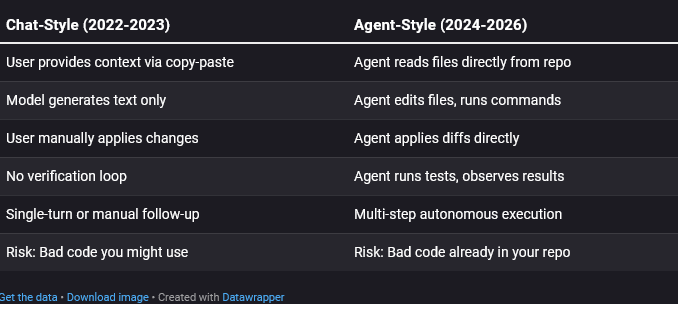
That last row is the crucial one. In the chat model, the worst case was receiving bad advice. You still had to copy it, review it, and run it yourself. Every mistake required your active participation.
In the agent model, the tool acts. If you grant it permission to edit files and run commands, it can make changes before you review them. The bad code is not sitting in a chat window waiting for your judgment. It is in your working tree, or worse, already committed.
This is not an argument against agentic tools. They are genuinely more capable and often dramatically faster. But capability and risk scale together. A tool that can fix a bug in thirty seconds can also introduce a bug in thirty seconds. A tool that can refactor a module can also break a module.
The prompt did not become less important. It became less sufficient. You now need to think about what the agent can see, what it can do, what will catch its mistakes, and how you will know when something went wrong. Those are workflow questions, not prompt questions.
The modern loop: Plan, inspect, act, verify, review
If prompting is not the whole system, what is? The best mental model is a loop with multiple stages, each of which can be tuned independently.

The agent workflow loop
Let me walk through each stage.
1. Scope the task
Before you type a prompt, decide what you are actually asking for. A tightly scoped task produces better results than an ambitious one. “Add input validation to the email field in the signup form” is better than “improve the signup flow.” Scope is not part of the prompt. It is a decision you make before prompting, and it shapes everything downstream.
2. Plan the approach
Good agents will form a plan before acting. Some tools show you the plan explicitly; others do it internally. Either way, the plan is where misunderstandings surface. If the agent says “I’ll refactor the database layer to add this feature,” and you only wanted a UI change, you want to catch that before it starts editing files.
3. Inspect the context
The agent reads files, searches code, and gathers information. This stage matters because what the agent sees determines what it knows. If your retrieval is poor, or the context window is overwhelmed with irrelevant files, the agent will work from incomplete or misleading information. No prompt refinement fixes this. You need better context loading.
4. Act (edit, execute)
The agent proposes changes, writes code, edits files, runs commands. This is where the work happens. This is also where mistakes get made. But the mistakes often originate earlier, in bad scoping, unclear plans, or inadequate context.
5. Verify the results
The agent runs tests, checks types, observes linter output, maybe even runs the application. This is the first automated feedback. If your project has good tests, the agent can catch many of its own mistakes. If your project has no tests, this stage provides almost no signal, and the agent will confidently produce broken code.
6. Review the changes
You look at the diff. You examine what changed. You decide whether to accept, reject, or request modifications. This is where human judgment re-enters the loop. It is also where many developers skimp, accepting changes without reading them because the tests passed. That is a mistake. Tests verify behavior; they do not verify intent, design quality, or subtle regressions.
The prompt mainly affects stages 1, 2, and 4. The other stages depend on your repository, your tools, your tests, your review habits. Prompt improvements cannot compensate for weak verification. Workflow improvements can.
Prompt quality vs workflow quality
Here is a claim that will annoy some people: a mediocre prompt inside a strong workflow often outperforms a brilliant prompt inside a weak workflow.
I do not mean that prompts are irrelevant. A clear prompt beats an unclear one. Specificity helps. Examples help. All the old advice still applies. But the marginal return on prompt polishing drops sharply once you have crossed the threshold of “reasonably clear.”
Meanwhile, the returns on workflow improvement remain high. Adding tests provides feedback the agent can use. Enabling type checking catches entire categories of error. Configuring the tool to load the right files improves every task. Setting up proper git hygiene makes rollback trivial. These investments compound across every future prompt.
Let me illustrate with a concrete example.
Annotated example: A strong workflow with an ordinary promptThe task: Add rate limiting to an existing API endpoint.**The prompt:“Add rate limiting to the /api/submit endpoint. Limit to 10 requests per minute per IP.”*This prompt is fine. It is not clever. It does not include chain-of-thought instructions, few-shot examples, persona specifications, or any of the elaborate scaffolding prompt engineers sometimes recommend. It is just a clear statement of intent.****The workflow around it:***1. Before prompting: *The developer creates a new git branch. The working tree is clean. Rollback is trivial.*2. Context configuration: *The agent is pointed at the routes file and the existing middleware. It is not indexing the entire monorepo. The context is focused.*3. Plan review: *The agent proposes installing a rate-limiting library and adding middleware. The developer scans this plan and nods. If the agent had proposed something bizarre, like rewriting the authentication system, this is where it would get caught.*4. Execution: *The agent edits the routes file, adds the middleware, updates package.json.*5. Verification: *The agent runs the existing test suite. The project has integration tests for the API. They pass. The agent also runs the linter. No new warnings.*6. Human review: *The developer reads the diff. It is small: a new import, a middleware call, a dependency. The changes match the intent. Approved.*7. Commit: *The developer commits with a clear message. The branch is ready for PR.****What made this succeed:***Tests existed. The agent could verify its own work. The scope was small. The context was focused. The plan was visible. The diff was reviewed. Git branches made rollback cheap. The prompt was clear enough, but it was not the hero. The system around it was.
Compare this to a developer with a masterfully crafted prompt but no tests, no type checking, a messy working tree, and a habit of accepting changes without reading them. That developer will ship bugs. No amount of prompt optimization fixes their workflow.
The lesson is not “prompts do not matter”. The lesson is “prompts are one lever among many, and often not the highest-leverage one”.
Failure modes that prompting alone cannot solve
Understanding where prompting fails makes the limitations concrete. Here is a catalog of common failure modes and what actually addresses them:
- Agent hallucinates APIs or methods that do not exist Prompting cannot fix: No prompt phrasing reliably prevents hallucination. What helps: Type checking catches imaginary methods. Tests fail when called functions do not exist. Grounding the agent in actual documentation or code samples via retrieval reduces (but does not eliminate) fabrication.
- Agent misunderstands project structure or conventions Prompting cannot fix: You cannot describe your entire codebase in a prompt. What helps: Better context loading. Pointing the agent at relevant files. Providing a CONVENTIONS.md or similar project documentation that the tool can ingest. Using tools that index your repo intelligently.
- Agent makes a change that breaks unrelated code Prompting cannot fix: Asking the agent to “be careful” does not create awareness of distant dependencies. What helps: Comprehensive test suites that catch regressions. Running the full test suite, not just tests for the changed code. Type systems that surface incompatibilities at compile time.
- Agent introduces security vulnerabilities Prompting cannot fix: Asking for “secure code” does not guarantee it. What helps: Security linters (semgrep, bandit, etc.) that flag dangerous patterns. Code review by a human who knows the security model. Defense in depth outside the code itself.
- Agent goes off on a tangent, doing far more than asked Prompting cannot fix: Agents sometimes interpret tasks expansively regardless of instructions. What helps: Reviewing the plan before execution. Using tools that require approval for each file edit. Setting explicit scope boundaries in project configuration. Keeping tasks small.
- Agent produces code that works but is unmaintainable Prompting cannot fix: “Write clean code” is too vague to enforce consistency. What helps: Automated linters and formatters. Style guides the agent can reference. Human review that rejects code not meeting standards. Refactoring in subsequent passes.
- Agent changes work locally but fail in CI or production Prompting cannot fix: The agent cannot see your CI environment from a prompt. What helps: Running CI locally before committing. Giving the agent access to CI configuration so it understands constraints. Environment parity between development and deployment.
- Agent creates subtle bugs that tests do not catch Prompting cannot fix: If your tests do not cover the case, the agent has no feedback signal. What helps: Better test coverage. Property-based testing that explores edge cases. Human review focused on logic, not just syntax.
The pattern is consistent. Every failure mode has a real remedy, and none of those remedies is “write a better prompt”. Prompts affect the initial generation. Everything else requires infrastructure: tests, types, linters, review, tooling configuration, and workflow discipline.
The practical mindset shift for developers
If you accept that prompting is now one layer in a larger system, what should you actually do differently?
The core shift is from phrasing to orchestration. You are no longer primarily a writer of requests. You are a designer of workflows, a configurer of tools, a builder of verification systems. The prompt is an input you provide; the outcome depends on everything else you have built around it.
Here are some substantive recommendations:
Invest in verification before investing in prompting
If your project lacks tests, add tests. If your project lacks type checking, enable it. If you have no linter, set one up. These investments pay dividends on every task. They give the agent feedback signals it can use to self-correct. They give you confidence that changes work. They cost time upfront but save far more time downstream.
Make rollback trivial
Always work on a clean git branch. Commit early and often. Use tools that show you diffs before applying them. Never let the agent make changes you cannot easily undo. This is not paranoia; it is operational hygiene. Cheap rollback lets you experiment more aggressively because failure costs less.
Scope tasks tightly
Resist the temptation to ask for large changes in a single prompt. “Refactor the authentication system” is a recipe for surprises. “Add password length validation to the signup handler” is tractable. Small tasks are easier to verify, easier to review, and easier to roll back. They also give you more frequent checkpoints to catch drift.
Review plans before execution
If your tool shows a plan, read it. If the plan describes work you did not ask for, stop and clarify. Catching a misunderstanding at the planning stage is cheap. Catching it after the agent has edited fifteen files is expensive.
Read the diff
Every time. Even if the tests pass. Tests verify behavior, but behavior is not the only thing that matters. Code style, maintainability, security implications, subtle logic errors: these require human eyes. Passing tests and a green linter do not mean “approved.” They mean “probably not obviously broken.”
Configure context deliberately
Learn how your tool loads context. Point it at relevant files. Exclude irrelevant directories. Provide project documentation it can ingest. The agent works from what it can see. If it sees junk, it produces junk. If it sees focused, relevant context, it produces better output.
***What to optimize first (in order)****1. Tests: Can the agent verify its own work? If no, add tests before anything else.**2. Type checking: Is there a type system catching obvious errors? Enable it.**3. Rollback: Can you undo any change in seconds? Work on clean branches.**4. Context loading: Is the agent seeing relevant files? Configure your tool.**5. Scope discipline: Are you asking for tractable, verifiable changes? Keep tasks small.**6. Plan review: Are you reading the plan before approving execution? Make it a habit.**7. Diff review: Are you reading every diff? No exceptions.*8. Prompt clarity: Is your request clear and specific? Now refine the prompt.
Notice that prompt clarity comes last. Not because it is unimportant, but because all the other items gate its effectiveness. A clear prompt into a broken workflow still produces broken results. A clear prompt into a strong workflow produces reliable results. Fix the workflow first.
Summary
The prompt engineering era taught us that language models respond to how you phrase requests. That remains true. But the era of agentic tools taught us something else: language models embedded in loops, with access to tools, with feedback from verification, behave differently than language models responding to isolated prompts.
When the tool can see your code, edit your files, and run your tests, the prompt becomes one input among many. The context matters. The plan matters. The verification matters. The review matters. The prompt initiates the process, but it does not control the outcome.
Developers who grasp this shift will stop treating AI-assisted coding as a prompting puzzle and start treating it as a systems-design problem. They will invest in tests, types, and tooling. They will build workflows that catch mistakes early. They will review everything. And they will get better results than developers still searching for the perfect incantation.
Prompting is not dead. But prompting alone is no longer enough.
Comments
Loading comments…