
Most people are not confused because AI is too advanced. They are confused because five different product categories keep getting flattened into the same useless label.
Ask a developer what AI tools they use for coding and you will get answers that span entirely different universes. One person means the chat window where they paste error messages. Another means the gray ghost text that appears while they type. A third means the thing that opened a pull request while they were at lunch. These are not variations on a theme. They are fundamentally different tools with different interfaces, different failure modes, different review requirements, and different places in a professional workflow.
The industry does not help. Marketing copy treats “AI-powered” as a feature rather than a description. Product announcements breathlessly compare autocomplete latency to agentic task completion as if both numbers measure the same thing. Engineers end up arguing about whether Tool A is better than Tool B when Tool A and Tool B are not even in the same category — like debating whether a calculator or a spreadsheet is the better “math tool”.
This article is the vocabulary reset. Before we can have sensible conversations about which tools fit which jobs, or how to integrate AI assistance into disciplined engineering workflows, we need shared terms that actually distinguish the things we are talking about. Not brand names. Categories.
Before we continue
If this story helps you understand AI better: 👏 Clap 50 times (yes, you can, simply hold the button), it will help me a lot. Medium’s algorithm favours this, increasing visibility to others who then discover the article. 🔔 Follow me on Medium and subscribe to get my stories straight to your inbox.
Why “AI tool” is now too vague to be useful
Two years ago, “AI coding tool” meant one thing: GitHub Copilot, the autocomplete that sometimes wrote your function body for you. The category was small enough that the label worked.
That is no longer true. The space has fragmented into products that share an underlying technology — large language models — but differ in almost every dimension that matters for practical use. Interface. Scope. Autonomy. Where code executes. How you review output. What happens when things go wrong.
Consider three scenarios, all of which someone might describe as “using AI to write code”:
Scenario one. You are halfway through a function. Gray text appears suggesting the next three lines. You glance at it, press Tab, and keep typing. Total interaction time: two seconds. Review method: you read it as it appears.
Scenario two. You are in a terminal session. You describe a refactoring task in natural language. The tool edits six files, runs your test suite twice, fixes a failing test, and asks you to approve the changes. Total interaction time: four minutes. Review method: you read a diff summary and spot-check the modified files.
Scenario three. You open a web dashboard, describe a feature, and assign it to a cloud worker. Twenty minutes later you receive a notification that a pull request is ready. You were in a meeting the whole time. Review method: code review, same as a human contributor.
These three scenarios involve different trust models, different review burdens, different risks, and different integration points in your workflow. Calling them all “AI coding tools” obscures everything that matters for actually using them well.
The problem compounds when people make decisions based on the blurred category. Someone evaluates a cloud agent based on autocomplete benchmarks. Someone else rejects terminal tooling because they had a bad experience with chat interfaces. Purchasing decisions get made on vibes because the category is too fuzzy to support real comparison.
We need sharper terms.
The five major categories readers actually encounter
Let me introduce the working taxonomy. These are not the only possible categories — edge cases exist, and some products blur lines deliberately — but they cover the vast majority of tools you will encounter in 2026 and give you enough vocabulary to reason about new ones.
1. Chat assistants
What they are: General-purpose conversational interfaces where you paste code, ask questions, and receive answers. ChatGPT, Claude in a browser, Gemini, Mistral’s Le Chat. You copy something in, you get something back, you copy it out.
Interface: Browser or app, conversational turns.
Execution: None. These tools generate text. They do not run code, touch your filesystem, or execute commands. You are the execution layer.
Autonomy: Zero in the traditional sense. They respond to what you type. Some have tool use or web search, but they do not take multi-step actions in your codebase.
Review surface: Whatever you paste back into your editor. Review happens when you manually transfer the output.
Best suited for: Exploration, explanation, drafting code you will heavily edit, learning, rubber-ducking, and generating starting points.
Chat assistants are the most familiar category and the one most poorly matched to their actual use. People treat them like coding tools when they are really thinking tools that happen to output code-shaped text. The code has never run. It has no connection to your actual project. It may reference libraries that do not exist in the versions it assumes. The assistant does not know what is in your repo unless you paste it in.
That is fine for the jobs chat assistants are good at. It becomes a problem when someone expects chat assistant output to drop into production without significant review and adaptation.
2. Inline IDE assistants
What they are: Autocomplete and suggestion engines embedded in your editor. GitHub Copilot (the original inline mode), Codeium, Supermaven, Amazon Q in VS Code, Cursor’s Tab completion. The gray text that appears as you type.
Interface: Your editor. Suggestions arrive in context, triggered by your cursor position and recent keystrokes.
Execution: None. They suggest; you accept or ignore. The code only runs when you run it through normal means.
Autonomy: Very low. They complete the thought you started. Some have “next edit prediction” that guesses where you will type next. But the human is driving.
Review surface: Inline, real-time, character by character. You see each suggestion as it appears and decide immediately.
Best suited for: Accelerating routine code, reducing keystrokes for boilerplate, staying in flow, and getting unstuck on syntax.
The key property of inline assistants is their tight feedback loop. Suggestion, glance, accept or reject, move on. This makes them low-risk in practice — not because the suggestions are always correct, but because the review is continuous and low-cost. You are reading the code as it appears in the exact context where it will live. Errors tend to surface immediately.
The failure mode is not that you accept bad code unknowingly. It is that you accept mediocre code lazily — verbose patterns, outdated idioms, or structurally awkward solutions that a moment of thought would have improved. Inline assistants optimize for flow, which can mean optimizing past the point where you should have stopped and reconsidered.
3. IDE agents with chat
What they are: Editor-embedded tools that combine a chat interface with the ability to see your project context and propose multi-file edits. Cursor’s Composer, Windsurf’s Cascade, Copilot Chat with workspace context, Cline, Aider in GUI mode. You describe what you want; they draft changes across your codebase.
Interface: A chat pane or command palette inside your editor, with access to your open files, project structure, and sometimes terminal output.
Execution: Varies. Some only propose edits you must approve. Some can run commands (build, test, lint) if you permit. Some can iterate — running tests, seeing failures, and adjusting their own output.
Autonomy: Low to medium. They respond to your prompts but can take multi-step actions within a conversation. The human typically approves each significant change.
Review surface: Diff view in the editor. You see proposed changes before they are applied, usually with syntax highlighting and inline annotation.
Best suited for: Refactoring, scaffolding new features, exploring implementation options, fixing bugs with context, and coordinated multi-file changes.
This is the category that has grown most rapidly since mid-2024. The value proposition is real: instead of copying code into a chat window and losing project context, the assistant sees your actual files, understands your imports, and proposes edits that fit your existing structure.
The risk is proportional. A chat assistant that hallucinates a wrong function name wastes your time but causes no damage. An IDE agent with write access that hallucinates a wrong function name might create a file, import it elsewhere, and leave you with a plausible-looking mess that only breaks at runtime. The review burden is higher, the diffs are larger, and the failure modes are more subtle.
Good practice with IDE agents involves smaller prompts, more frequent review, and skepticism toward large generated diffs that you cannot read carefully. The tool is powerful. Power requires proportional discipline.
4. Terminal coding agents
What they are: Command-line tools that operate on your local codebase through natural-language instructions. Claude Code, Aider (CLI mode), Codex CLI, Mentat. You run them in a terminal, describe a task, and they edit files, run commands, and iterate.
Interface: Terminal. You type prompts; they respond with actions and text.
Execution: Local. They run on your machine, in your project directory, with access to your filesystem and shell. Some can run arbitrary commands; some are sandboxed to specific operations.
Autonomy: Medium to high. A terminal agent might edit multiple files, run tests, see failures, edit again, and run tests again — all in response to a single prompt. The human can intervene but is not required to approve every step.
Review surface: Varies by tool. Some show each file change and ask approval. Some show a summary and proceed. Some run until done and present a final diff. The review happens in the terminal or through your editor’s git integration.
Best suited for: Larger refactoring tasks, iterative bug fixing, codebase exploration, and workflows where you want to describe the goal and let the tool figure out the steps.
Terminal agents occupy a middle ground that some engineers find ideal. They are more powerful than IDE chat but still local, still under your observation, still stoppable with Ctrl-C. You watch them work. You see the commands they run. When something goes wrong, you are present.
The tradeoff is attention. Using a terminal agent effectively requires monitoring — not approval-clicking on every change, but awareness of what the tool is doing. If you start a task, switch to email, and come back twenty minutes later, you may find the agent went in an unexpected direction seven iterations ago and compounded the problem. The tools that ask for explicit approval on each action are safer but slower. The tools that run freely are faster but demand trust and monitoring.
The failure mode for terminal agents is context collapse: the agent loses track of what it was doing, starts over, makes contradictory changes, or gets stuck in a loop. Good tools mitigate this with checkpoints, undo, and clear state management. Good practice involves clear prompts, well-defined stopping conditions, and the habit of reviewing diffs before committing.
5. Cloud coding agents
What they are: Services that accept a task description, run autonomously in a remote environment, and return completed work — typically a pull request, a branch, or a diff. OpenAI’s Codex (the agent product, not the old model), GitHub Copilot’s agent mode, Devin-style products, Factory, Poolside. You assign a task and walk away.
Interface: Web dashboard, chat, or API. Sometimes integrated into issue trackers or project management tools.
Execution: Remote. The agent runs in a cloud sandbox with a cloned copy of your repo. It may have its own compute, its own shell, its own browser. It does not touch your local machine.
Autonomy: High. The defining feature is that the agent works without your continuous presence. It may take minutes or hours. It makes its own decisions about approach, file structure, and implementation details. You see the result, not the process.
Review surface: Pull request or equivalent. You review the output the same way you would review a contribution from a human: code review, CI checks, manual testing if warranted.
Best suited for: Well-specified tasks that can be completed without real-time clarification, parallelizable work, and situations where human attention is the bottleneck.
Cloud agents represent the highest-autonomy category currently in production use. They offer genuine leverage — you can assign multiple tasks simultaneously, work on something else, and come back to finished pull requests. For the right kinds of tasks, this is transformative.
The review burden is also the highest. You did not watch the agent work. You do not know what approaches it tried and abandoned. You do not know whether the clean-looking diff is the result of careful implementation or brute-force iteration that happened to pass tests. The PR is an artifact, not a conversation.
This demands PR review discipline at least as rigorous as you would apply to a junior developer or external contractor — arguably more, because the agent has no context beyond what you gave it and no judgment about organizational norms, security practices, or architectural intent. The output is often surprisingly good. It is also sometimes subtly wrong in ways that pass CI but cause problems in production.
The four comparison axes that matter
The taxonomy above is useful, but categories alone do not tell you which tool fits which job. For that, you need axes you can reason about: dimensions where tools differ in ways that affect how you should use them.
Axis 1: Interface
Where do you interact with the tool?
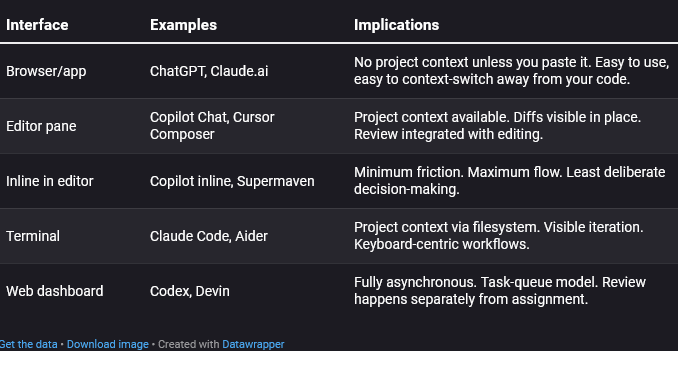
Interface shapes behavior. A tool you access in a browser tab encourages copy-paste workflows. A tool in your terminal encourages watching it work. A tool in a dashboard encourages fire-and-forget. None of these are inherently better; they fit different work styles and different tasks.
Axis 2: Autonomy
How much does the tool do without explicit human approval?
This is a spectrum, not a binary:
- None: Chat assistants generate text. You do everything else.
- Suggestion-level: Inline completions propose; you accept or reject each one.
- Action-with-approval: IDE agents propose diffs; you approve before application.
- Multi-step with checkpoints: Terminal agents iterate but pause at key points.
- Fully autonomous: Cloud agents complete tasks end-to-end without intervention.
Higher autonomy means more leverage and more risk. The question is not “how much autonomy is good?” but “how much autonomy is appropriate for this task, this codebase, and this level of specification clarity?”
A well-specified bug fix with good test coverage can tolerate high autonomy. A vague feature request in a complex codebase with poor tests probably should not run unattended for twenty minutes.
Axis 3: Execution environment
Where does the code run, and what can the tool access?
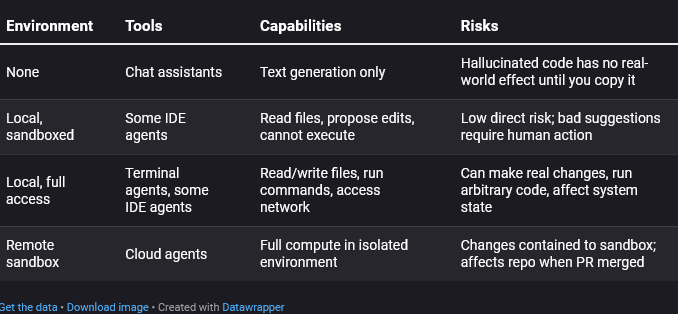
This axis matters for risk assessment. A tool that cannot execute anything can only waste your time with bad suggestions. A tool with shell access can rm -rf if things go wrong. (Good tools prevent this. Not all tools are good tools.) A remote sandbox isolates damage but means you review output without having watched execution.
Axis 4: Review surface
How do you inspect the tool’s output before accepting it?
- Character-by-character: Inline completions. You read each suggestion as it appears.
- Diff view: IDE agents. You see proposed changes highlighted against current code.
- Terminal output: CLI agents. You see what files changed, what commands ran.
- Pull request: Cloud agents. You review in your normal PR workflow.
The review surface determines how much effort review requires and how easy it is to miss problems.
Inline review is cheap per-suggestion but can induce approval fatigue — you stop really reading and just tab-tab-tab. Diff review scales with change size; a three-line diff is trivial, a three-hundred-line diff is a burden. PR review is well-understood but entirely post-hoc; you cannot intervene mid-process.
Same task, five tool shapes
Abstract categories are useful. Concrete examples are better. Let us take one simple, realistic task and see how it looks across each category.
The task: Add input validation to a function that parses user-submitted dates. The function currently accepts a string and calls the date parser directly. We want it to check that the string is non-empty and matches an expected format before parsing.
Chat assistant approach
You paste the function into ChatGPT or Claude. You write: “Add input validation to check that the input string is non-empty and matches YYYY-MM-DD format before parsing.”
The assistant returns a modified function with the validation added. You read it, copy the parts you want, paste them into your editor, adjust imports if needed, run your tests, and fix anything that does not quite fit.
Time: Five minutes, mostly spent context-switching and adapting the output.
Review: You read everything as you paste it.
Failure mode: The generated code assumes a regex library you do not use, or formats the error message inconsistently with your codebase. You catch this during manual integration.
Inline IDE assistant approach
You are editing the function in VS Code with Copilot enabled. You add a comment: // Validate: non-empty, matches YYYY-MM-DD. You press Enter.
Copilot suggests an if-block with a regex check. You read it, accept it. It suggests an error throw. You accept that too. You tweak the error message to match your style. Done.
Time: Ninety seconds.
Review: Inline, real-time.
Failure mode: The suggested regex is slightly wrong (e.g., accepts invalid months). You notice when tests fail — or you do not notice until later.
IDE agent approach
In Cursor Composer, you type: “Add input validation to the parseDateString function in utils/date.ts. Check for non-empty string and YYYY-MM-DD format. Throw a ValidationError with a descriptive message.”
Composer shows a diff: three new lines of validation logic plus an import for ValidationError. You read the diff, see it looks reasonable, click Apply. Your tests run automatically; they pass.
Time: Two minutes.
Review: Diff view before apply.
Failure mode: The diff looks right but the ValidationError import was added incorrectly, or the function has a second call site that now needs error handling. The tool does not know about the second call site unless you mentioned it.
Terminal agent approach
You run Claude Code in your project directory. You type: “Add input validation to parseDateString in utils/date.ts. Non-empty check and YYYY-MM-DD format check. Use our existing ValidationError class. Run the tests when done.”
The agent edits the file, shows you the change, runs npm test, reports that 23 tests pass. You skim the diff, see the validation, commit.
Time: Three minutes.
Review: Diff in terminal plus test confirmation.
Failure mode: The agent ran the tests but your test coverage for that function is poor. The change works for the happy path; the edge case handling is wrong. You find out in staging.
Cloud agent approach
You open your task queue, create a ticket: “Add input validation to parseDateString (utils/date.ts). Requirements: check non-empty, check YYYY-MM-DD regex. Use ValidationError class. Ensure tests pass.” You assign it to the Codex agent and go to your next meeting.
Forty minutes later, you receive a pull request. The diff adds the validation, includes a new test case, and passes CI. You code-review it like any other PR, leave one comment about the error message wording, the agent responds with a fix, you approve and merge.
Time: Your time: five minutes of review. Calendar time: an hour.
Review: Standard PR review.
Failure mode: The new test case only covers the happy path. The agent did not think to test edge cases you would have tested manually. The PR looks complete, so you merge without adding more tests yourself.
Common category mistakes
Understanding the categories helps you avoid the mistakes that follow from conflating them.
Mistake 1: Expecting chat assistant output to be drop-in ready
Chat assistants generate plausible code that has never run. Every function call, every import, every API usage is a claim about reality, not a verified fact. Treating chat output as production-ready is how you end up with code that references libraries that do not exist or uses deprecated methods.
Fix: Treat chat output as a starting draft. Plan to read, adapt, test, and revise.
Mistake 2: Judging terminal agents by chat standards
Terminal agents can run commands. They can see test failures and respond. They have context chat assistants lack. Expecting them to be unreliable because chat assistants are unreliable misses the category difference.
Fix: Evaluate terminal agents by their own properties: iteration quality, context retention, command-execution safety.
Mistake 3: Trusting cloud agents because inline assistants work well
Inline completions have tight feedback loops. You see every suggestion and decide immediately. That experience builds intuitions that do not transfer to cloud agents, which make many decisions you never see. “Copilot is usually good” does not mean “Codex will make the right architectural choices unsupervised.”
Fix: Review cloud agent output with fresh eyes, as if a new team member submitted it.
Mistake 4: Using high-autonomy tools for underspecified tasks
Cloud agents and terminal agents can do a lot — if you tell them clearly what to do. Vague prompts plus high autonomy equals unpredictable output. “Make this code better” assigned to a cloud agent could return anything from minor formatting changes to a complete architectural rewrite.
Fix: Match autonomy to specification clarity. Use high-autonomy tools for well-defined tasks. Use lower-autonomy tools for exploratory work where you need to stay in the loop.
Mistake 5: Comparing tools across categories as if they were substitutes
Cursor and Codex are not competitors in any meaningful sense. They serve different parts of your workflow. Comparing their “capabilities” without acknowledging the category difference leads to meaningless arguments and bad purchasing decisions.
Fix: Compare within categories. Cursor vs. Windsurf. Claude Code vs. Aider. Codex vs. Factory. Cross-category comparisons only make sense when you are deciding which category fits a particular job.
Don’t compare these blindly Before evaluating any two AI coding tools, ask: Are they in the same category? Chat assistant vs. IDE agent → different interfaces, different context, different review surfaces. Not comparable. Terminal agent vs. cloud agent → similar autonomy, different execution environments, different presence requirements. Compare carefully. Inline autocomplete vs. chat assistant → same model might power both, but entirely different use patterns. Not comparable. If the tools are not in the same category, you are not choosing between them. You might use both for different purposes.
A simple mental model for the rest of my AI series
Here is the framework, condensed to something you can keep in your head:
Two questions determine the category:
- Where does interaction happen? Browser, editor, terminal, or dashboard?
- What does the tool do without asking you? Suggest text, propose edits, execute commands, or complete whole tasks?
Two questions determine whether a category fits a task:
- How well-specified is the task? Vague tasks need low autonomy and tight feedback. Precise tasks can tolerate high autonomy.
- What is the cost of undetected errors? High-stakes code needs thorough review. Disposable scripts can tolerate lighter checks.
The general principle:
More autonomy requires more specification upfront and more scrutiny afterward. You are not removed from the loop; you are moved to a different part of it.
This is not a judgment about which tools are better. It is a recognition that these tools occupy different points in a tradeoff space, and using them well means understanding where you are in that space at any given moment.
Glossary of terms
Chat assistant: A conversational AI tool (typically web-based) that generates text responses including code, without access to your project or the ability to execute commands.
Inline IDE assistant: An autocomplete system embedded in your code editor that suggests code as you type, based on cursor position and surrounding context.
IDE agent: An editor-embedded tool with chat or command interface that can see your project structure and propose multi-file edits, sometimes with the ability to execute commands.
Terminal coding agent: A command-line tool that operates on your local codebase, editing files and optionally running commands in response to natural-language prompts.
Cloud coding agent: A remote service that accepts task descriptions, works autonomously in a sandboxed environment, and returns completed work (typically a pull request).
Autonomy: The degree to which a tool takes action without explicit human approval for each step.
Execution environment: Where the tool’s operations actually run — your local machine, a remote sandbox, or nowhere (text generation only).
Review surface: The interface through which you inspect and approve the tool’s output — inline suggestions, diff views, terminal output, or pull requests.
What comes next
This story gives you some basic vocabulary. The rest of the planned series will use it.
When we discuss prompt engineering, we will distinguish between prompting a chat assistant and prompting a terminal agent — different context availability, different failure modes, different techniques. When we evaluate specific tools, we will compare within categories. When we talk about risk and review, we will tie those discussions to the review surface each category provides.
The goal throughout is not to tell you which category is best. It is to help you match tools to tasks with clear eyes, use them with appropriate discipline, and build workflows that make AI assistance genuinely useful rather than impressively unreliable.
Start by noticing, in your own work, which category you are actually using at any given moment. That awareness is the foundation for everything else.
And if you like what I’m doing here, I’d be thrilled if you’d consider buying me a coffee.

Comments
Loading comments…